Chapter 4 MDC-1840BB/1841BB/1860BB/1810BB/1820BB Series
Installation Operation Manual
4-8 0093142122-11
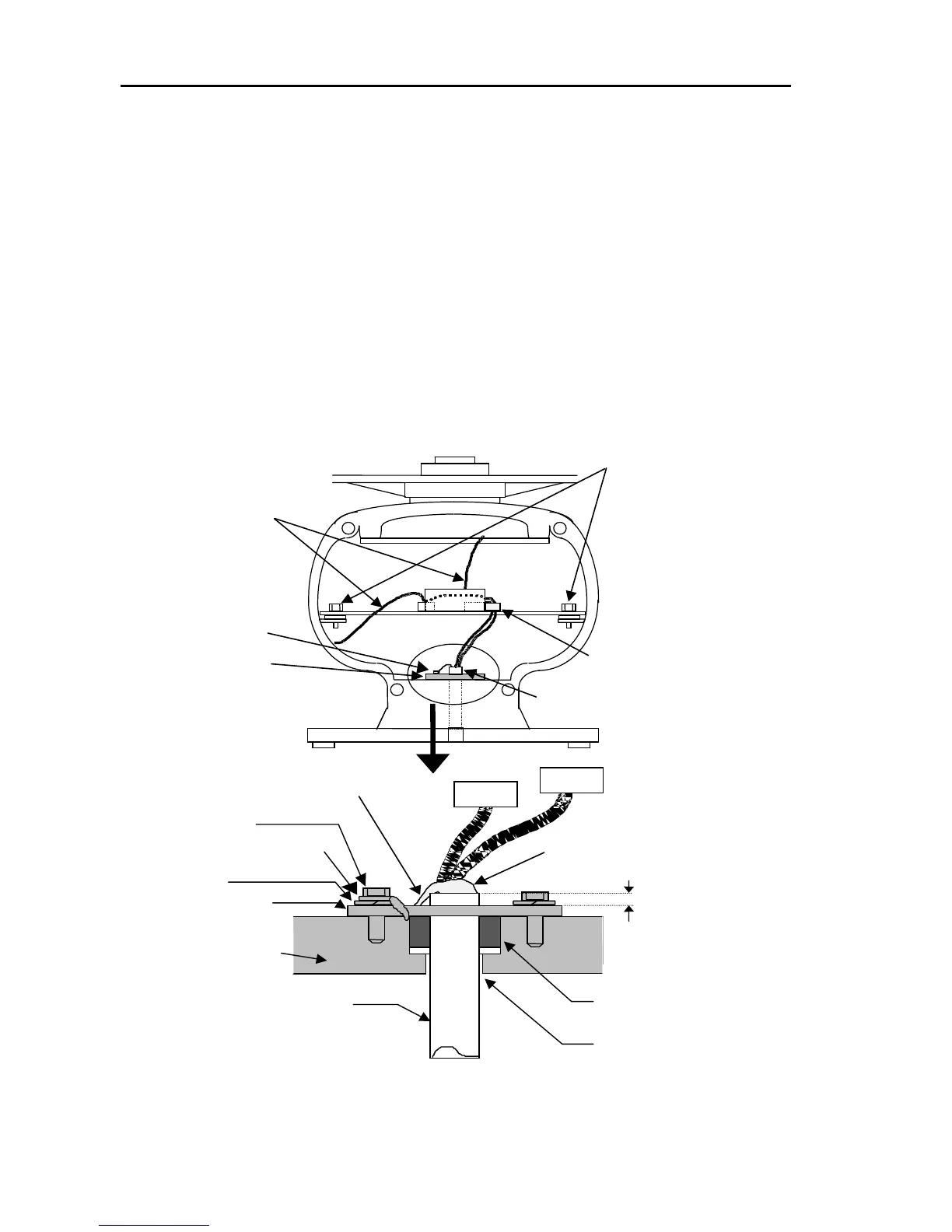
4.6.3.2 Connecting the cable for the Open type scanner
(1) Remove the front and rear covers by loosening fixing bolts (4 bolts each).
(2) Remove the TR(transceiver) unit by removing two fixing bolts. Make sure the
magnetron fitted on the transceiver does not attract any magnetizing material.
(3) Remove the rubber sealing, washer, and retainer plate from the antenna cable.
(4) Feed the cable through the access hole through to the inside of the antenna unit.
(5) Slide the rubber sealing, washer and retainer plate onto the cable.
(6) Fix the cable retainer plate over the dressed braid using three fixing bolts.
(7) Fix the antenna cable with the cable clamp.
(8) Connect the antenna cable to the Modulator PCB. (Refer to the interconnection
diagram for detail)
Figure 4.6 Connecting the cable to the antenna
TR unit fixing bolts
Remove these connectors
Fixing bolt
Fixing plate
Interconnection cable
Clump
5 mm maximum
Fixing bolt
Cable shield terminal
Washer
Fixing plate
Scanner unit
Connecting cable
Rubber water sealing
Cable inlet
Lay the braid under the fixing
plate as short as possible.
Peel off residual heat-shrink tube here



 To Next Page