.
ATTACHMENTS AND OPTIONS
MACHINE READY FOR ATTACHMENT
ATTACHMENTS AND OPTIONS
MACHINE READY FOR ATTACHMENT
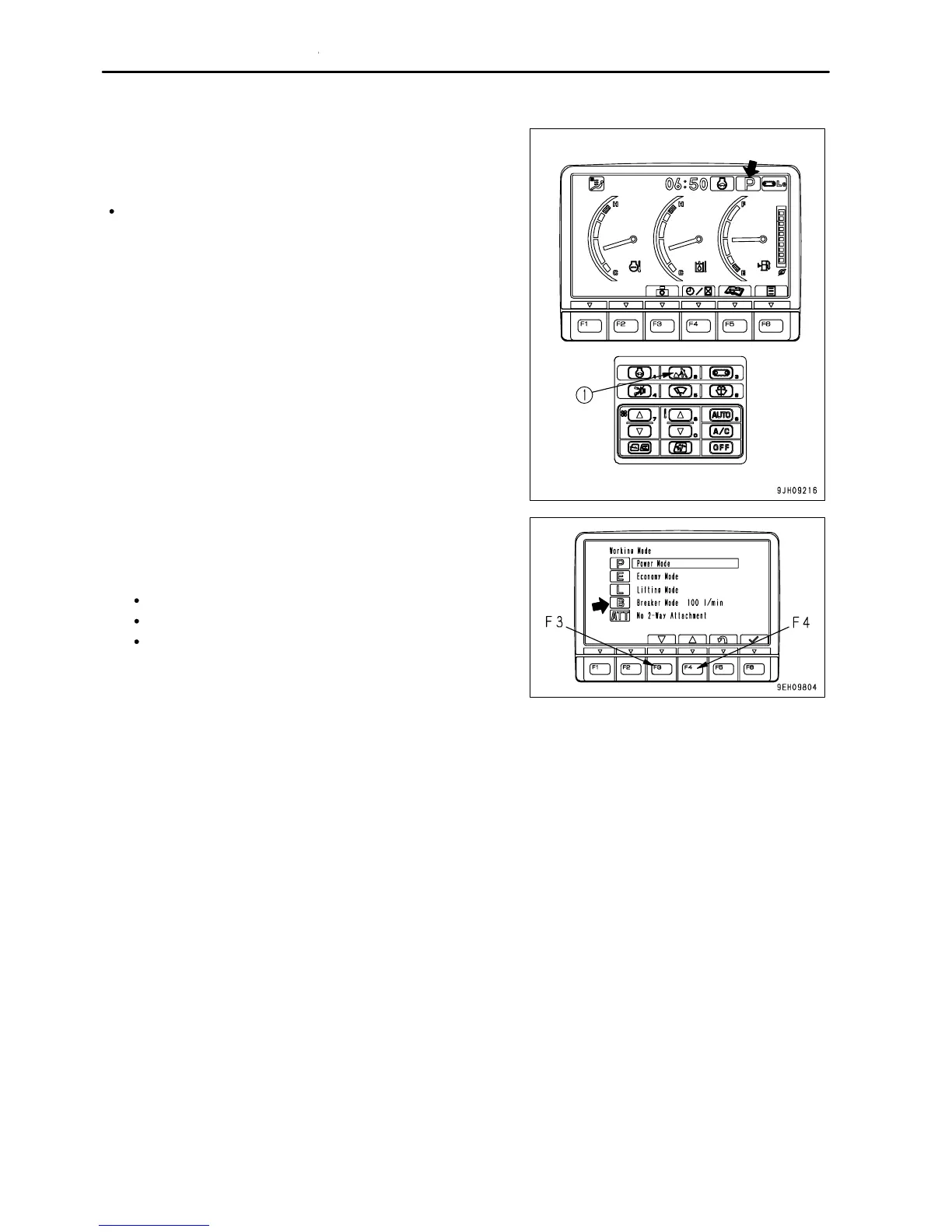
If the working mode pilot monitor does not display B for the breaker
mode, press working mode selector switch (1) and set to the
breaker mode as follows.
When working mode selector switch (1) is pressed, the screen
switches to the working mode selection screen.
1.
Press working mode selector switch (1) or press switches F3
or F4 to select breaker mode B.
2. With breaker mode B highlighted in yellow, do one of the
following to accept the selection.
Keep working mode selector switch (1) pressed.
Press switch F6.
Leave as it is for 5 seconds.
If switch F5 is pressed, the screen will return to the working
mode selection screen without changing the mode to the
breaker mode.
6 - 14



 To Next Page