.
OPERATION
DETAILED CONTROLS AND GAUGES
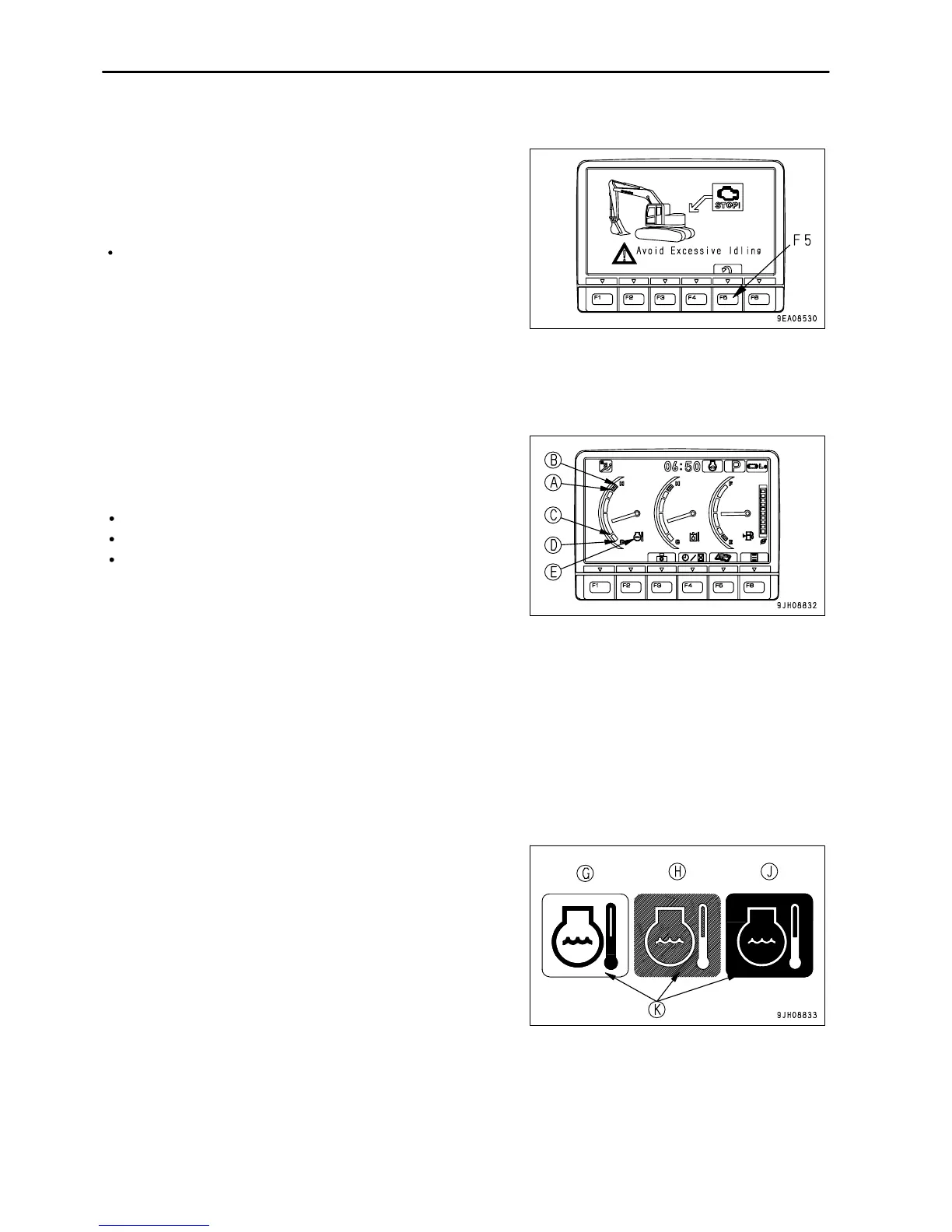
Idle Stop Guidance
If the levers are not operated for more than five minutes, and the
engine is idling, the idling stop message is displayed on the
monitor. When waiting for work or stopping work for a short
periods, stop the engine to reduce unnecessary fuel consumption.
The idling stop message screen returns to the standard screen
any lever is operated again or when function switch F5 (Back) is
pressed.
Gauges and Meter
Engine Coolant Temperature Gauge
This meter (10) shows the engine coolant temperature.
During normal operations, the indicator should be in the green
range. If the indicator goes beyond red range (A) during
operations, the overheat prevention system is actuated.
(A) - (B): Red range
(A) - (C): Green range
(C) - (D): White range
The overheat prevention system is actuated as follows.
Red range (A) position: Engine coolant temperature monitor (E) shows abnormality display
Red range (B) position: Engine speed changes to low idling, engine coolant temperature monitor (E) shows
abnormality display, alarm buzzer sounds at same time
The overheat prevention system continues to work until the indicator enters the green range.
When the engine is started, if the indicator is at position (C), engine coolant temperature monitor (E) shows the
low-temperature display.
If this happens, carry out the warm-up operation. For details, see "Engine Warm Up (PAGE 3-139)".
Display (G) at low temperatures: Monitor background (K) is white
Display (H) at correct temperatures: Monitor background (K) is
blue
Display (J) when condition is abnormal: Monitor background (K)
is red
3 - 20



 To Next Page