V - 20
Basic Settings and Operation
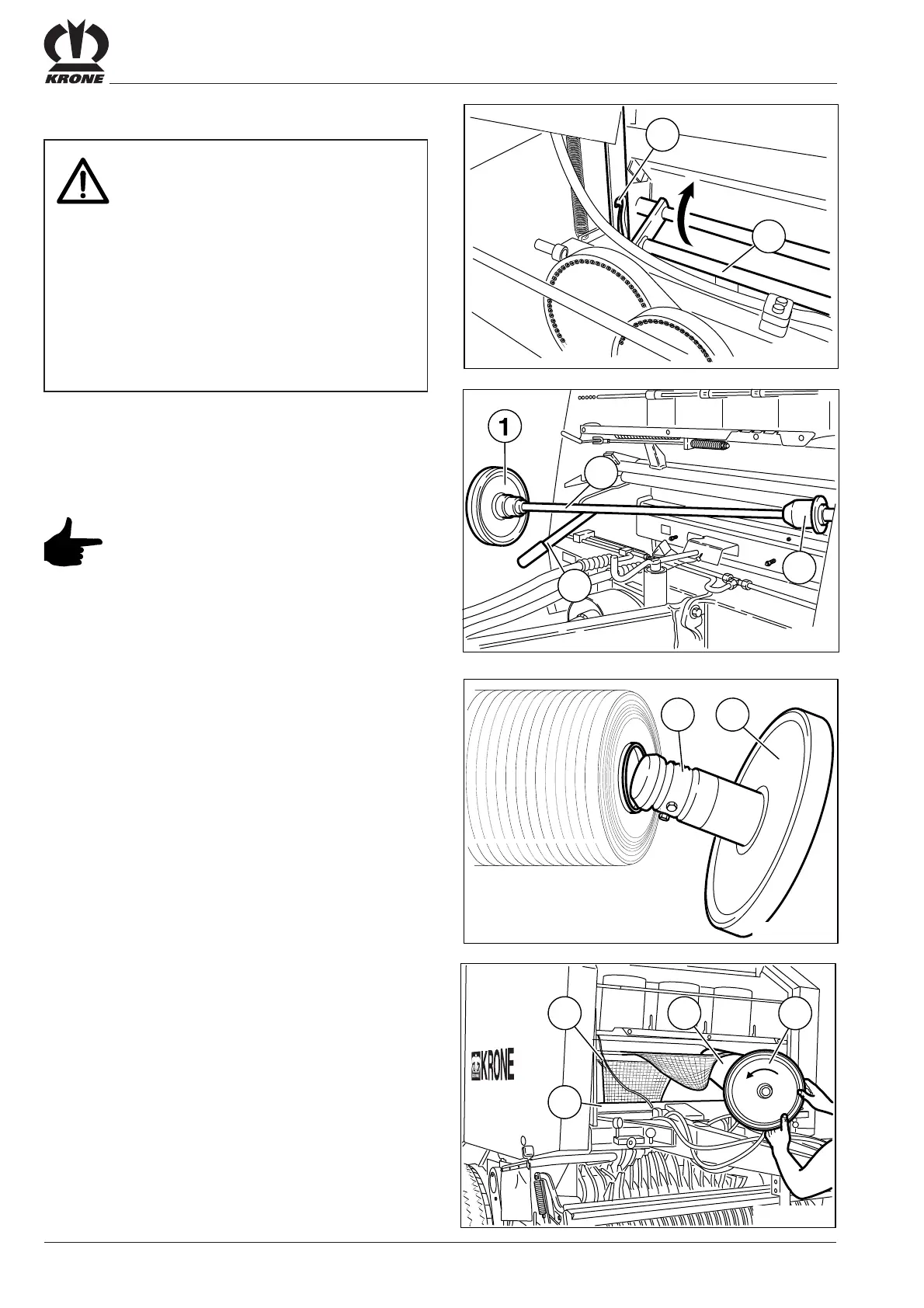
The starting end of the netting roll should
point towards the machine and be drawn
from the top down.
• Raise the lever (2).
• Swing the brake disc (1) and the netting roll mounting
(3) forwards.
• Detach the brake disc (1).
• Slide the netting roll onto the netting roll mounting
shaft (3) and the retainer (4).
5.7.4 Inserting the Netting Roll
• Pull the connecting link guide (1) forward.
• Pull the net stretcher bar (2) upwards and lock into
the upper connecting link.
• Slide the brake disc (1) and cardboard tube clamp (2)
counterclockwise into the cardboard tube and then
onto the netting roll mounting shaft as far as possible.
• Thread the netting (2) over the guide shaft (3) to the
net stretcher bar (4).
• Swing the netting roll mounting back into its support.
Attention!- Contamination of tying twine
as well as the tying mechanism by oil
and grease
Effect: Damages to the machine and
problems with unrolling of the tying
twine
• Twine, twine tensioner and eyes must
not be contaminated with oil or
grease.
• Those parts of the tying device the
tying twine or net will rum through,
must not be contaminated with oil or
grease.







 To Next Page