2.3 INSTALLAZIONE ELETTRICA LAVASTOVIGLIE MONOFASE
Lavastoviglie monofase con spina Schuko 230V+T
Se la lavastoviglie è dotata di spina schuko, collegarla alla presa a muro. Collegare l’apparecchio
al sistema equipotenziale tramite l’apposito morsetto visibile sul retro della lavastoviglie.
Lavastoviglie monofase senza spina 230V+T
Se la lavastoviglie non è dotata di spina elettrica, provvedere alla connessione come di seguito
indicato:
Filo blu: neutro
Filo giallo/verde: impianto di messa a terra
Collegare l’apparecchio al sistema equipotenziale tramite l’apposito morsetto visibile sul retro della
lavastoviglie
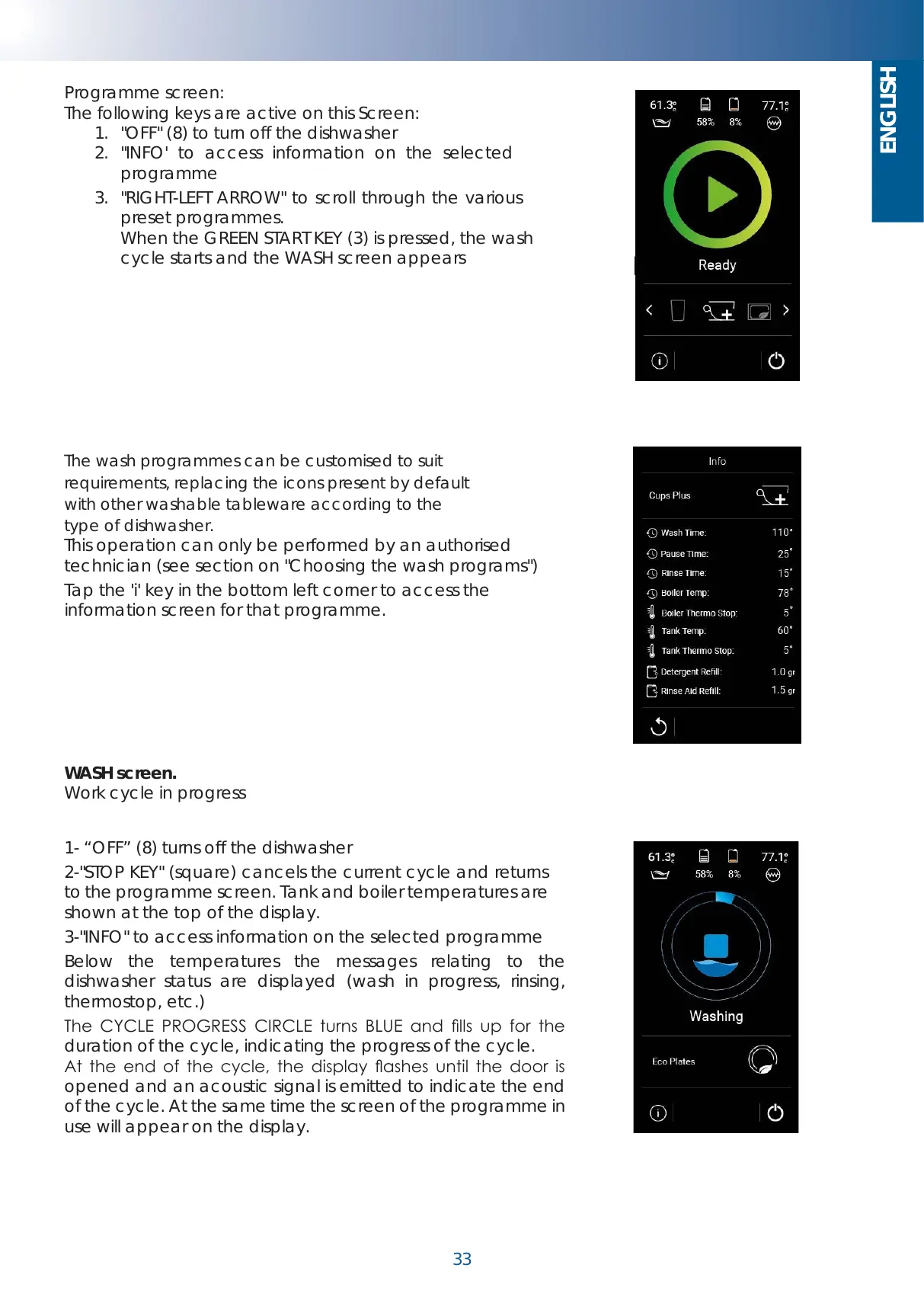
Programme screen:
The following keys are active on this Screen:
1. "OFF" (8) to turn off the dishwasher
2. "INFO' to access information on the selected
programme
3. "RIGHT-LEFT ARROW" to scroll through the various
preset programmes.
When the GREEN START KEY (3) is pressed, the wash
cycle starts and the WASH screen appears
The wash programmes can be customised to suit
requirements, replacing the icons present by default
with other washable tableware according to the
type of dishwasher.
This operation can only be performed by an authorised
technician (see section on "Choosing the wash programs")
Tap the 'i' key in the bottom left corner to access the
information screen for that programme.
WASH screen.
Work cycle in progress
1- “OFF” (8) turns off the dishwasher
2-"STOP KEY" (square) cancels the current cycle and returns
to the programme screen. Tank and boiler temperatures are
shown at the top of the display.
3-"INFO" to access information on the selected programme
Below the temperatures the messages relating to the
dishwasher status are displayed (wash in progress, rinsing,
thermostop, etc.)
The CYCLE PROGRESS CIRCLE turns BLUE and lls up for the
duration of the cycle, indicating the progress of the cycle.
At the end of the cycle, the display ashes until the door is
opened and an acoustic signal is emitted to indicate the end
of the cycle. At the same time the screen of the programme in
use will appear on the display.
Schermata del programma:
In questa Schermata sono attivi i tasti:
1. “OFF” (8) per spegnere la lavastoviglie
2. “INFO” per accedere alle informazioni relative al
programma selezionato
3. “FRECCIA A DX A SX” per scorrere i vari programmi
preimpostati.
Premendo il TASTO VERDE DI START (3) si avvia il ciclo di
lavaggio e appare la schermata di LAVAGGIO
I programmi di lavaggio possono essere
personalizzati in base alle proprie esigenze,
sostituendo le icone presenti di default con altre
stoviglie lavabili in base alla tipologia di
lavastoviglie.
Tale operazione può essere eseguita solo da un
tecnico autorizzato (vedere paragrafo relativo alla
“Scelta dei programmi di lavaggio”)
Toccando il tasto "i" in basso a sinistra si accede
alla schermata info del relativo programma.
Schermata di LAVAGGIO.
Ciclo di lavaggio in corso
1- “OFF” (8) spegne la lavastoviglie
2- “TASTO STOP” (quadrato) annulla il ciclo in corso e riporta
alla schermata del programma. In alto del display vengono
visualizzate le temperature di vasca e boiler.
3- “INFO” per accedere alle informazioni del programma
selezionato
Sotto alle temperature vengono visualizzati i messaggi
relativi allo stato della lavastoviglie (lavaggio in corso,
risciacquo, thermostop ecc…)
Il cerchio di CERCHIO AVANZAMENTO CICLO si colora di
BLU e avanza riempiendosi per tutta la durata del ciclo di
lavaggio, ad indicare l’avanzamento del ciclo.
Al termine del ciclo il display lampeggia fino a all’apertura
della porta e v iene emesso un segnale acustico ad
indicare la fine del ciclo. Contemporaneamente a display
apparirà la schermata del programma in uso.


 To Next Page