2WA/2NJ/2RK
3-113
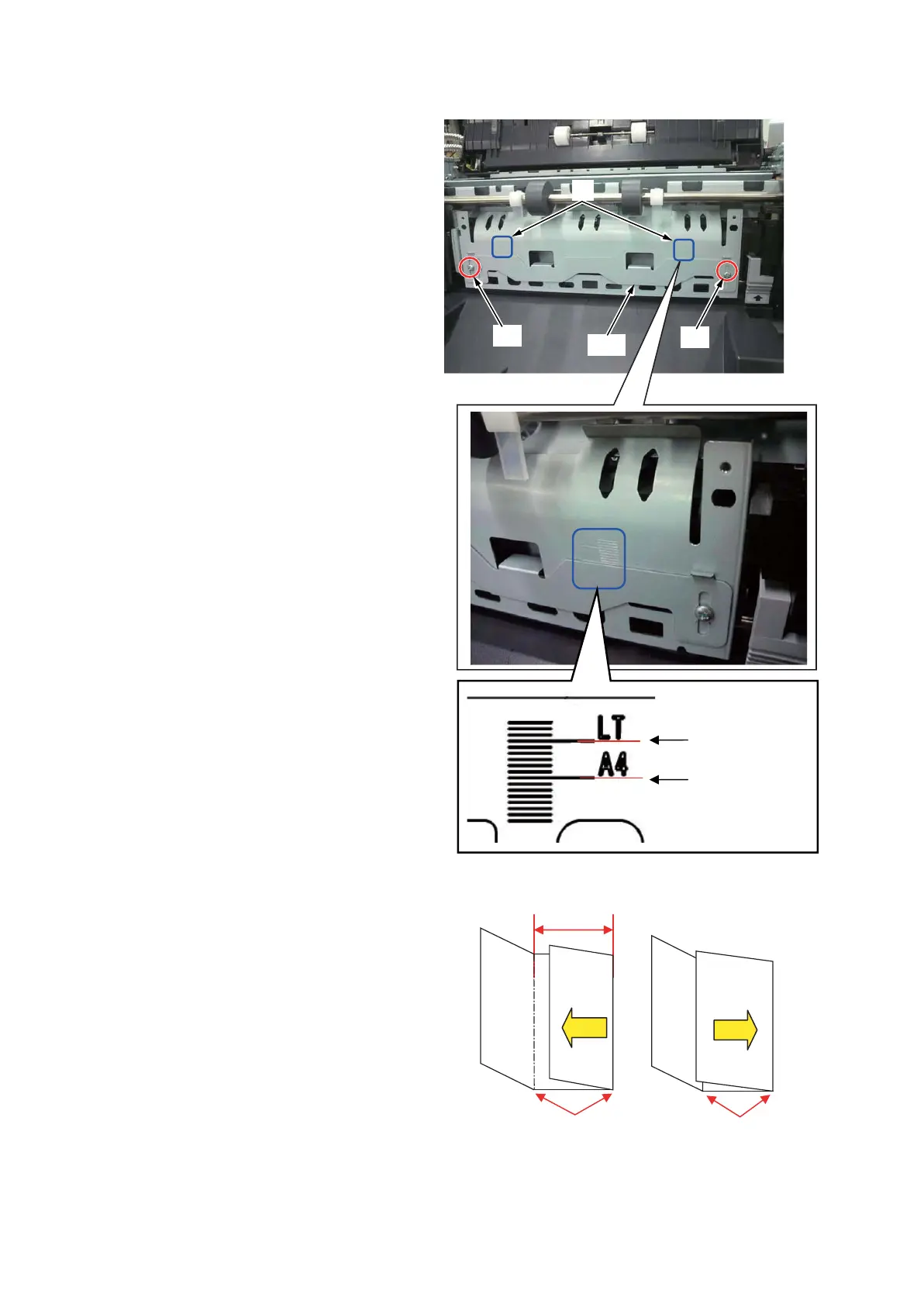
3. Loosen two screws (b) securing the
adjuster plate (a) and move it.
*: Raise the adjuster plate to decrease the
width B and lower the adjuster to increase
the width.
Scale: 1mm)
*: When adjusting, fix it where the left and
right scale are equal in Refer ence to the
scale (c).
Shipment setting position
Metric : A4 (d)
Inch : LT (e)
*: A4 and LT punch marks are at the
machine rear side only.
*:
Figure 3-107
Treatment 2
Change the setting values in U246 [Setting:
Three Fold] to shift the tri-folding position (a)
and to change the width A and C. (Width of B
remains unchanged.)
Raise the set value to align the tri-folding to the
left.
Lower the set value to align the tri-folding to
the right.
Figure 3-108
F
b
a
b
d
e
A
C
Left
Right
A
C
B
a
a












 To Next Page