23
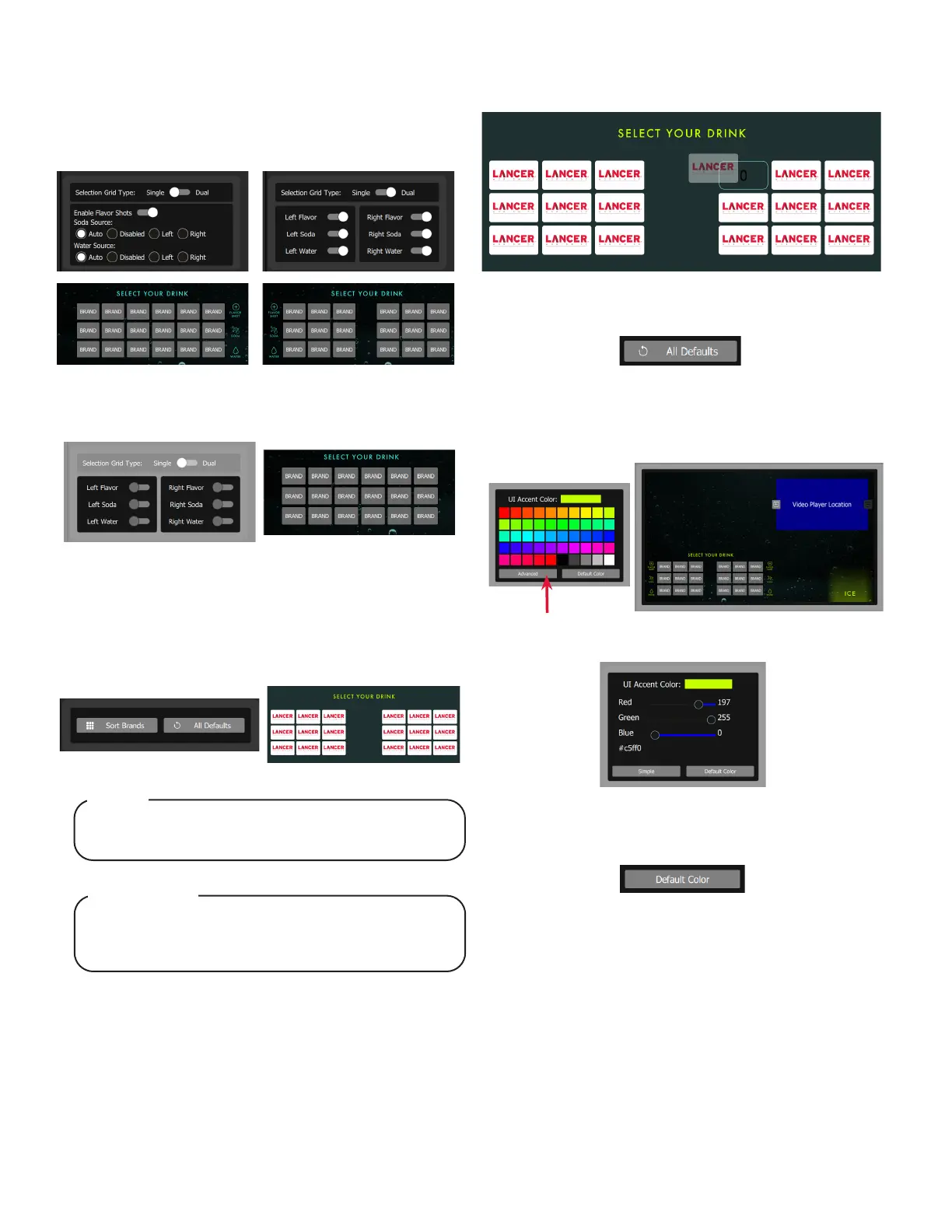
1. The Selection Grid Type toggles either a Single or Dual
grid for the customer interface. The single grid provides
larger icons in a single grouping while the dual grid
will automatically center the brand icons above each
associated nozzle.
2. Toggle the switches below to show/hide flavors, soda, and
water icons in the customer interface for the left and right
nozzles.
1. Tap the Sort Brands button to manually rearrange the
brands on the customer interface by dragging the brands
to their desired location.
Dual Grid mode limits the positioning of brand icons to the
associated dispense nozzle that the brand was mapped.
NOTE
Le mode Dual Grid limite le positionnement des icônes
de marque à la buse de distribution associée à laquelle la
marque a été mappée.
REMARQUE
2. Drag and drop brand to desired location.
GRID OPTIONS
SORT BRANDS
Single Dual
3. Press the All Defaults to revert back to the original
interface display settings.
THEMING
1. UI Accent Color can be changed using the color picker
pane.
3. Press the Default Color button to revert back to the original
accent color.
2. Selecting Advanced enables the use of sliders to pick an
accent color.



 To Next Page