27
1. Insert an empty USB drive into an open USB port on the
unit.
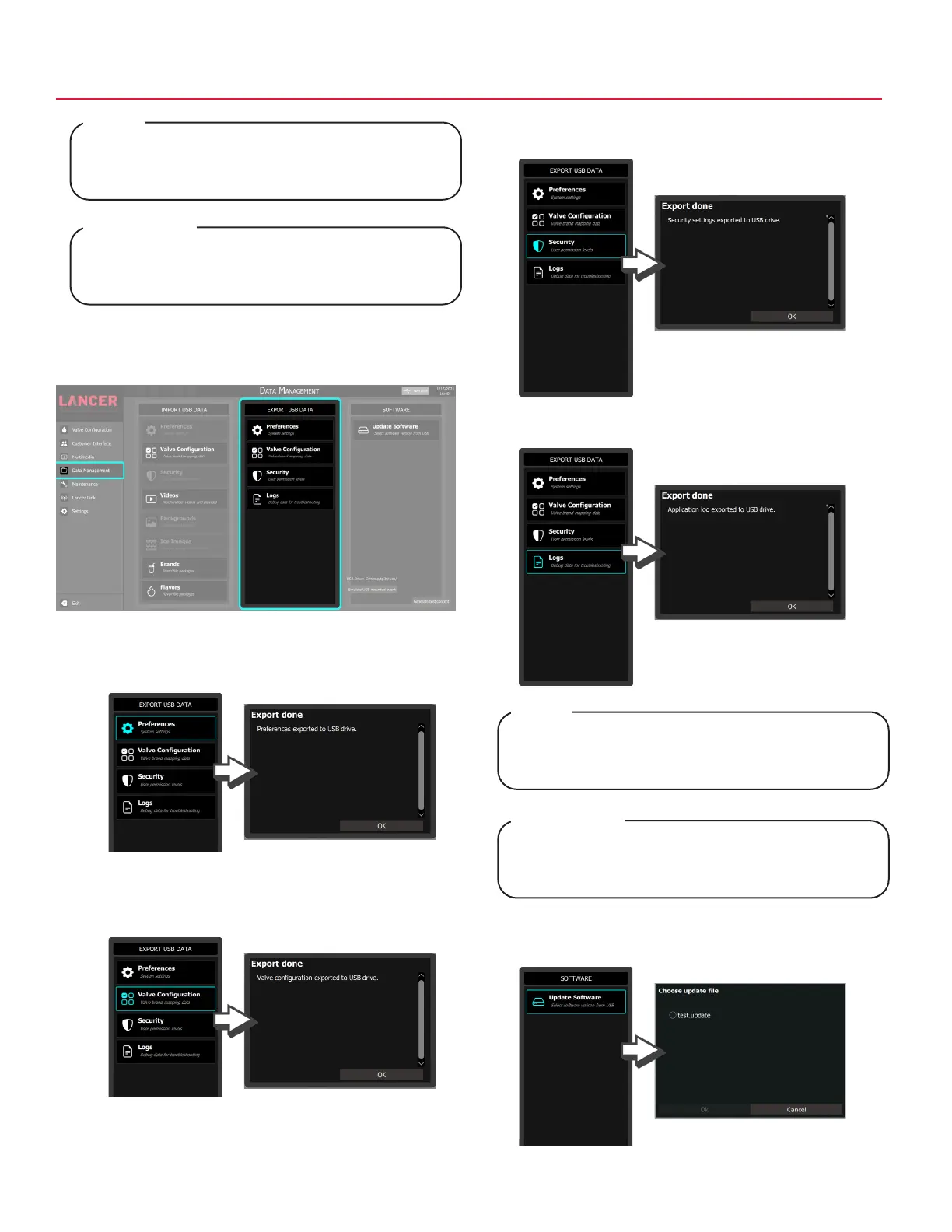
2. Tap Data Management on the navigation menu.
Data Management - Export USB Data
3. Tap the Preferences button under the Export USB Data
pane to export data related to system settings.
4. Tap the Valve Configuration button under the Export USB
Data pane to export valve brand mapping data.
5. Tap the Security button under the Export USB Data pane
to export user permission levels.
6. Tap the Logs button under the Export USB Data pane to
export debug data for troubleshooting.
7. Tap the Update Software button under the Software pane
to import the selected software version from USB.
The following highlights the steps necessary to copy
a tower’s brand configuration settings from one Tower
dispenser to another.
NOTE
Voici les étapes nécessaires pour copier les
paramètres de configuration de la marque d’une tour
d’un distributeur Tower à un autre.
REMARQUE
Logs may be used by Lancer for advanced
troubleshooting of the equipment. Use only if
instructed to by Lancer customer service.
NOTE
Les journaux peuvent être utilisés par Lancer pour
le dépannage avancé de l’équipement. Ne les utilisez
que si le service client de Lancer vous le demande.
REMARQUE



 To Next Page