29
Lancer Link Setup
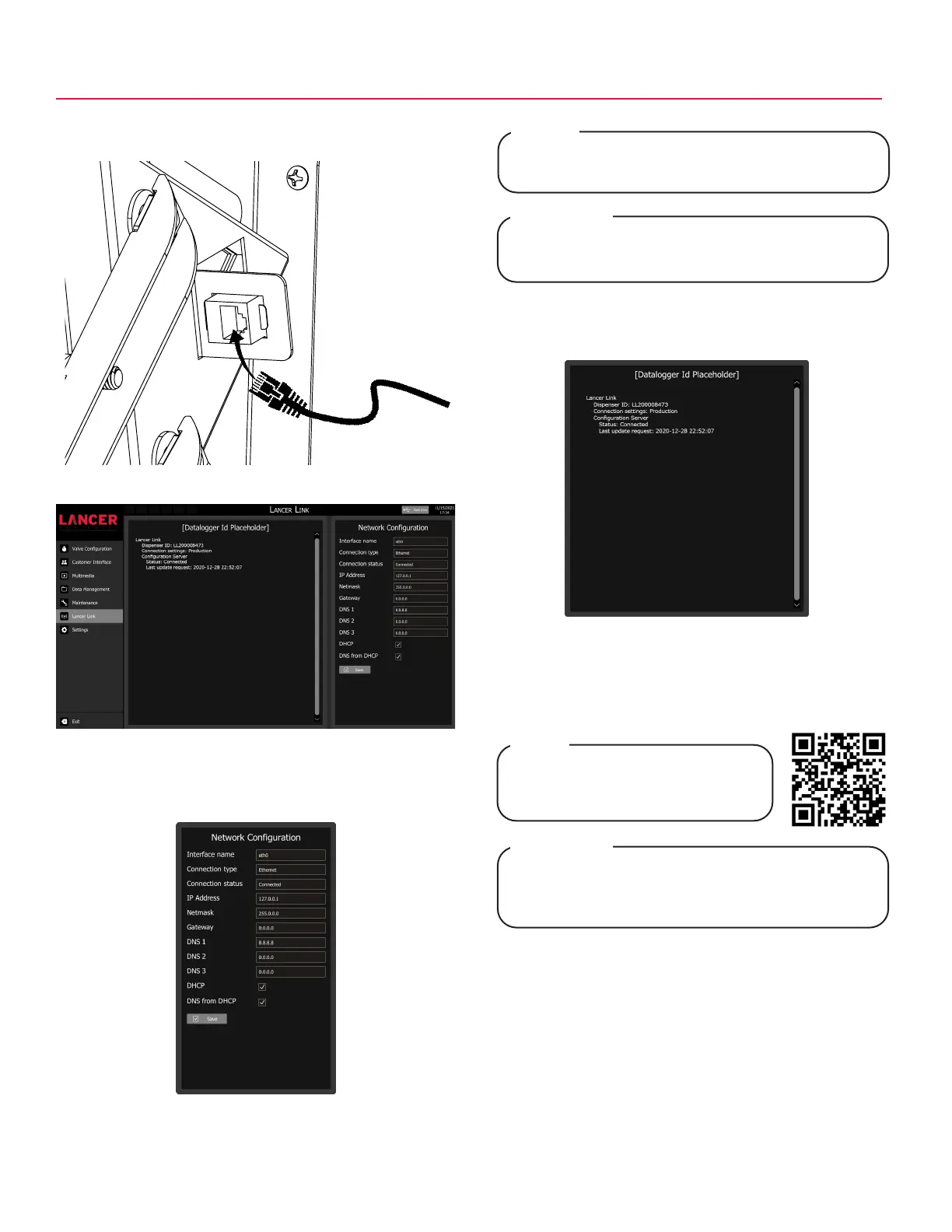
1. Lift merchandiser and plug an Ethernet cable from wall or
router to the ethernet port located in the upper left corner.
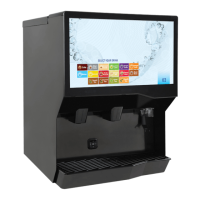
2. Tap Lancer Link on the navigation menu.
3. Update any parameters under the Network Configuration
pane and tap the Save button, if necessary.
5. Once initial assigned by Lancer customer service, use
“Dispenser ID” to activate unit on the Lancer Link website:
https://prod-lancercorp-portal-app-cu.azurewebsites.net/
It may take up to 10 minutes for a network connection
to be established.
NOTE
L’établissement d’une connexion réseau peut prendre
jusqu’à 10 minutes.
REMARQUE
4. Locate the “Dispenser ID” in the center portion of the
screen, then call Lancer Worldwide Customer Service at
1-800-729-1500, to register your account.
Refer to Lancer Link User Guide
(PN: 28-3067) for instructions on
web-based setup.
NOTE
www.lancerworldwide.com/tools/instruction-sheets/
Reportez-vous au Guide de l’utilisateur Lancer Link
(PN: 28-3067) pour obtenir des instructions sur la
configuration Web.
REMARQUE
Ethernet



 To Next Page