PLMNL0199 REV. J Effective Date: 08/05/21 36 FiberCUT
®
ST Operation Manual
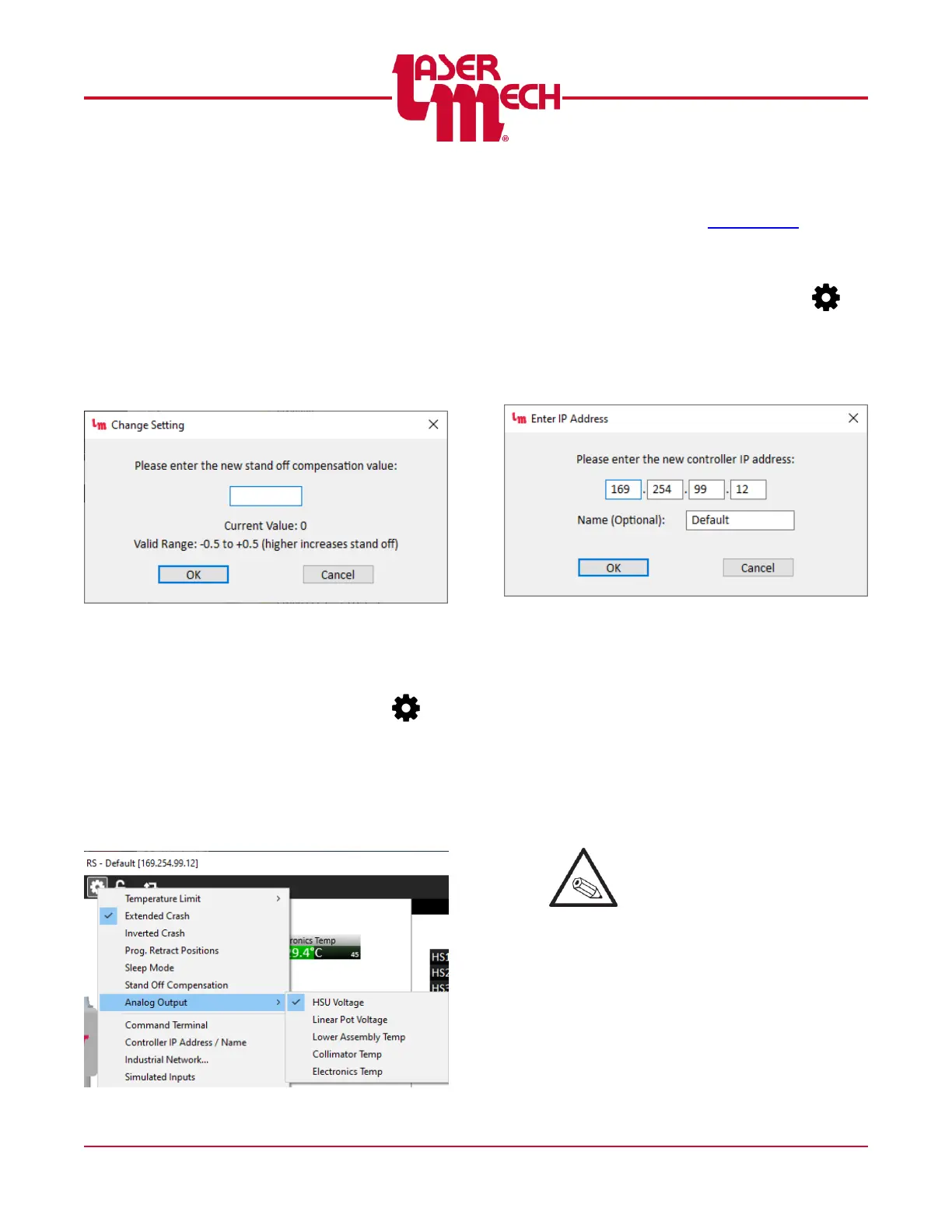
For steps 2 to 5, see Figure 41.
2. A dialog box will appear with a
field to enter the new value.
The current value and valid
range are also displayed.
3. Enter a valid new value in the
provided field.
4. Click OK to store the value.
5. If necessary, click Cancel to exit
the screen.
Figure 41
5.6.8 Analog Output
For steps 1 and 2, see Figure 42.
1. Click the Settings button ( ) in
the toolbar and hover over Analog
Output.
2. Click HSU Voltage, Linear Pot
Voltage, Lower Assembly Temp,
Collimator Temp, or Electronics
Temp, as desired.
Figure 42
3. The Analog Output (P2-12) will
now correspond to the specified
value. See Section 3.4.2 for more
details.
5.6.9 Controller IP Address / Name
1. Click the Settings button ( ) in
the toolbar and select Controller
IP Address / Name.
The Enter IP Address screen appears.
See Figure 43.
Figure 43
2. Enter the desired IP address and
name, then click OK.
3. If the IP address has been
changed, FiberCUT
®
Monitor
disconnects from the controller
and attempts to connect to the
new IP address.
Otherwise, the name will update
immediately.
You may need to reconfigure your
PC's network adapter settings
before being able to reconnect.



 To Next Page