PLMNL0199 REV. J Effective Date: 08/05/21 37 FiberCUT
®
ST Operation Manual
5.6.10 EtherNet/IP (If Equipped)
FiberCUT
®
controllers are set by
default to use DHCP for EtherNet/IP
communications. A static IP address
can be set using FiberCUT
®
Monitor.
1. Click the Settings button ( ) in
the toolbar and select Industrial
Network....
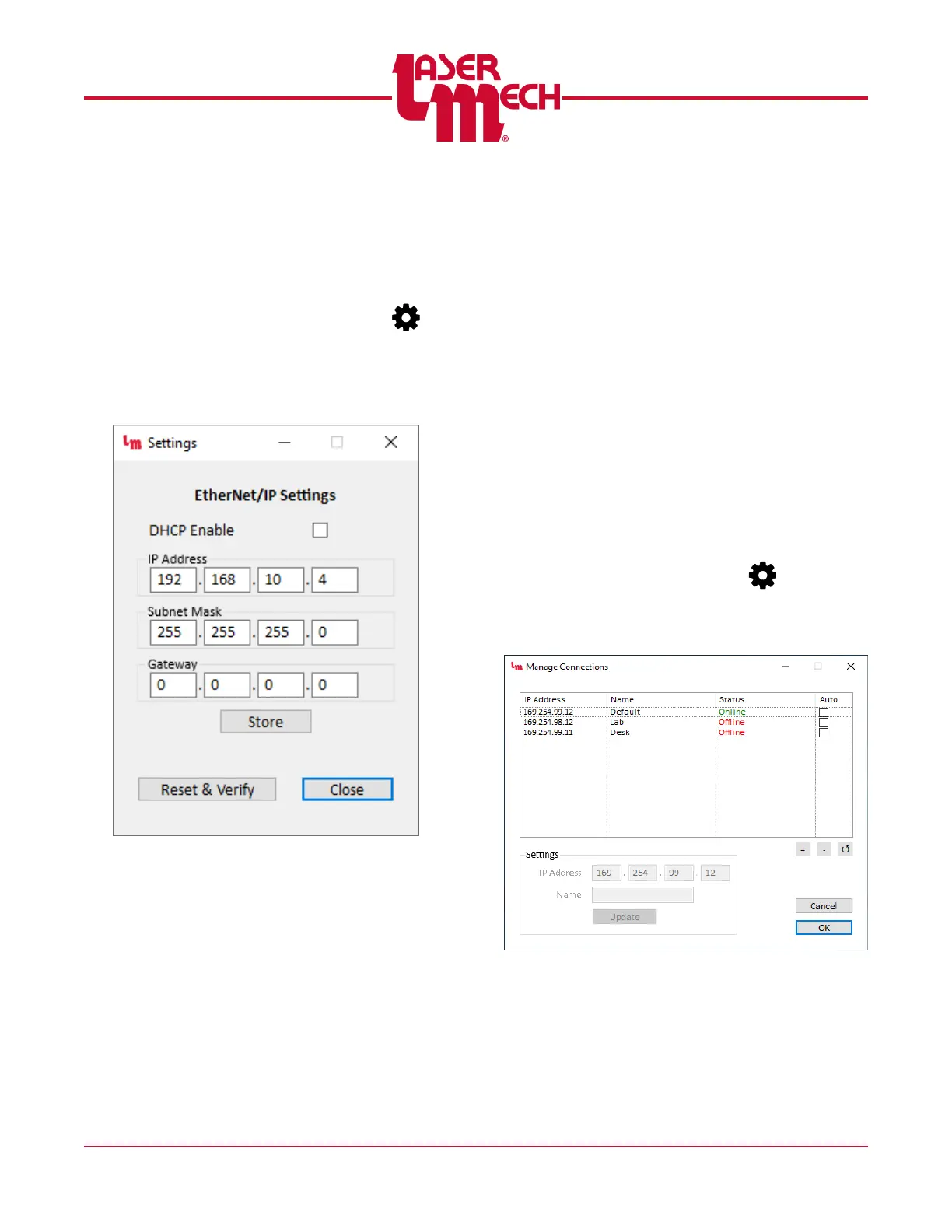
The EtherNet/IP Configuration screen
appears. See Figure 44.
Figure 44
2. Configure the DHCP, IP Address,
Subnet Mask, and Gateway
settings as desired.
3. If desired, click the Store button to
save the changes to the controller.
4. If desired, click the Reset & Verify
button to reset the controller and
implement the new configuration.
Wait for Configuration
Updated to appear then
confirm the displayed values
are the proper settings.
Otherwise, power must be
cycled in order for new
settings to take effect.
5. Click Close to exit the screen.
5.7 Manage Connections
When using Multiple View, the Manage
Connections screen allows you to easily
check the status of all assigned IP
addresses and rearrange the panel where
they appear.
Click the Settings button ( ) in the main
toolbar and select Manage Connections.
The Manage Connections screen appears.
See Figure 45.
Figure 45



 To Next Page