PLMNL0199 REV. J Effective Date: 08/05/21 46 FiberCUT
®
ST Operation Manual
6.7 Servicing the Fiber Collimator
Assembly
The collimator assembly must be removed
to service the collimator optics.
Before opening any part of the
head, clean off the dust and/or
process debris according to Section
6.2.
DO NOT BLOW OFF THE HEAD
WITH COMPRESSED AIR!
To remove the collimator assembly:
1. Clean the outside of the head
according to Section 6.2.
2. Remove cutting head from robot
according to Section 6.6.
In order to keep out debris, move the
head to a horizontal orientation.
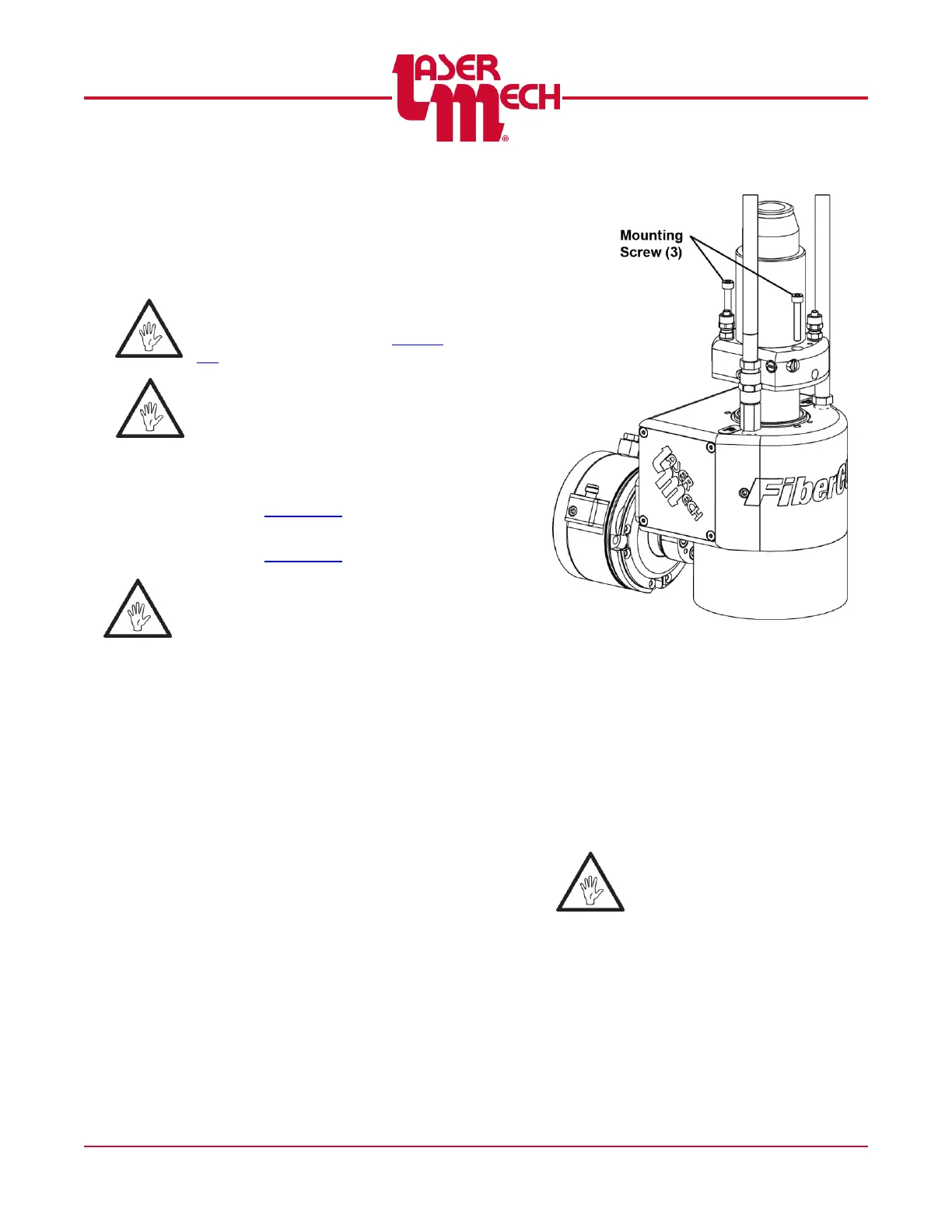
3. Unbolt the fiber collimator assembly
from its mount by loosening the screws
with a 3mm wrench. See Figure 56.
4. To remove the fiber collimator
assembly from the cutting head, use
steady pressure to unseat it from the o-
ring seal.
The plate is dowel-pinned in place,
so pull it straight out.
Verify that the o-rings come out
with the assembly and do not
remain in the head.
Figure 56
To reinstall the collimator:
5. Align the collimator assembly so:
The (3) mounting screws are in line
with the tapped holes in the head.
The (2) alignment pins are in line
with the alignment pin holes in the
head.
Take special note not to snag,
pinch or tangle any wires inside
the head during reinstallation.
6. Insert and tighten the (3) mounting
screws using a 3mm wrench.



 To Next Page