About X-431 Station
Diagnostics
Toolbox & Apps
FAQ
Initial Use
8
www.x431.com +86 755 8455 7891
LAUNCH
Station
User's Guide
9 Lifting pedal: Freely adjust the height of the screen.
10 Beam lifter
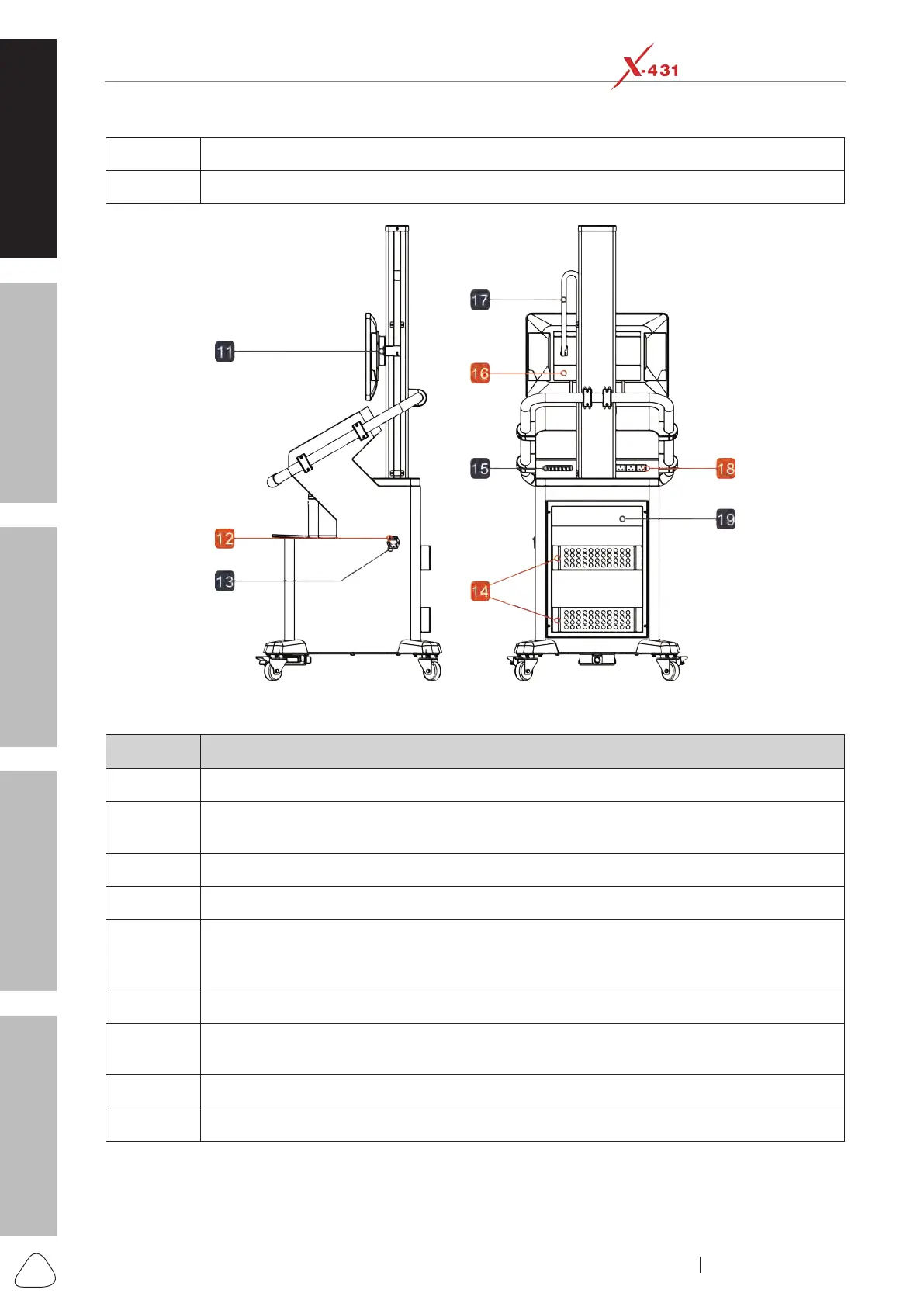
Rear & Side Views
No. Notes & Descriptions
11 Hook rack
12
Power switch for the Diagnostic Workbench - Plug in the power cord and turn this switch on
when working.
13 Power jack - Connects the power cord to supply power to the diagnostic workbench.
14 Storage basket - For storing idle items and repair tools.
15
USB hub - Connected to the diagnostic tool, it integrates multiple USB ports so that multiple
USB devices can be connected to it at the same time (such as add-on modules: Scopebox,
Videoscope, Thermal Imager, etc.).
16 Cross-linking plate - For connecting the screen hook rack (11) and the beam lifter (10).
17
Lifting drag chain - Several wiring harnesses (such as DC power cord, USB cable and
HDMI cable, etc.) are pre-installed into it for connecting the diagnostic tool.
18 Power socket - It is convenient for other devices to get power.
19 Back cover







 To Next Page