About X-431 Station
DiagnosticsToolbox & AppsFAQ
Initial Use
7
www.x431.com +86 755 8455 7891
LAUNCH
Station
User's Guide
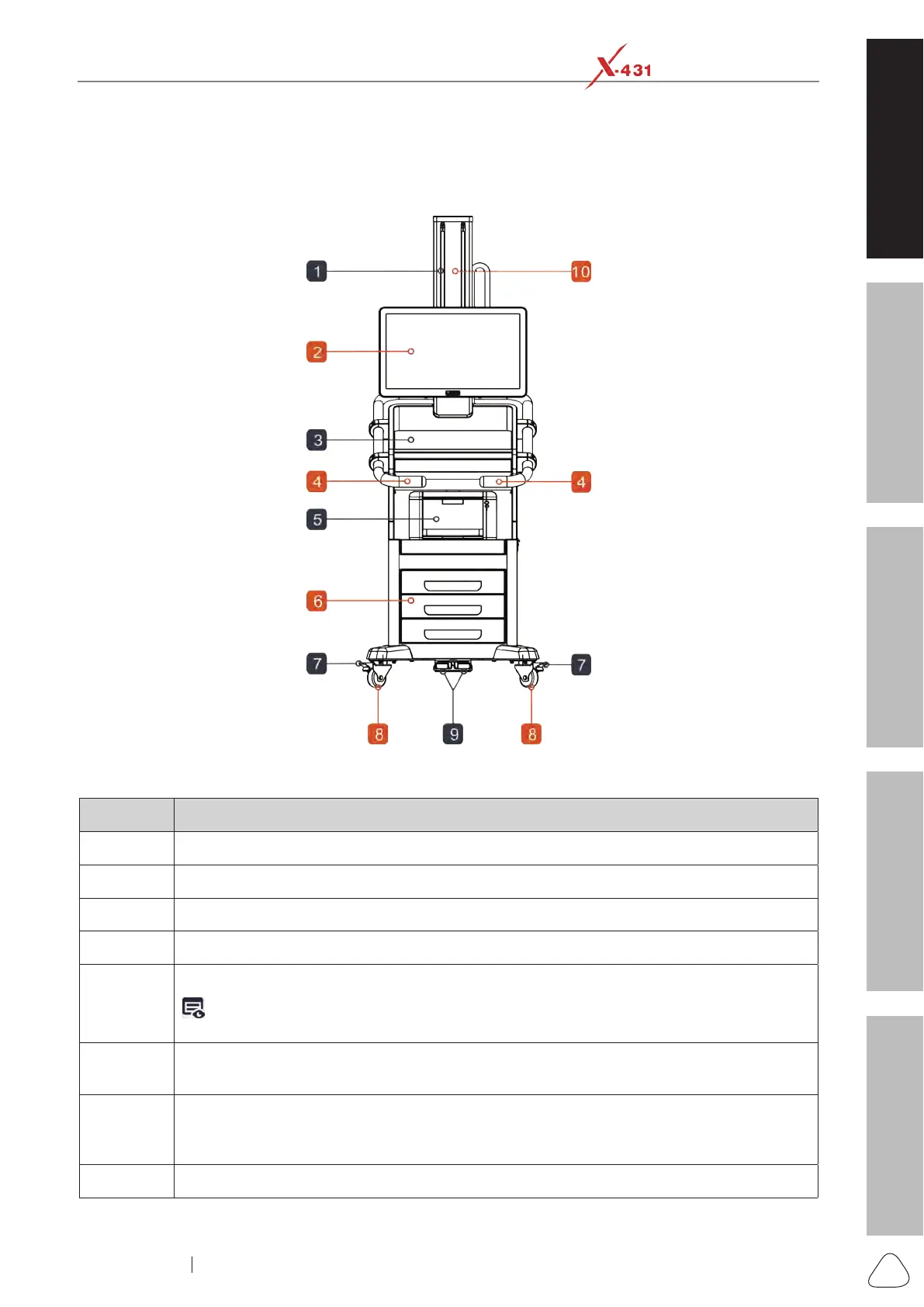
1.5 Components & Controls
1.5.1 Mobile Diagnostic Workbench
Front View
No. Notes & Descriptions
1 Sliding rail - Lifts the screen up/Drops the screen down along the sliding rail.
2 Display screen
3 Work station - For placing the mouse and keyboard.
4 Push rod
5
Printer(Optional) - Prints the diagnostic reports.
Note: The printer and the diagnostic tool needs to be configured and connected (via wired/
wireless) before printing.
6
Storage drawers - For storing repair tools, non-16 pin connectors, Roxie W, and Pilot TPMS
etc.
7
Parking safety mechanism - When it is not locked, the diagnostic workbench can move
freely. After locked, the universal rolling caster becomes stuck and the diagnostic
workbench cannot move freely.
8 Universal rolling caster









 To Next Page