About X-431 Station
DiagnosticsToolbox & AppsFAQ
Initial Use
99
www.x431.com +86 755 8455 7891
LAUNCH
Station
User's Guide
4 Edge trigger level marker
5 Displays the trigger information, including the edge trigger slope, source and level.
6 Sample rate
7 Horizontal Settings Panel: Controls the time base.
8
Vertical Settings Panel: Controls the amplitude of the displayed signal. User can change the
volt/div, coupling and probe attenuation of the CH1/CH2/CH3/CH4.
9 Trigger Settings Panel: Controls the start event of the sweep.
10 Channel Selection Button
11
Function Menu
[Auto]: It indicates auto trigger setting.
[Ref]: There are expert reference and base reference available. Expert reference enables
you to recall your customized expert database, whereas base reference provides automatic
pre-setting function of specialized sensors.
[File]: Provides save snapshot, snapshot manager, waveform record and waveform replay.
[View]: Calibration and display settings are available.
[Measure]: Includes signal source measurement, horizontal measurement, vertical
measurement and clear measurement.
[Settings]: Shows/hides the parameter settings area including horizontal settings, vertical
settings and trigger settings.
/ [Start/Stop]: Starts/stops collecting waveforms.
4.3.4 Operations
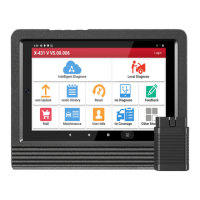
1). Channel selection and attributes setting
<1> Channel selection
There are two ways available for channel selection:
A. Select from the channel tab shown at the bottom of the waveform display area
B. Select from Vertical settings
Note: For better comparison and identification, each channel and waveform are marked in different colors.
Fig. Oscilloscope-2
<2> Channel attributes & trigger setting
Channel attributes can be set via horizontal settings and vertical settings.




 To Next Page