Miscellaneous
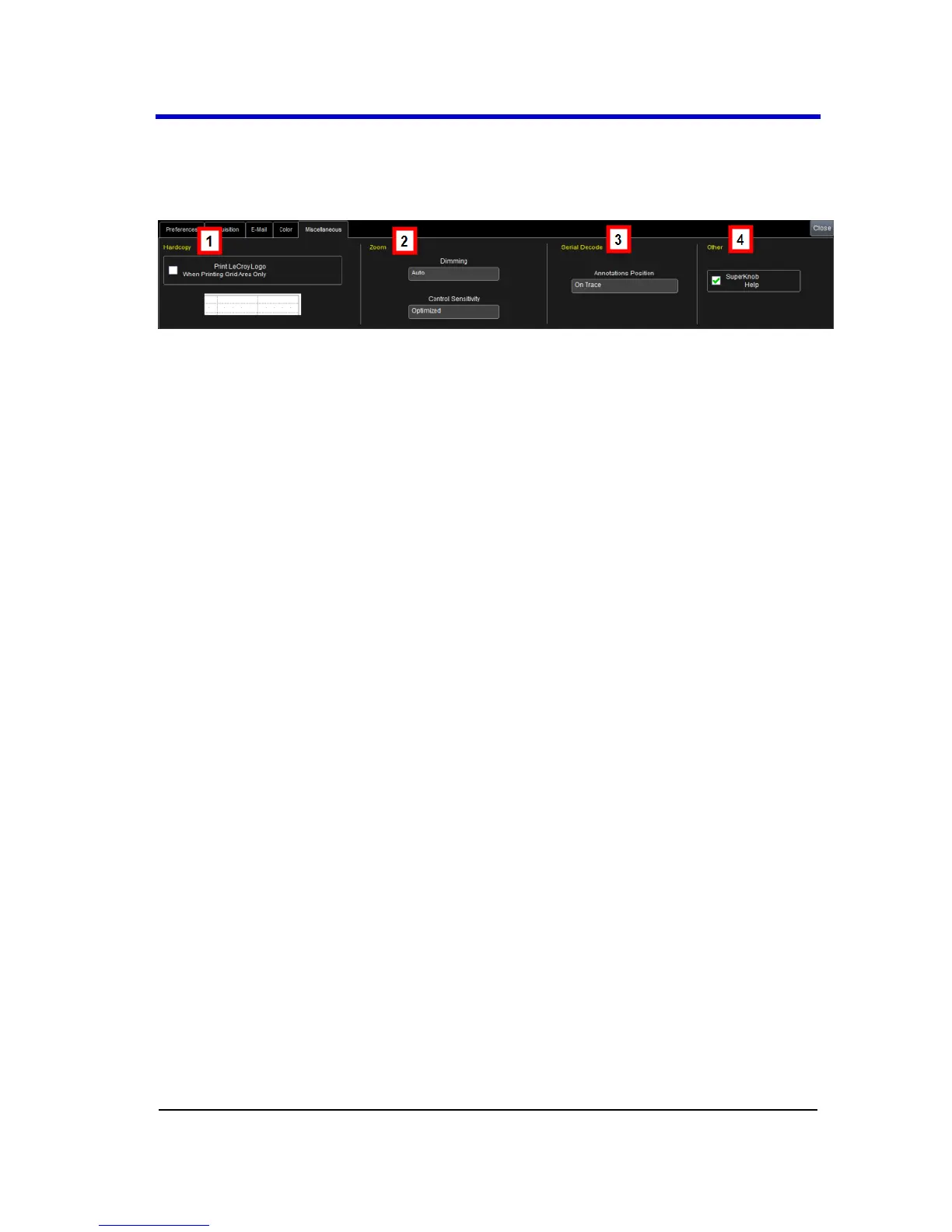
Other Preference setting controls are shown on the Miscellaneous dialog
as follows:
Numbered sections on this dialog correspond with the following
explanations.
1. You can add the LeCroy Logo to hardcopies of your grid display
waveforms by marking the Print LeCroy Logo When Printing Grid
Area Only checkbox on the Hardcopy section of the dialog.
2. You can adjust the Dimming and Control Sensitivity of Zoom
traces as follows:
Use the Dimming control to choose select On, Off, and Auto
values. This controls the darkening/shading of waveform areas not
part of the Zoom trace.
Use Control Sensitivity to choose Legacy or Optimized values
3. If you have Serial Data Debug Solutions installed on your
oscilloscope, you can control Annotations being put On Trace (on
all traces) or On Noisy Trace (only on noisy traces).
4. You can shut off the SuperKnob Help flyout menu by un-marking
the SuperKnob Help checkbox on the Other section of the dialog.
System Recovery Tool
Restoring Software Using the Acronis
Application
Your oscilloscope is designed to operate reliably for many years. The
application software operating the instrument runs on a Windows
platform. The loading or incomplete removal of additional Windows
applications can cause problems in the stability of the operating system.
Severe cases may require a reloading of the base operating system and
oscilloscope application.





 To Next Page