Training TriggerScan
The TriggerScan Trainer inspects a currently acquired waveform and
automatically builds a list of common trigger setups used to find rare
events.
PLEASE NOTE THE FOLLOWING:
You must acquire and display at least 3 cycles of a signal before
running the Trainer.
You should run the Trainer if you want to change the trigger types
or if you change the channel or signal.
1. Touch Trigger → Trigger Setup... from the menu bar.
2. On the Trigger dialog, click the TriggerScan tab.
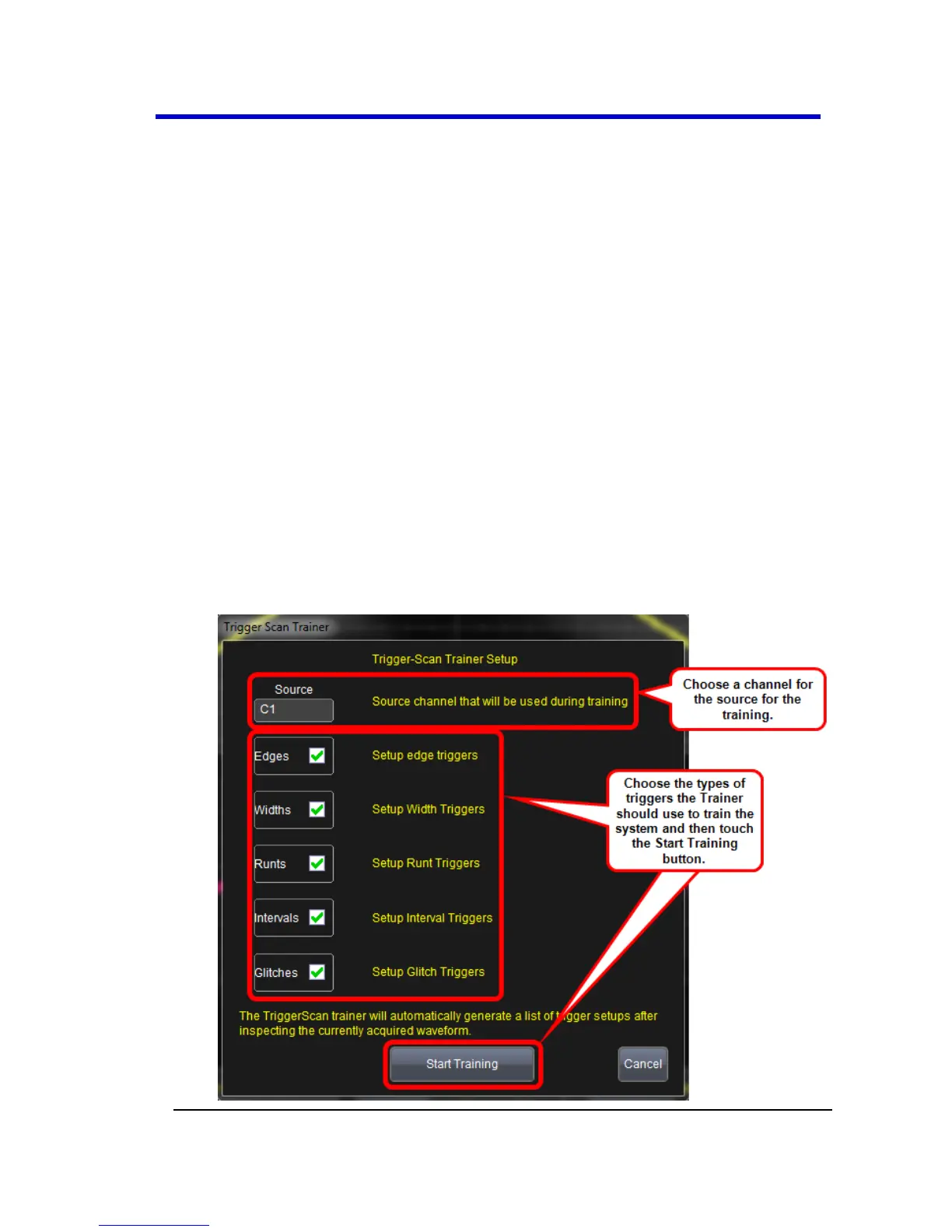
3. Touch the Trainer button and select a channel as the source for
the training on the Trigger Scan Trainer pop-up. Also choose the
types of triggers the Trainer should use to train the system and
then touch the Start Training button. The training begins. When it
is complete, a list of smart trigger setups is displayed in the Trigger
List.





 To Next Page