Front Panel Groupings
The front panel is divided into sections based on various functions. The
following topics explain these sections in more detail.
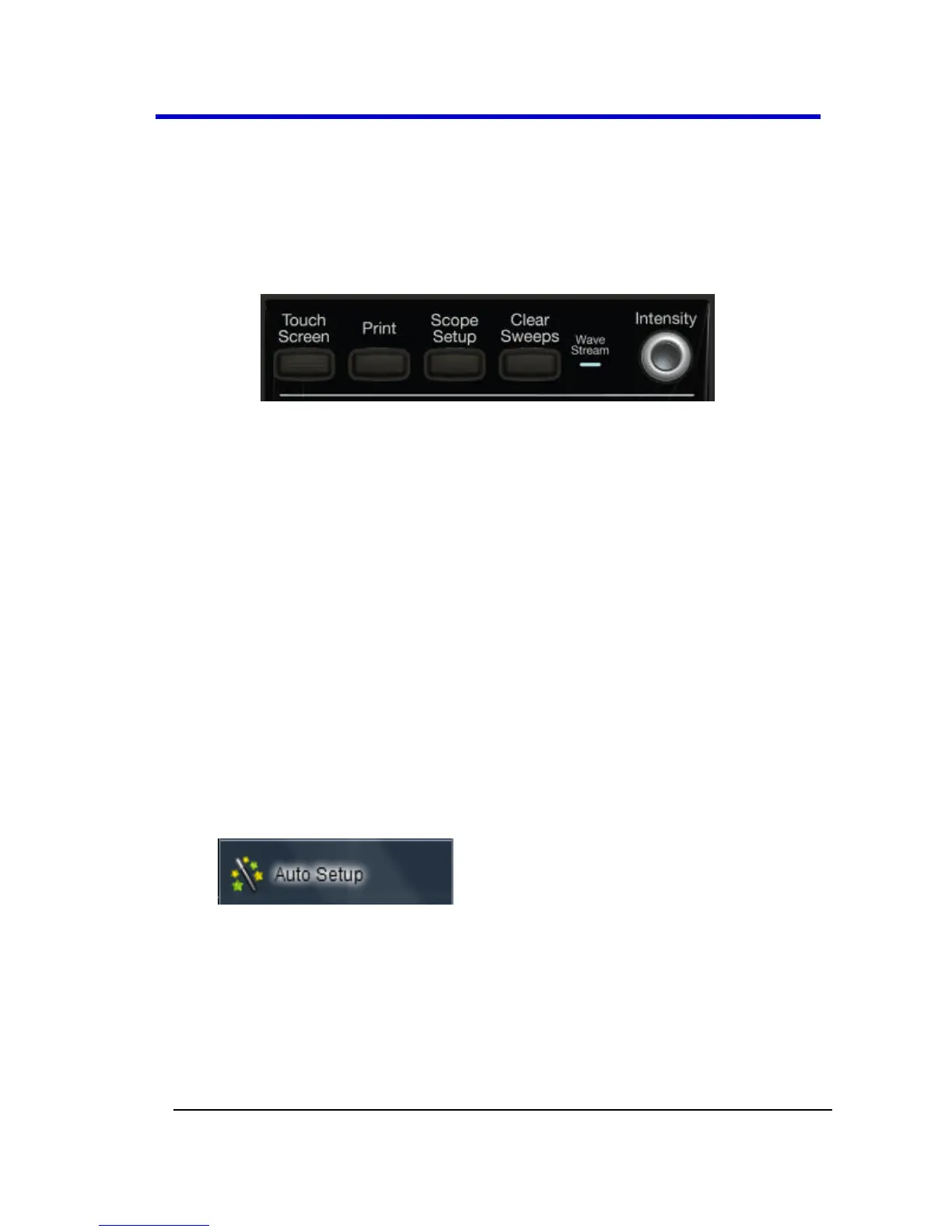
Miscellaneous Setup Controls and WaveStream Indicator
This topmost section of the front panel provides the following functions:
Touch Screen - By default this button's blue backlit LED is ON and
the touch screen is enabled. By pressing this button and turning
off the LED, the touch screen is then disabled.
Print - Press this button and it automatically executes the based
on the settings you've made as described in Printing and
Hardcopy Functions (on page 161).
You can set the oscilloscope to automatically spool directly to a
printer, to a file, an email (with attachment), or to the clipboard.
Scope Setup - Press once and the Scope Setup flyout menu is
shown. The Scope Setup flyout menu quickly provides access to
Auto Setup, C1 Find Scale, C2 Find Scale, C3 Find Scale, C4 Find
Scale, and Default Setup buttons. These functions perform various
automatic setup configurations to your instrument. This
corresponds to the Auto Setup... selection on the menu bar from
the Vertical, Timebase, or Trigger menus.
Press the Auto Setup... button on the flyout menu to perform a
full auto setup. Press a Channel Find Scale button on the flyout
menu to perform a quick auto setup for that channel only. Press
the AUTO SETUP... front panel button twice to perform the last
selection from the Auto Setup... flyout menu (the default is to
perform a full auto setup).




 To Next Page