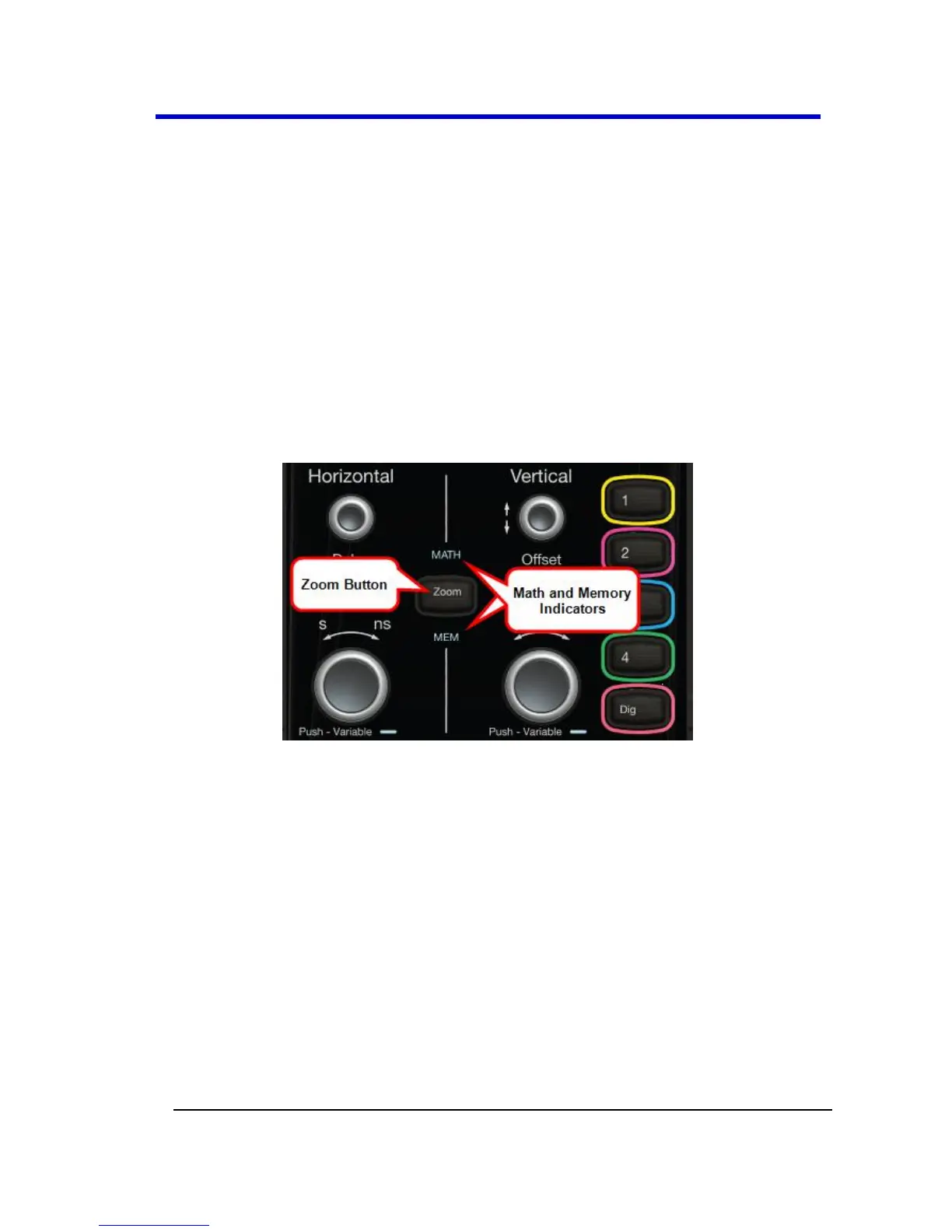
Channels - The channel buttons (1 - 4 and Digital) control both
channel ON/OFF and which channel is active for the Vertical Offset
and Volts/Div knobs controls. If a channel is OFF, pressing that
channel button turns it on and makes it active. If a channel button
is ON, pressing that channel button makes it active, and then
pressing it a second time turns it OFF.
Offset - Press to toggle between a zero vertical offset value and
the previous vertical offset value for the selected channel. Turn to
change the vertical offset value for the selected channel.
Gain - Press to toggle between fixed and variable gain adjustment.
Turn to change the gain value.
Math, Zoom, and Memory Indicators and Controls
When pressed, the Zoom automatically creates a Zoom trace of all
active channels. Math and Memory traces must first be enabled
on their respective dialogs in Math → Math | Memory Setup... for
use by the front panel controls.
When Math, Zoom, or Memory traces are enabled - see Math →
Math | Zoom | Memory Setup..., respectively - the corresponding
indicator light illuminates and the Horizontal and Vertical controls
specifically control the Math, Zoom, or Memory trace.
The Push - Variable function on the Time/Div front panel control
for Horizontal only applies to Math, Zoom, or Memory traces and
not Channels. Press the button to toggle between fixed and
variable adjustments or turn the knob to change the value.




 To Next Page