Video Camera
34 M320 Ref. 10734261 / Version 03 M320 Ref. 10734261 / Version 03 35
9.4.1 Color (whitebalance)
Use neutral white or gray color chart for manual white
balance adjustment.
X
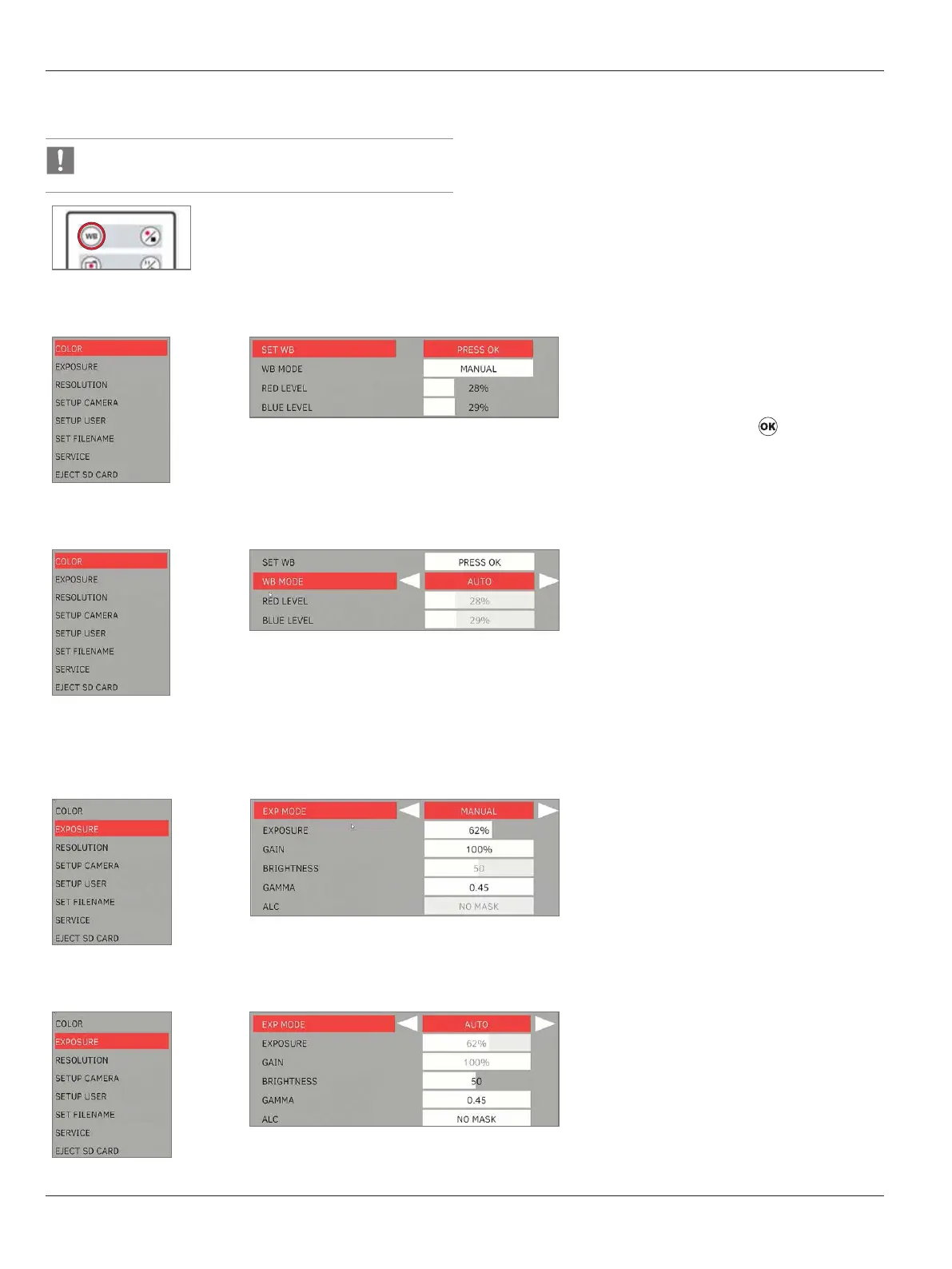
Lay a neutral white paper or gray chart under the focus of the microscope. Press "WB" on the
remote control.
Manual White Balance (recommended)
X
Select “MANUAL” for manual white balance
mode (WB mode) - recommended.
X
Lay a neutral white paper or gray chart under
the focus of the microscope.
X
Select “SET WB” and press . Then, adjust
‘RED LEVEL’, ‘BLUE LEVEL’ as needed.
Automatic white balance
X
Select “AUTO” for automatic white balance
adjustment. White balance is adjusted
automatically in real-time.
9.4.2 Exposure
Manual exposure
X
Select "MANUAL" for manual exposure.
X
Correct the values for "EXPOSURE", "GAIN",
and "GAMMA".
Automatic exposure
X
Select "AUTO" for automatic exposure.
X
Correct the values for "BRIGHTNESS" and
"GAMMA".


 To Next Page