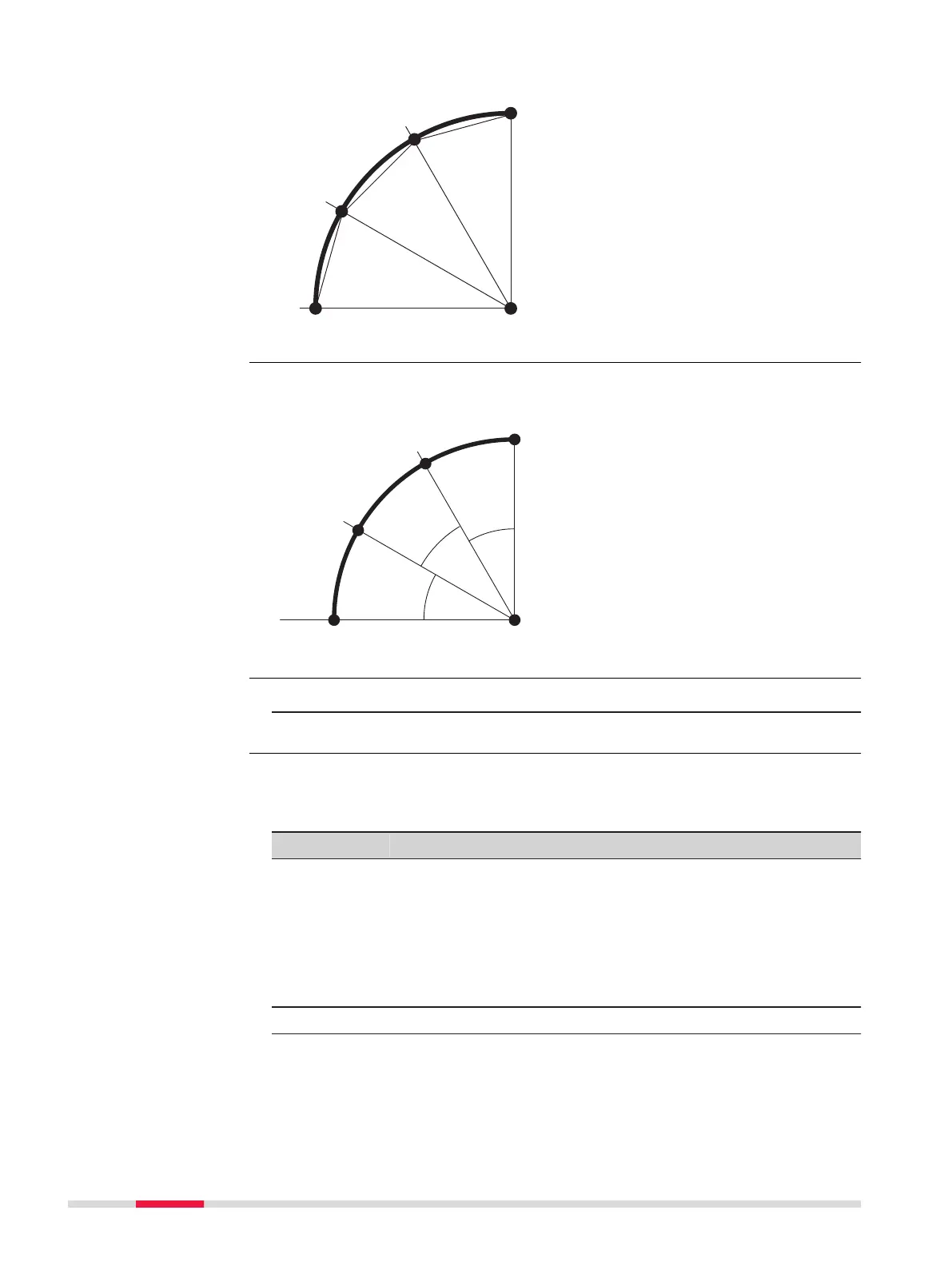
To stake out a series of equidistant chords along the arc.
P0 Center point of arc
P1 Start point of arc
P2 Stake out point
P3 Stake out point
P4 End point of arc
a Radius of arc
b Chord length
To stake out a series of points along the arc defined by the angle segments
from the center point of the arc.
P0 Center point of arc
P1 Start point of arc
P2 Stake out point
P3 Stake out point
P4 End point of arc
a Radius of arc
b Angle
1. Press Setout from the Reference Arc - Info screen.
2. Select one of the four methods of stake out available.
Enter the stake out values. Press CentreP to stake the arc centre point.
Description of fields
Field
Option Description
Line Editable field For stake out arc, chord and angle: Longitudi-
nal offset from the reference arc. This is cal-
culated by the arc length, chord length or
angle and the selected misclosure distribu-
tion.
For stake out point: Longitudinal offset from
the reference arc.
Offset Editable field Perpendicular offset from the reference arc.
Distrib. For stakeout arc: Method of misclosure distri-
bution. If the entered arc length is not an
integer of the whole arc, there will be a mis-
closure.
Stake out chord
Stake out angle
Access
Stake out point, arc,
chord or angle
98 Apps



 To Next Page