☞
Shield the instrument from direct sunlight and avoid uneven temper-
a
tures around the instrument.
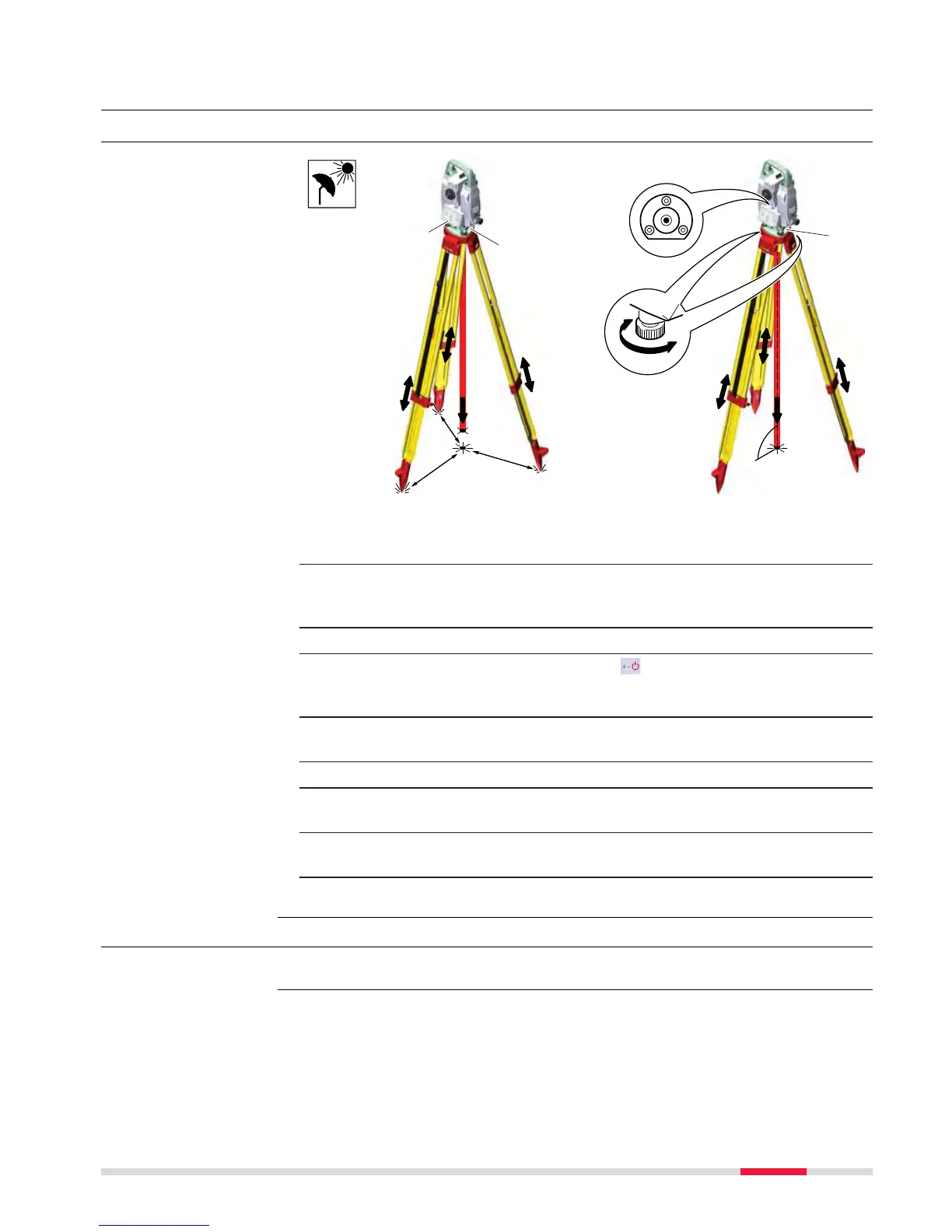
1. Extend the tripod legs to allow for a comfortable working posture.
Position the tripod above the marked ground point, centring it as
good as possible. Ensure that the tripod plate is roughly horizontal.
2. Fasten the tribrach and instrument onto the tripod.
3. Turn on the instrument by pressing
. Select Se
ttings/TS instru-
ment/Level & compensator to activate the laser plummet and
electronic level.
4. Use the tribrach footscrews (a) to centre the plummet (b) above the
ground point.
5. Adjust the tripod legs to level the circular level (c).
6. By using the electronic level, turn the tribrach footscrews (a) to level
the instrument precisely.
7. Centre the instrument precisely over the ground point (b) by shifting
the tribrach on the tripod plate.
8. Repeat steps 6. and 7. until the required accuracy is achieved.
4.2 Setting up for Remote Control (with the RadioHandle)
For this functionality, the TS13 Robotic licence must be purchased.
Instrument setup
s
tep-by-step
Availability
Operation 37



 To Next Page