UNITY MOTORHOME ELECTRICAL SYSTEM OPERATION
97
2.
Depress the start button
13
until the diesel generator
engine starts running then release the button. The
display screen will show “GEN OFF” until the engine
starts.
3.
Allow the diesel generator engine to settle and run
smoothly before operating any electrical appliances.
4.
Become familiar with the output capacity and
capability of your diesel generator.
5.
Be careful not to overload the diesel generator.
Refer to the diesel generator manual located in
the Motorhome Information Kit for further details.
STOPPING THE AUXILIARY DIESEL
GENERATOR
Prior to stopping the generator, turn off all large
appliances and let the generator run for two minutes
to cool down.
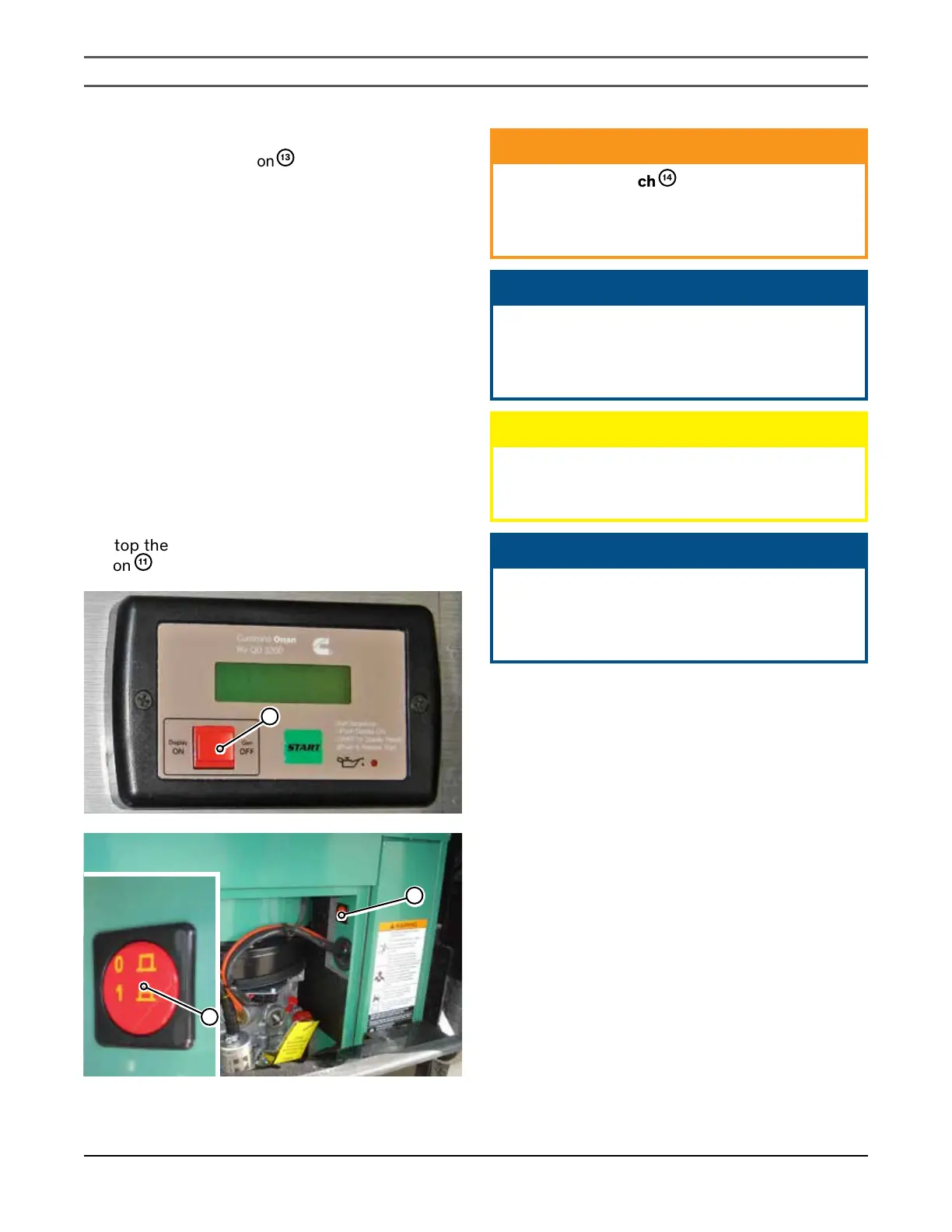
To stop the generator, depress the red “Gen OFF”
button
11
.
11
14
14
ᘐ WARNING
Press the stop switch
14
to stop the generator set
or to prevent it from starting while performing
maintenance and/or service. To allow the
generator set to run, press the switch again.
ᘐ NOTICE
Overloading the generator for long periods of time
can cause the generator windings to overheat.
Keep electrical loads within the recommended
wattage ratings.
ᘐ CAUTION
Do not smoke while refueling. Keep flames,
sparks, and smoking materials away from fuel
or flammablefumes.
ᘐ NOTICE
The “Gen OFF” button does not also function as
a start switch. The diesel generator can only be
started using the remote control panel inside
the motorhome.


 To Next Page