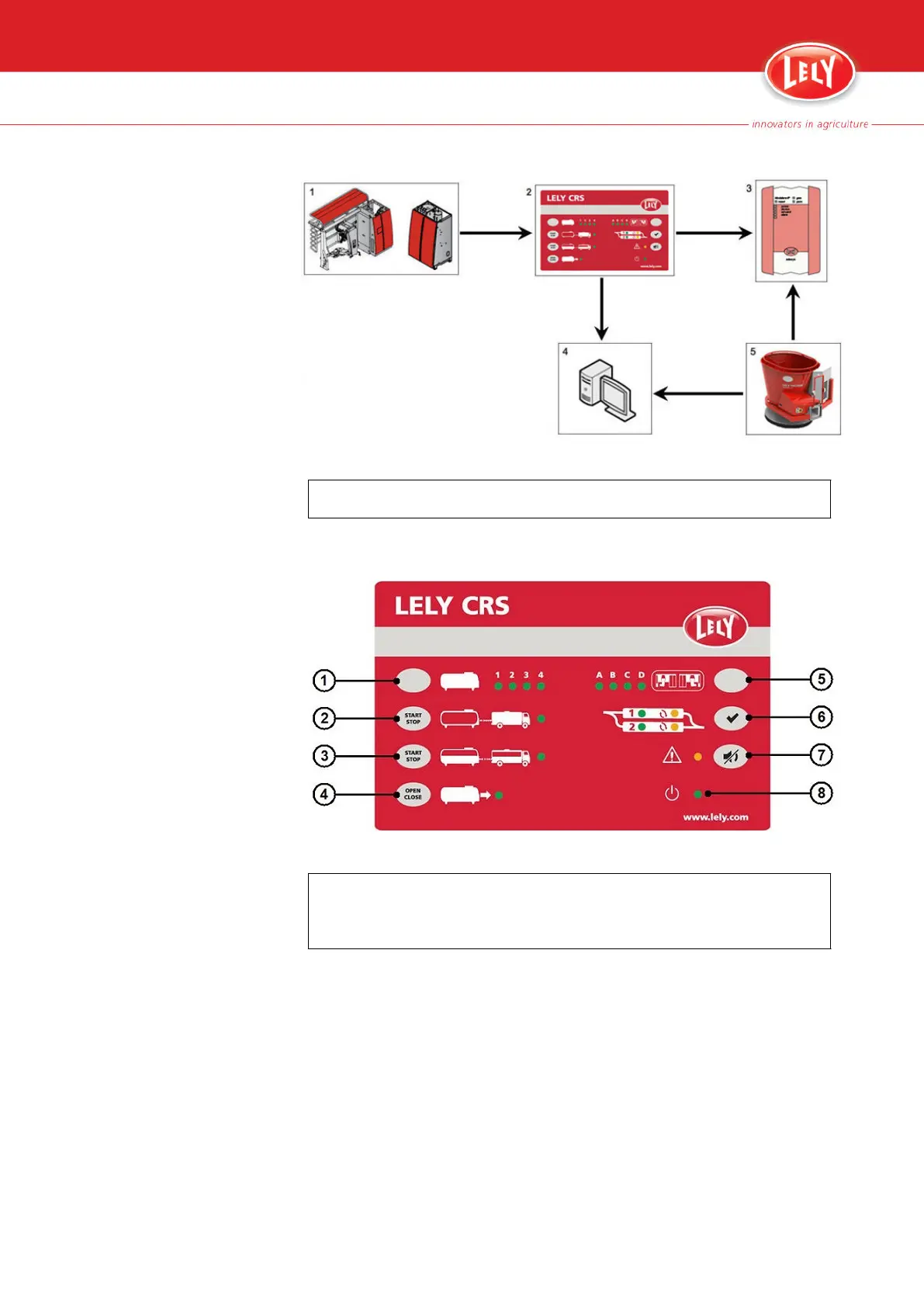
Figure 10. Overview of the alarm system
KEY:
1. Astronaut milking robot - 2. CRS M3 - 3. Modalarm - 4. T4C - 5. Vector
• The red LED (7) on the CRS M3 cabinet shows if there is an active alarm
on the Astronaut milking robot or on the CRS M3.
Figure 11. CRS M3 control panel
KEY:
1. Milk tank selection button - 2. Tank driver procedure button - 3. Partial milk collection
button - 4. Main tank valve button - 5. Cluster selection button - 6. Twin filter reset button -
7. Alarm buzzer mute button - 8. CRS M3 status LED
• The E-Link shows the full alarm message for the Astronaut milking robot
alarms.
• The CRS M3 web interface (page 4‑4) shows the list of active alarms for
the Astronaut milking robot and for the CRS M3.
• The Modalarm web interface (page 4‑12) and T4C show the lists of
active alarms for the Astronaut milking robot and for the CRS M3, but
also for the Vector (if installed).
• Alarms that are generated by the Modalarm itself are shown in the purple
status bar on the Modalarm web interface.
Description 4-11
PDF of the English original HTML, 5.1004.8514.0 -



 To Next Page