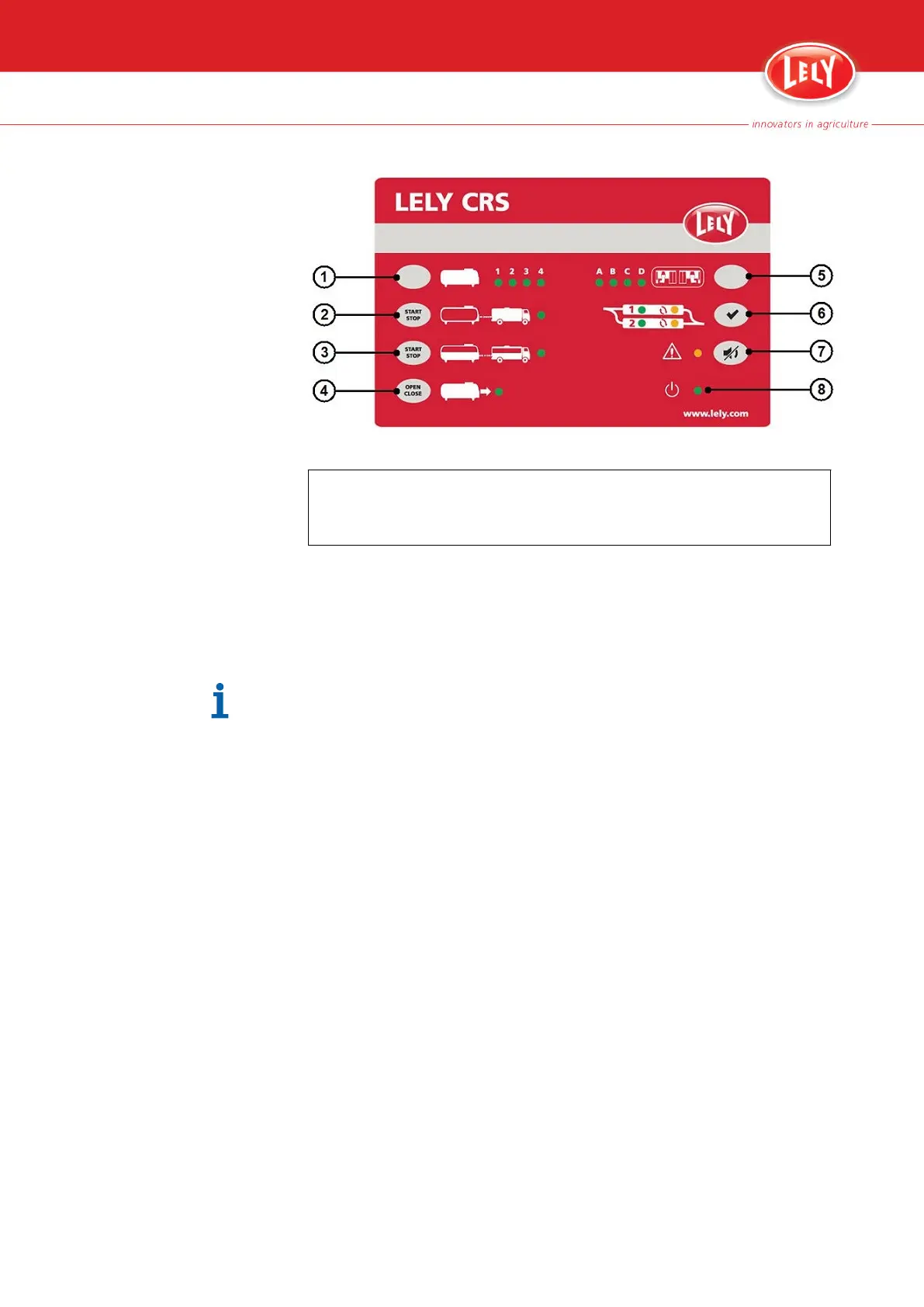
Figure 18. CRS M3 control panel
KEY:
1. Milk tank selection button - 2. Tank driver procedure button - 3. Partial milk collection
button - 4. Main tank valve button - 5. Cluster selection button - 6. Twin filter reset button -
7. Alarm buzzer mute button - 8. CRS M3 status LED
3. When done, close the tank valve by hand (or push the button (4) on
the CRS M3).
4. On the main tank stop the partial milk collection procedure.
5.1.4
Mute the Buzzer
Only alarm 79 (pulse alarm 'Visit cow needs supervision') and alarm 134
(alarm 'All buckets M4USE filled') generate a buzzer sound. When an alarm
is muted, the cause of the alarm must be removed to prevent a new
notification for the alarm.
When the alarm notification comes in on the CRS M3, the buzzer sounds
and the red LED (7) is on:
Operating Instructions 5-7
PDF of the English original HTML, 5.1004.8514.0 -



 To Next Page