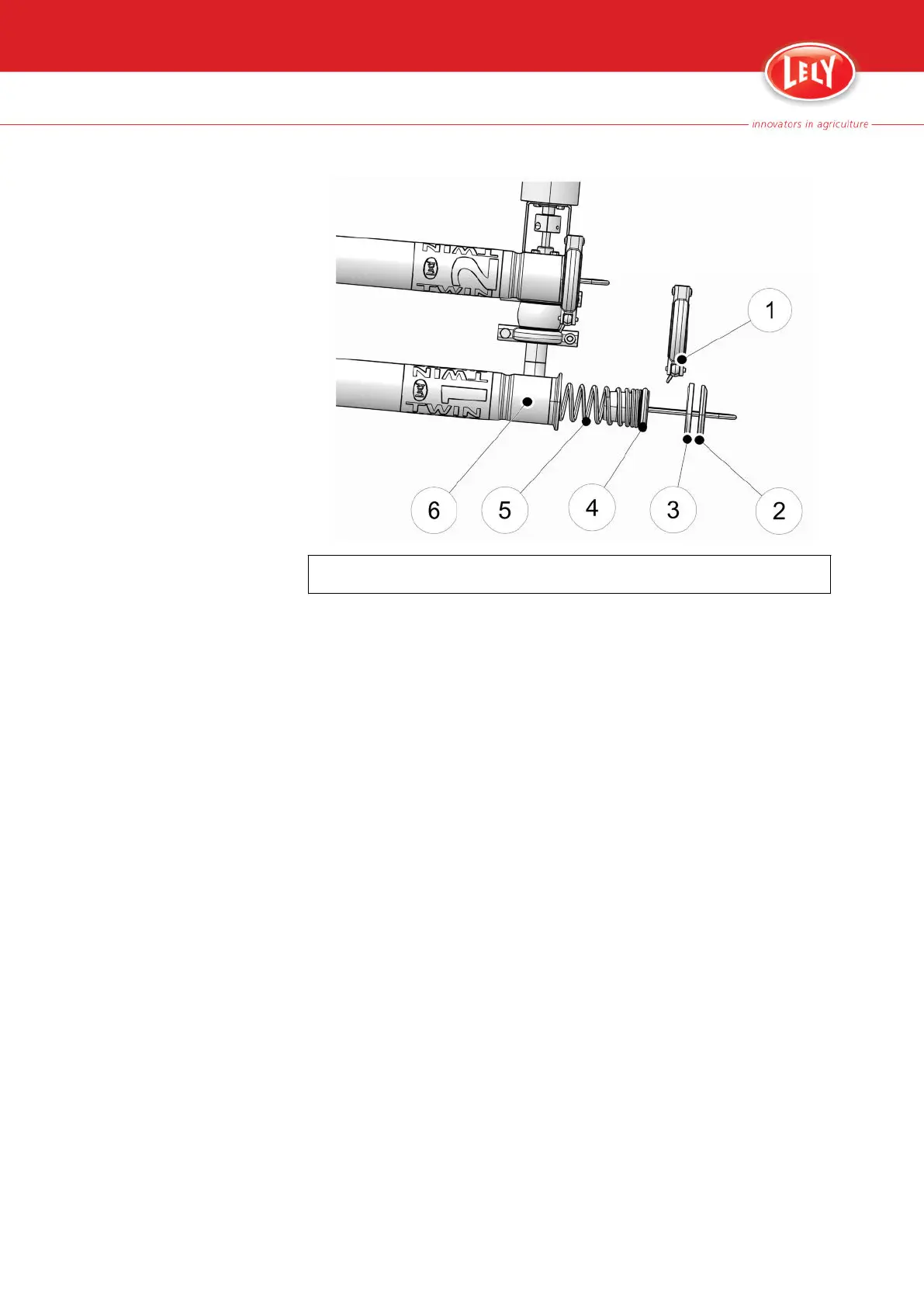
KEY:
1. Tri -clamp - 2. Cap - 3. Cap seal - 4. O-ring - 5. Spring - 6. Filter housing
1. Remove the cap with the spring (5) and the filter element from the
filter housing (6).
2. Remove the spring with filter sock from the cap (2).
3. Examine the filter element for flakes that identify mastitis in the herd.
4. Remove the cap (2) from the filter element and the spring (5).
5. Flush the cap (2), the cap seal (3), the O-ring (4) and the filter housing
(6) with clean water.
6. Make sure that the cap seal (3) and the top of the filter housing (6) are
clean and dry.
7. Put the spring (5) into a new filter element and fold the element top
into the top of the spring.
8. Install the cap (2) on the spring (5).
9. Put the filter sock and the spring (5) into the filter housing (6).
10. Push the filter sock fully into the filter housing.
11. Replace the tri-clamp (1) to the filter housing (6) and tighten the clamp
hand-tight.
4. Reset the filter status on the CRS M3 cabinet with the button (6): the
red LED goes off.
5-2 Operating Instructions
PDF of the English original HTML, 5.1004.8514.0 -



 To Next Page