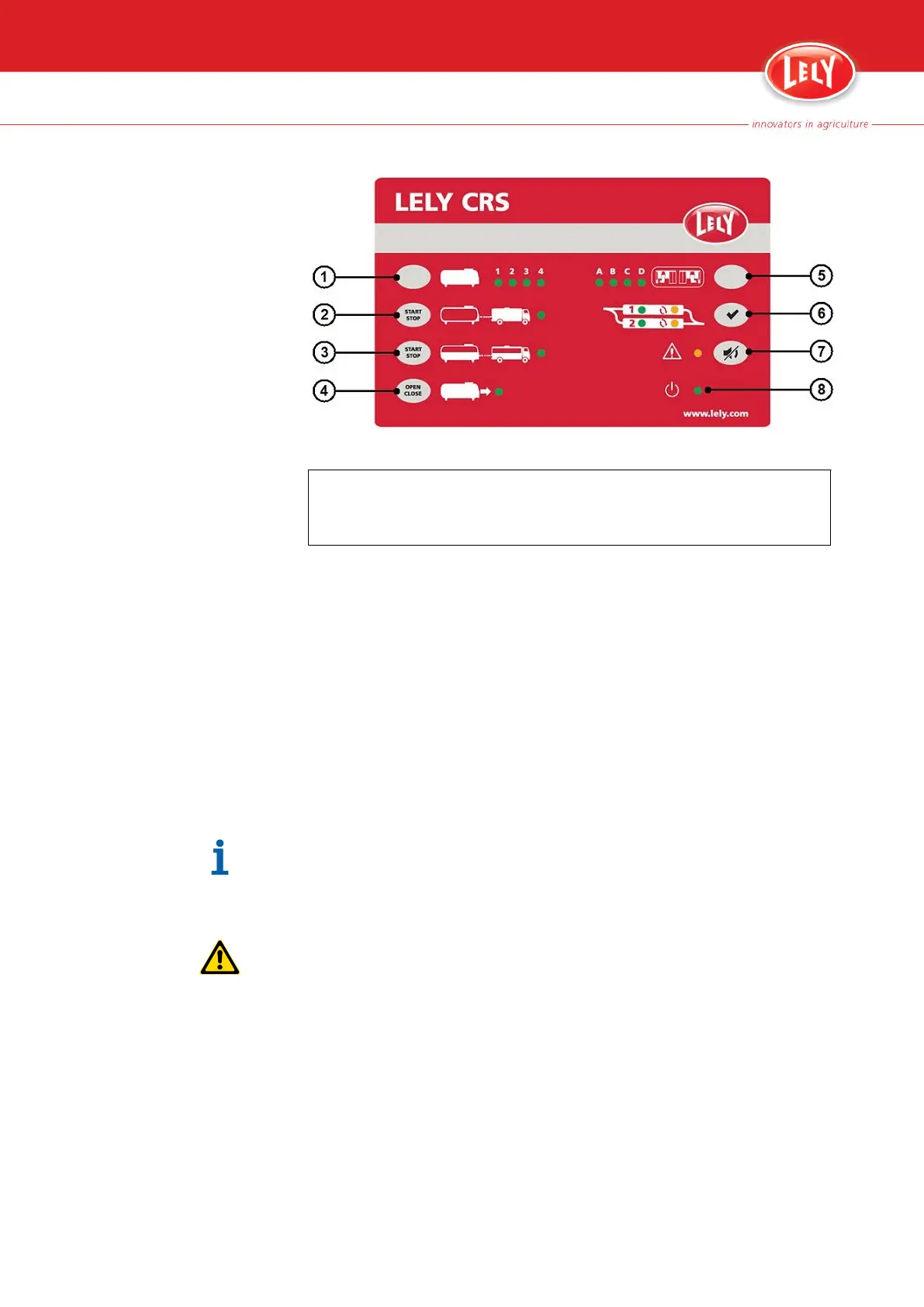
Figure 15. CRS M3 control panel
KEY:
1. Milk tank selection button - 2. Tank driver procedure button - 3. Partial milk collection
button - 4. Main tank valve button - 5. Cluster selection button - 6. Twin filter reset button -
7. Alarm buzzer mute button - 8. CRS M3 status LED
2. Push and hold the button (2) until the related LED starts to flash (the
tank driver procedure is now being prepared).
3. When the LED is continuously on, the main tank can be emptied:
•
Push the button (4) to open the tank valve or
• On the main tank open the tank valve by hand
4. When the main tank is empty and cleaned:
• Push the button (4) to close the tank valve or
• On the main tank close the tank valve by hand
5. Push and hold the button (2) until the related LED starts to flash (the
tank driver procedure is now being finished). The LED goes off when
the procedure is finished.
The CRS M3 web interface shows the status of the tank driver procedure:
request received, busy, finished or off.
5.1.2.2 On the Main Tank
Do not use this procedure to partially empty the main tank (page 5
‑
5).
1. On the main tank start the tank driver procedure.
2. Open the tank valve by hand (or push the button (4) on the CRS M3).
5-4 Operating Instructions
PDF of the English original HTML, 5.1004.8514.0 -



 To Next Page