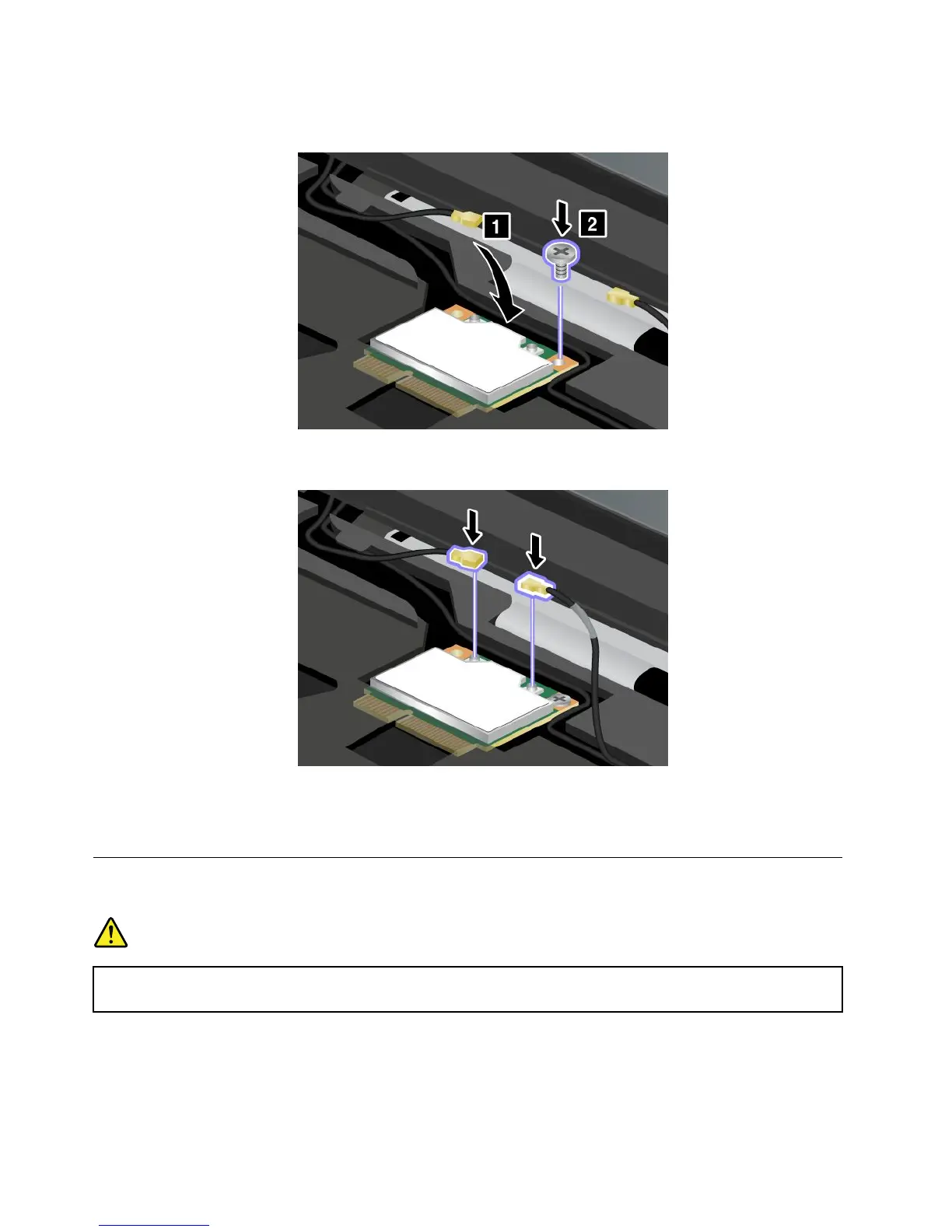
9.Pivotthecarduntilyoucansnapitintoplacebypressingtheuppersideoftheconnectors,andsecure
thecardwiththescrew.
10.ConnectthecablestothenewwirelessLAN/WiMAXcard.Besuretoattachthegraycabletothe
connectormarkedTR1orMainonthecard,andtheblackcabletotheconnectormarkedTR2orAux.
11.Reinstallthekeyboard.See“Replacingthekeyboard”onpage70.
12.Reinstallthebatteryandturnthecomputeroveragain.Thenreconnecttheacpoweradapterand
thecables.
ReplacingorinstallingthePCIExpressMiniCardforwirelessWAN
connection
DANGER
Electriccurrentfrompower,telephone,andcommunicationcablesishazardous.Toavoidshock
hazard,disconnectthecablesbeforeopeningthecoverofthisslot.
Attention:BeforeyoustartinstallingaPCIExpressMiniCard,touchametaltableoragroundedmetal
object.Thisactionreducesanystaticelectricityfromyourbody.Thestaticelectricitycoulddamagethecard.
ToreplaceorinstallthePCIExpressMiniCard,dothefollowing:
84UserGuide
















 To Next Page