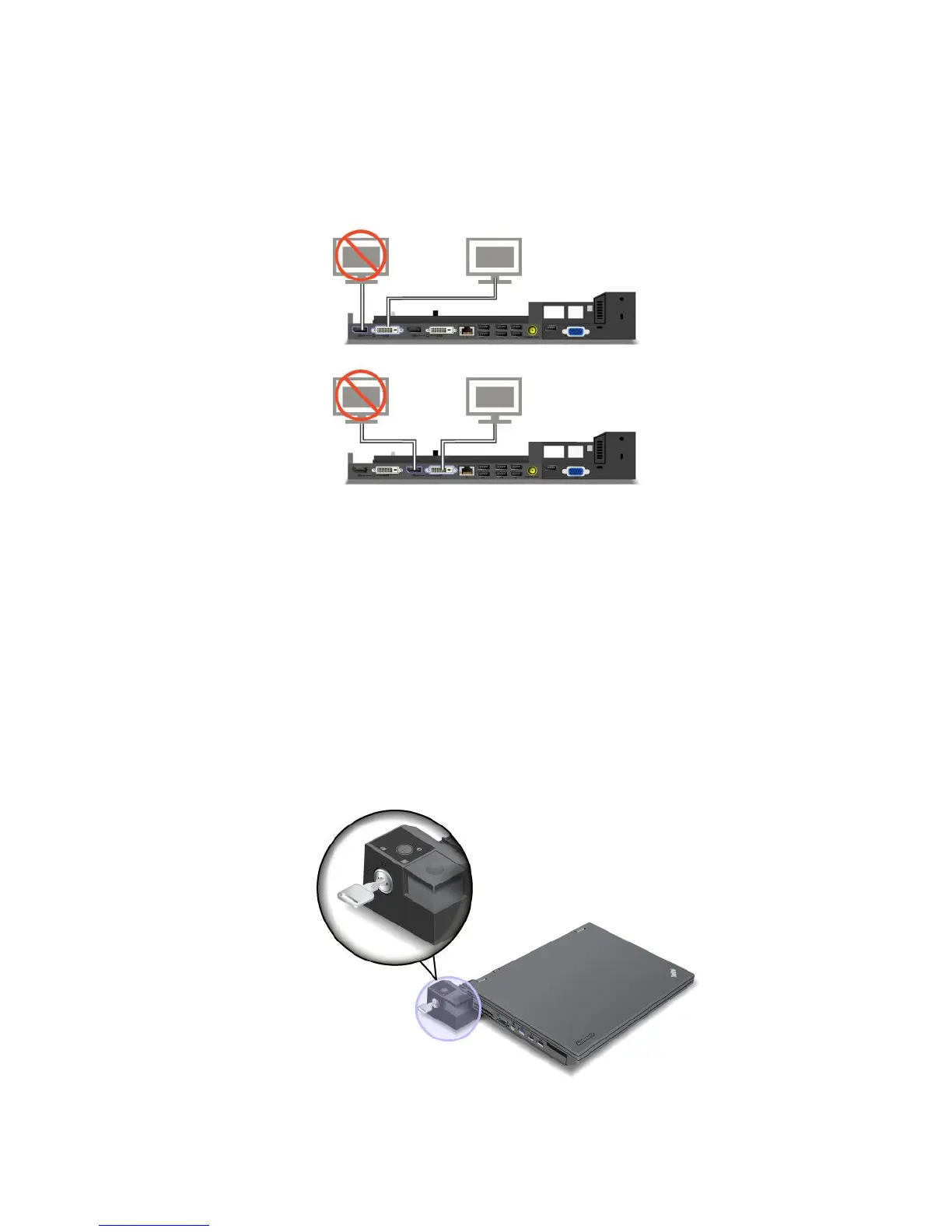
ConnectinganexternaldisplaytotheThinkPadMiniDockPlusSeries3andMiniDockPlusSeries
3withUSB3.0
Group1(topgure)andGroup2(lowergure)areindependentofeachother.EachhasaDisplayPort
connectorandaDVIconnector.IfyouconnectadisplaytoaDisplayPortconnectorandaDVIconnector
thatareinthesamegroup,theDisplayPortconnectorisinactive.
Detachingaportreplicatorordockingstation
Todetachyourcomputerfromtheportreplicatorordockingstation,dothefollowing:
1.Ensurethat:
•ThedevicesconnectedtoUSBconnectorsarenotinuse.
•TheconnectiontoanEthernetconnectorhasbeenended.
•Thesystemlockkeyofthedockingstationisinplaceandintheunlocked(horizontal)positionfor:
–ThinkPadMiniDockSeries3
–ThinkPadMiniDockPlusSeries3
–MiniDockSeries3withUSB3.0
–MiniDockPlusSeries3withUSB3.0
Chapter7.Enhancingyourcomputer99
















 To Next Page