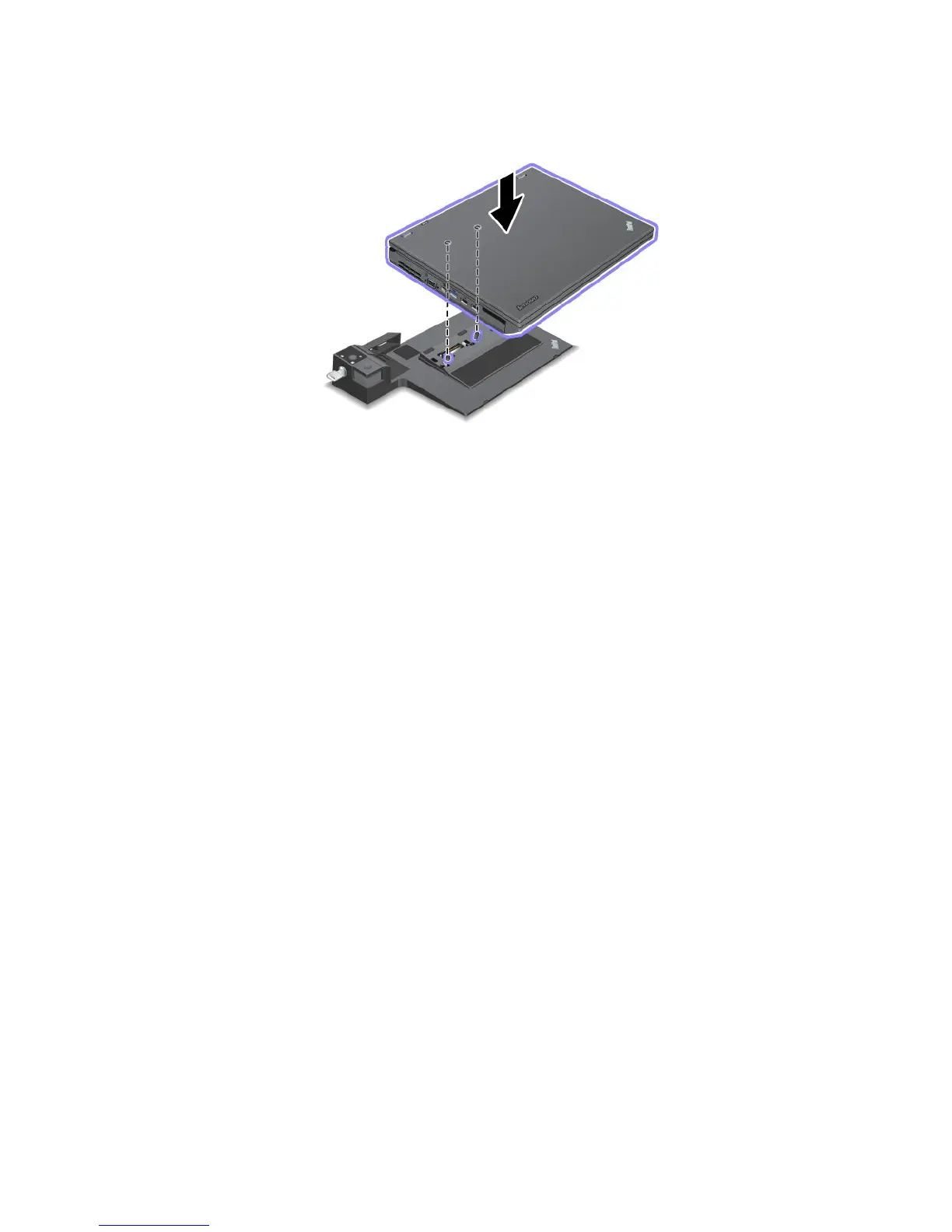
3.Putyourcomputerontheplatformoftheportreplicatorordockingstationandensurethatthetop-left
cornerofthecomputerisalignedtotheguideplateonthedockingstation.
4.Insertyourcomputerintotheportreplicatorordockingstationalongthesurface,untilyouhearaclick.
Thecomputerisattachedtotheportreplicatorordockingstation.
Note:Iftheportreplicatorordockingstationindicatorisnotlightedafteryouattachtheportreplicator
ordockingstation,yourcomputerisnotcorrectlyconnectedtotheportreplicatorordockingstation.
Checktheacpoweradapteroftheportreplicatorordockingstation,ordisconnectandre-attachtheac
poweradapter.Thenattachyourcomputertotheportreplicatorordockingstation.
Notes:
•Ifyouattachtheportreplicatorordockingstation,butdonotconnecttheacpoweradapterofthat
attachmenttothepowerjack,yourcomputergoesintobatterymode.
•Ifyourcomputerandtheattachedportreplicatorordockingstationareconnectedtoseparateacpower
adapters,yourcomputergoesintobatterymoderst,andthenshiftsintoacpowermode.
•Ifineitherofthetwoprecedingsituationsthebatteryofyourcomputerisdetached,orhasnobattery
charge,yourcomputershutsdown.
98UserGuide

















 To Next Page