10 Securitykeyhole:Useasecuritycablelockthattsthiskeyholetolockyourdockingstationtoa
stationaryobjecttoprotectitfromtheft.
Attachingaportreplicatorordockingstation
Notes:
•Beforeyouattachthecomputertoasupportedportreplicatorordockingstation,disconnectanacpower
adapterfromthecomputer.
•Ifyourcomputerisoperating,ensurethatithasnishedanyoperationsinvolvingdevicesthatare
connectedtoaUSBconnector.AlsoensurethatanyconnectiontoanEthernetconnectorhasbeen
disconnected.
•ThefollowingillustrationsarefortheThinkPadMiniDockSeries3.Theprocedureisthesameforother
dockingstations.Forpartreplicators,startfromstep2.
Toattachyourcomputertoaportreplicatorordockingstation,dothefollowing:
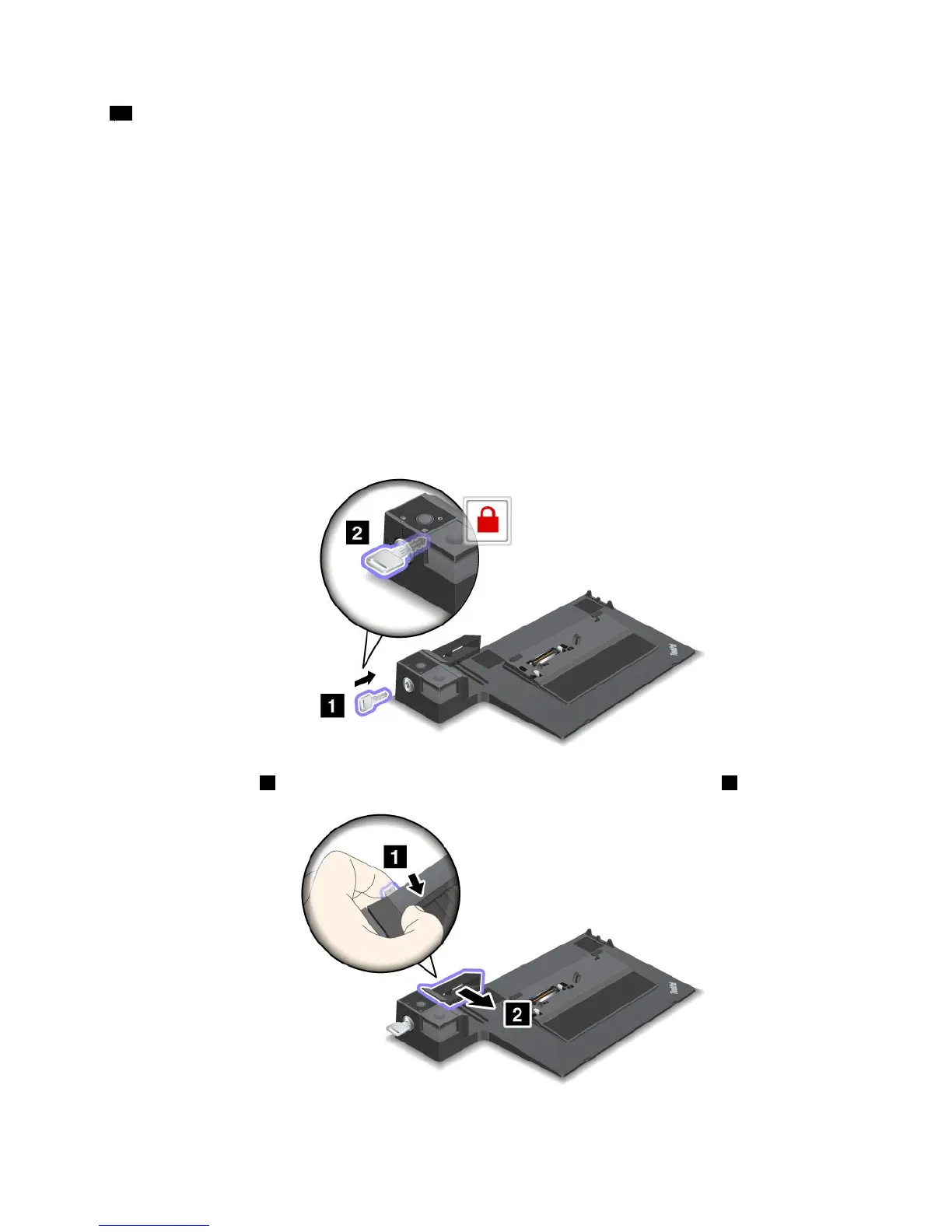
1.Ensurethatthesystemlockkeyisinplaceandintheunlocked(horizontal)positionandthatthe
mechanicallockhasbeendetached.
2.Pressthebutton 1 andpulltheslidingadjusterinthedirectionshownbythearrow 2 .
Chapter7.Enhancingyourcomputer97

















 To Next Page