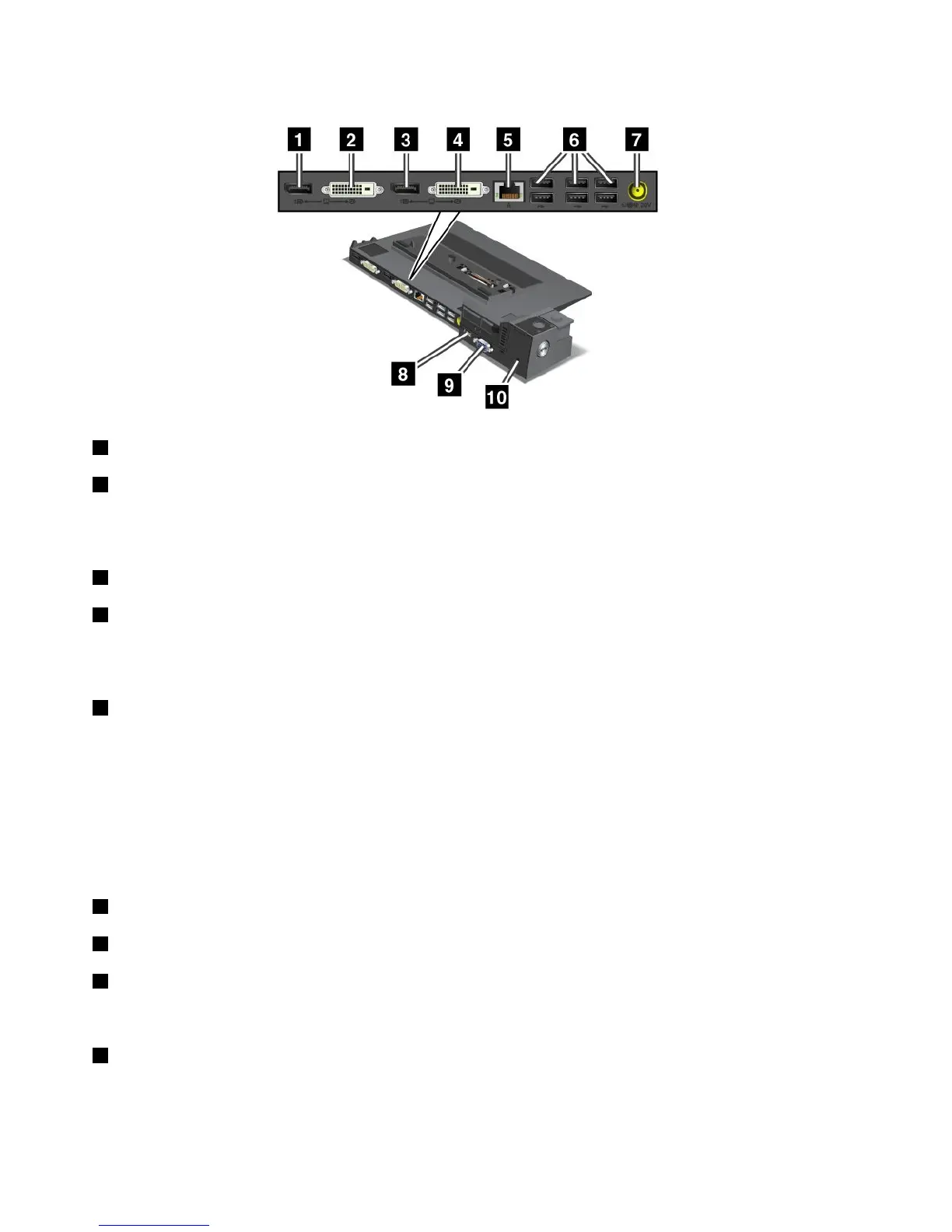
ThinkPadMiniDockPlusSeries3andMiniDockPlusSeries3withUSB3.0
1 DisplayPortconnector:Connectadisplaydevice.
2 DVIconnector:ConnectamonitorthatsupportsSingle-LinkDVI.
Note:TheDVIconnectorprovidesadigitalinterfaceonly.Thisconnectorcanonlybeusedwithacomputer
thatsupportsDVIconnectionestablishedthroughdockingstations.
3 DisplayPortconnector:Connectadisplaydevice.
4 DVIconnector:ConnectamonitorthatsupportsSingle-LinkDVI.
Note:TheDVIconnectorprovidesadigitalinterfaceonly.Thisconnectorcanbeusedwithacomputerthat
supportsDVIviadockingonly.
5 Ethernetconnector:ConnectthedockingstationtoanEthernetLAN.Theindicatorontheconnector
isthesameasthatonthecomputer.
Notes:
•YoucannotusetheTokenRingcableforthisconnector.
•Youcanusethisconnectorfora10BASE-T/100BASE-TX/1000BASE-TEthernetconnection.
Note:IfyouattachyourcomputertothedockingstationanduseanEthernetconnector,usetheEthernet
connectoronthedockingstation,nottheoneonthecomputer.
6 USBconnectors:ConnectUSB2.0compatibledevices.
7 Powerjack:Connecttheacpoweradapter.
8 eSATAconnectorvorUSB3.0connector:ForThinkPadMiniDockPlusSeries3,thisisaneSATA
connectorforconnectingeSATAdevice.FortheMiniDockPlusSeries3withUSB3.0,thisisaUSB3.0
connectorforconnectingaUSBcompatibledevice.
9 Externalmonitorconnector:Connectanexternalmonitor.
Note:Ifyouattachyourcomputertothedockingstationanduseanexternalmonitorconnector,usethe
externalmonitorconnectoronthedockingstation,nottheoneonthecomputer.
96UserGuide

















 To Next Page