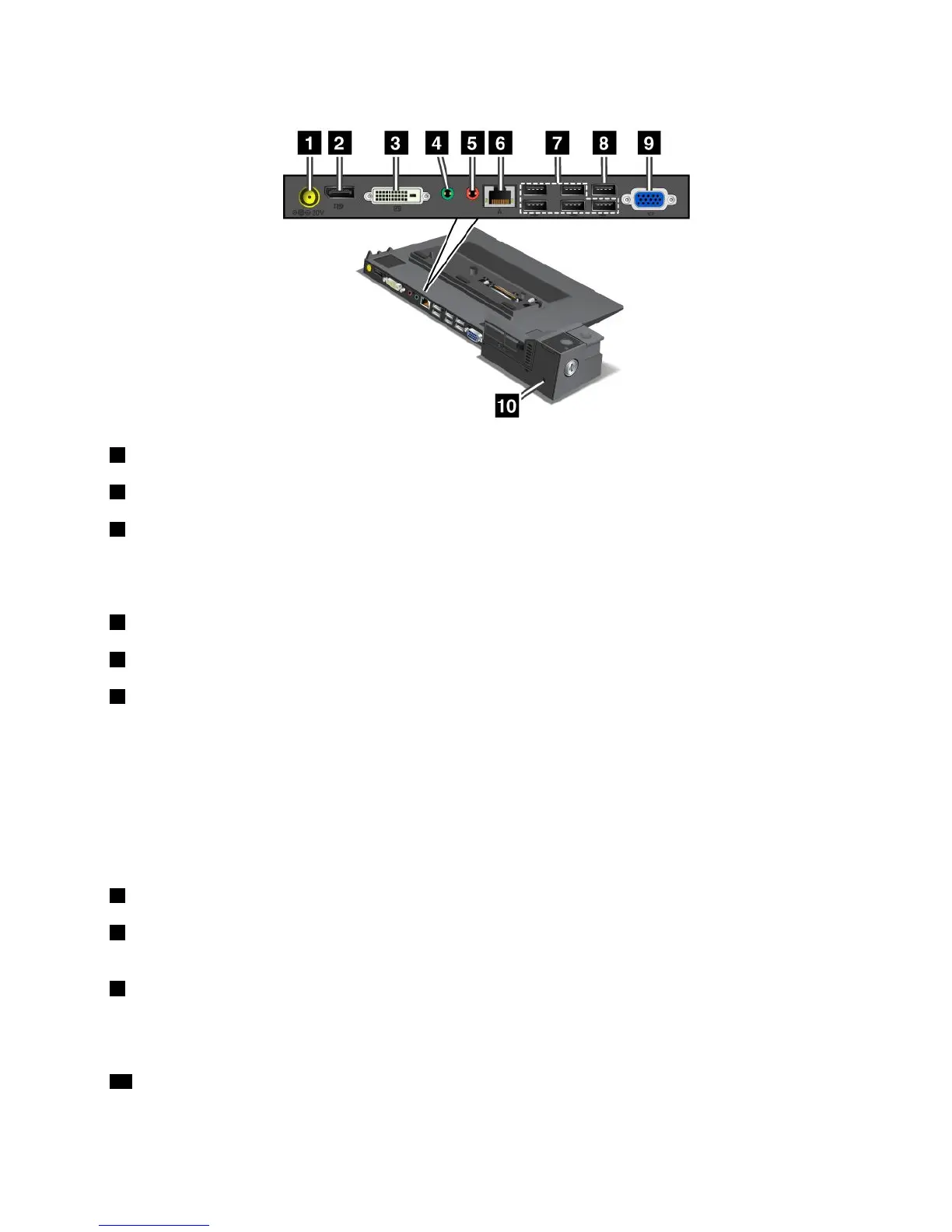
ThinkPadMiniDockSeries3andMiniDockSeries3withUSB3.0
1 Powerjack:Connecttheacpoweradapter.
2 DisplayPortconnector:Connectadisplaydevice.
3 DVIconnector:ConnectamonitorthatsupportsSingle-LinkDVI.
Note:TheDVIconnectorprovidesadigitalinterfaceonly.Thisconnectorcanonlybeusedwithacomputer
thatsupportsDVIconnectionestablishedthroughdockingstations.
4 Headphonejack:1/8inch(3.5mm)indiameter.Useittoconnectanexternalstereoheadphone.
5 Microphonejack:1/8inch(3.5mm)indiameter.Useittoconnectanexternalmicrophone.
6 Ethernetconnector:ConnectthedockingstationtoanEthernetLAN.Theindicatorontheconnector
isthesameasthatonthecomputer.
Notes:
•YoucannotusetheTokenRingcableforthisconnector.
•Youcanusethisconnectorfora10BASE-T/100BASE-TX/1000BASE-TEthernetconnection.
Note:IfyouattachyourcomputertothedockingstationanduseanEthernetconnector,usetheEthernet
connectoronthedockingstation,nottheoneonthecomputer.
7 USBconnectors:ConnectUSB2.0compatibledevices.
8 USB2.0connector(ontheThinkPadMiniDockSeries3)orUSB3.0connector(ontheMiniDockSeries
3withUSB3.0):ConnectacompatibleUSBdevice.
9 Externalmonitorconnector:Connectanexternalmonitor.
Note:Ifyouattachyourcomputertothedockingstationanduseanexternalmonitorconnector,usethe
externalmonitorconnectoronthedockingstation,nottheoneonthecomputer.
10 Securitykeyhole:Useasecuritycablelockthattsthiskeyholetolockyourdockingstationtoa
stationaryobjecttoprotectitfromtheft.
Chapter7.Enhancingyourcomputer95

















 To Next Page