•Eachofthehard-disk-drivebay(5to8)isusedforinstallinga3.5-inchnon-hot-swapharddiskdrives.
Note:Thenumberoftheinstalledharddiskdrivesvariesbymodel.
•Forinformationaboutthesupportedexpansioncard,see“Systemboardcomponents”onpage45
.
•Dependingonthemodel,yourservermightcomewithascrew-secured,non-hot-swappowersupply
assemblyoroneortwohot-swapredundantpowersupplies.
•Formoreinformationaboutthememorymodules,see“Memorymoduleinstallationrules”onpage94.
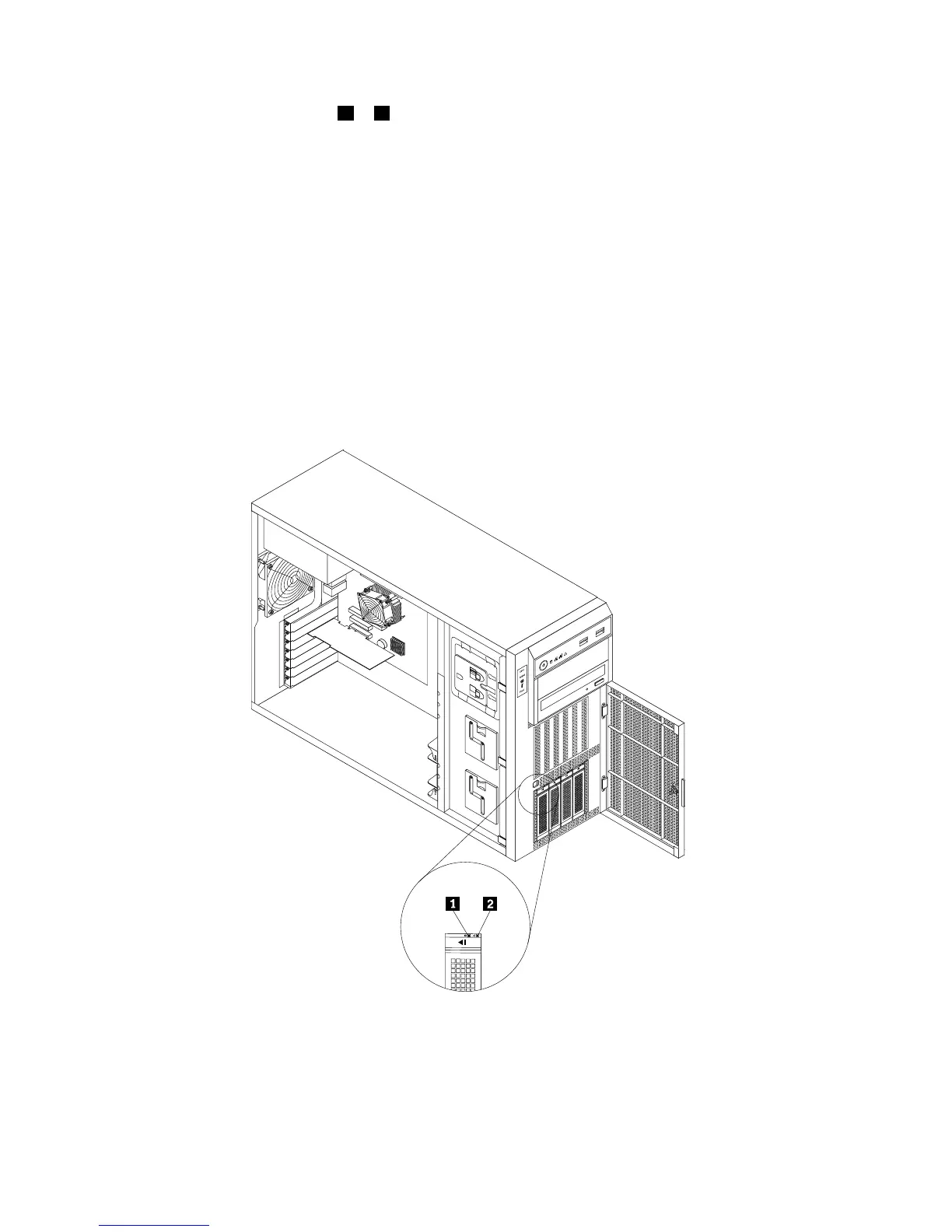
Hot-swaphard-disk-drivestatusLEDs
Thistopicappliesonlytoservermodelswithhot-swapharddiskdrives.
Note:Dependingonthemodel,yourservermightlookslightlydifferentfromtheillustrationsinthistopic.
Eachhot-swapharddiskdrivehastwostatusLEDsonthefront.Unlockandopenthefrontdoortogain
accesstotheharddiskdrivesandviewthestatusLEDs.
Figure15.3.5-inchhot-swaphard-disk-drivestatusLEDs
32ThinkServerTS430HardwareMaintenanceManual













 To Next Page