Before removing a RAID super capacitor module:
1. Remove the top cover. See “Remove the top cover” on page 52.
2. Remove the air baffle. See “Remove the air baffle” on page 55.
To remove a RAID super capacitor module, complete the following steps:
Watch the procedure. A video of the removal process is available:
• Youtube:
https://www.youtube.com/playlist?list=PLYV5R7hVcs-CjaaAyvBOOZ749SC-2SK2C
• Youku: http://list.youku.com/albumlist/show/id_51276391
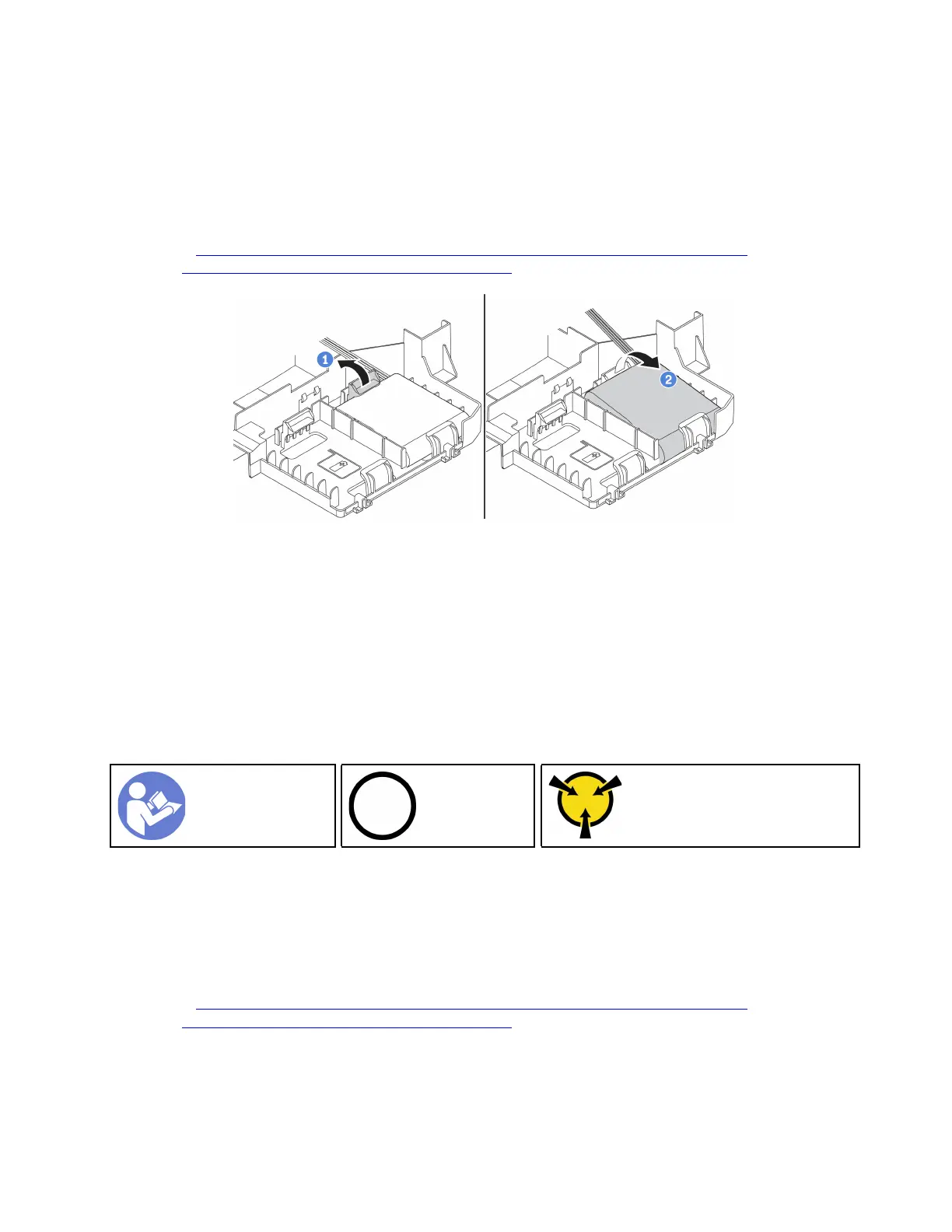
Figure 89. Removal of a RAID super capacitor module
Step 1. Gently press the tab on the air baffle as shown.
Step 2. Remove the RAID super capacitor module from the air baffle.
If you are instructed to return the old RAID super capacitor module, follow all packaging instructions and use
any packaging materials that are provided.
Install a RAID super capacitor module
Use this information to install a RAID super capacitor module.
“Read the
installation
Guidelines” on
page 49
“Power off
the server for
this task” on
page 14
“ATTENTION:
Static Sensitive Device
Ground package before opening”
on page 52
Before installing a RAID super capacitor module, touch the static-protective package that contains the new
RAID super capacitor module to any unpainted surface on the outside of the server. Then, take the new RAID
super capacitor module out of the package and place it on a static-protective surface.
To install a RAID super capacitor module, complete the following steps:
Watch the procedure. A video of the installation process is available:
• Youtube:
https://www.youtube.com/playlist?list=PLYV5R7hVcs-CjaaAyvBOOZ749SC-2SK2C
• Youku: http://list.youku.com/albumlist/show/id_51276391
Chapter 3. Hardware replacement procedures 121






 To Next Page