Install a simple-swap drive
Use this information to install a simple-swap drive.
“Read the
installation
Guidelines” on
page 49
“Power off
the server for
this task” on
page 14
“ATTENTION:
Static Sensitive Device
Ground package before opening”
on page 52
Notes:
• For a list of supported drives, see https://static.lenovo.com/us/en/serverproven/index.shtml.
• The drive bays are numbered to indicate the installation order (starting from number “0”). Follow the
installation order when you install a drive. See “Front view” on page 17.
• You can mix drives of different types and different capacities in one system, but not in one RAID array.
The following order is recommended when installing the drives:
– Drive type priority: SATA SSD, SATA HDD
– Drive capacity priority: the lowest capacity first
• The drives in a single RAID array must be the same type, same size, and same capacity.
Before installing a simple-swap drive:
1. If there is a drive filler installed, remove it and keep it in a safe place.
2. Touch the static-protective package that contains the new drive to any unpainted surface on the outside
of the server. Then, take the new drive out of the package and place it on a static-protective surface.
To install a simple-swap drive, complete the following steps:
Watch the procedure. A video of the installation process is available:
• Youtube:
https://www.youtube.com/playlist?list=PLYV5R7hVcs-CjaaAyvBOOZ749SC-2SK2C
• Youku: http://list.youku.com/albumlist/show/id_51276391
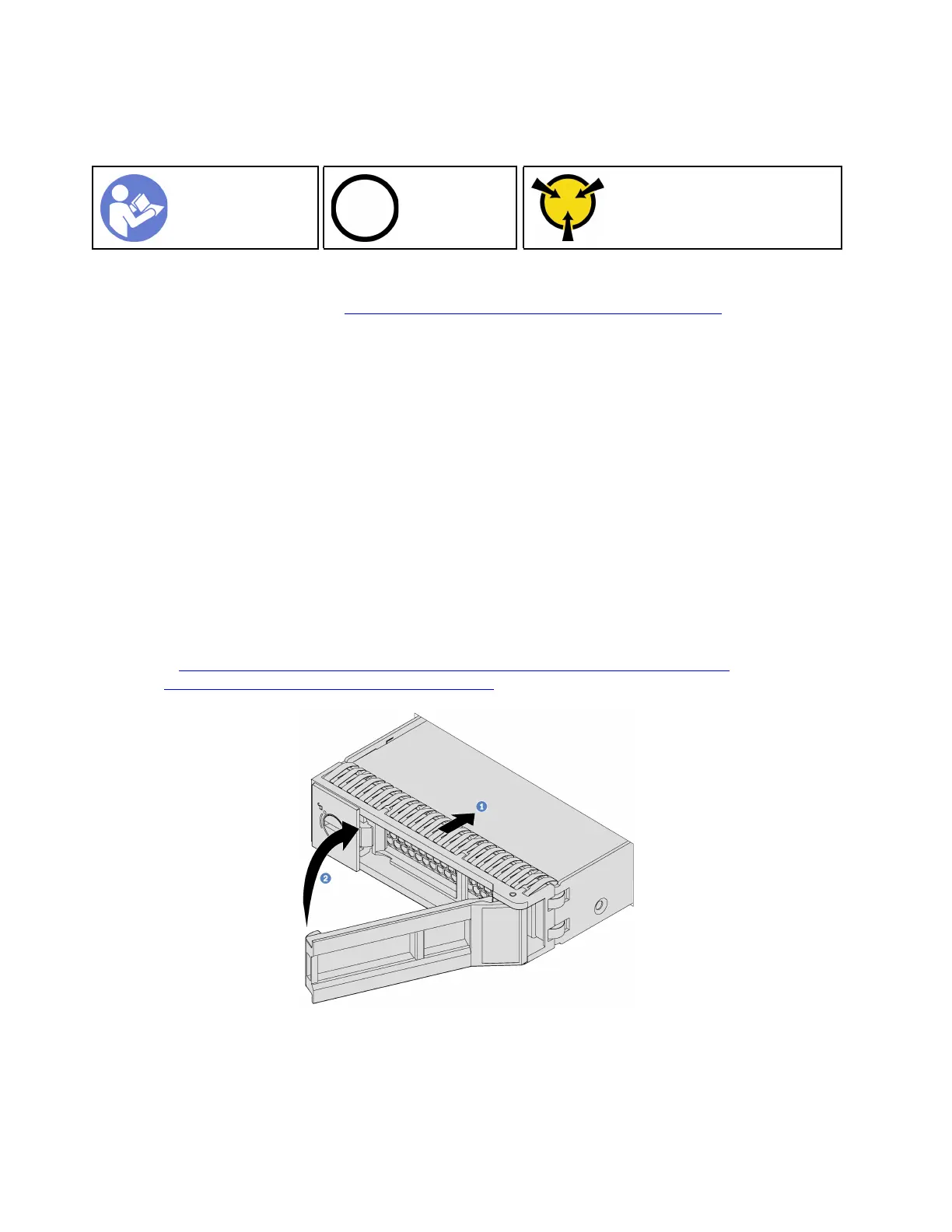
Figure 52. Simple-swap drive installation
Step 1. Ensure that the drive tray handle is in the open position. Slide the drive into the drive bay until it
snaps into position.
Step 2. Close the drive tray handle to lock the drive in place.
88
ThinkSystem SR570 Maintenance Manual






 To Next Page