If you are instructed to return the old LOM adapter, follow all packaging instructions and use any packaging
materials that are provided.
Install the LOM adapter
Use this information to install the LOM adapter.
“Read the
installation
Guidelines” on
page 49
“Power off
the server for
this task” on
page 14
“ATTENTION:
Static Sensitive Device
Ground package before opening”
on page 52
Before installing the LOM adapter:
1. If riser 1 assembly is installed, remove it to access the LOM adapter slot.
2. Touch the static-protective package that contains the new LOM adapter to any unpainted surface on the
outside of the server. Then, take the new LOM adapter out of the package and place it on a static-
protective surface.
To install the LOM adapter, complete the following steps:
Watch the procedure. A video of the installation process is available:
• Youtube:
https://www.youtube.com/playlist?list=PLYV5R7hVcs-CjaaAyvBOOZ749SC-2SK2C
• Youku: http://list.youku.com/albumlist/show/id_51276391
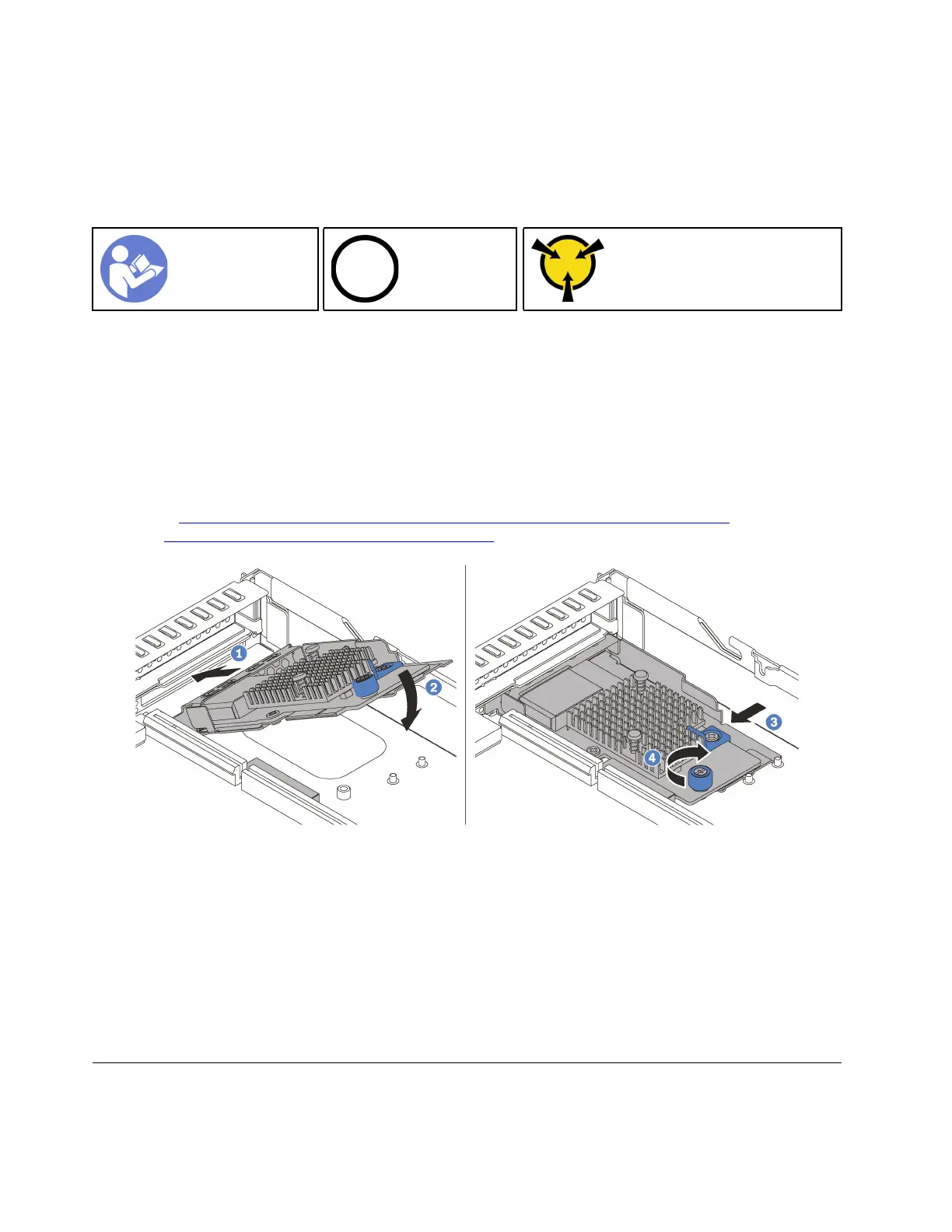
Figure 54. LOM adapter installation
Step 1. Insert the LOM adapter into the rear of the chassis at an angle as shown.
Step 2. Lower the LOM adapter and slide it to the rear of the chassis until the LOM adapter stops.
Step 3. Push the LOM adapter as shown to insert it into the connector on the system board.
Step 4. Tighten the thumbscrew to secure the LOM adapter.
After installing the LOM adapter, complete the parts replacement. See “Complete the parts replacement” on
page 152.
Riser card replacement
Use this information to remove and install a riser card.
90 ThinkSystem SR570 Maintenance Manual






 To Next Page