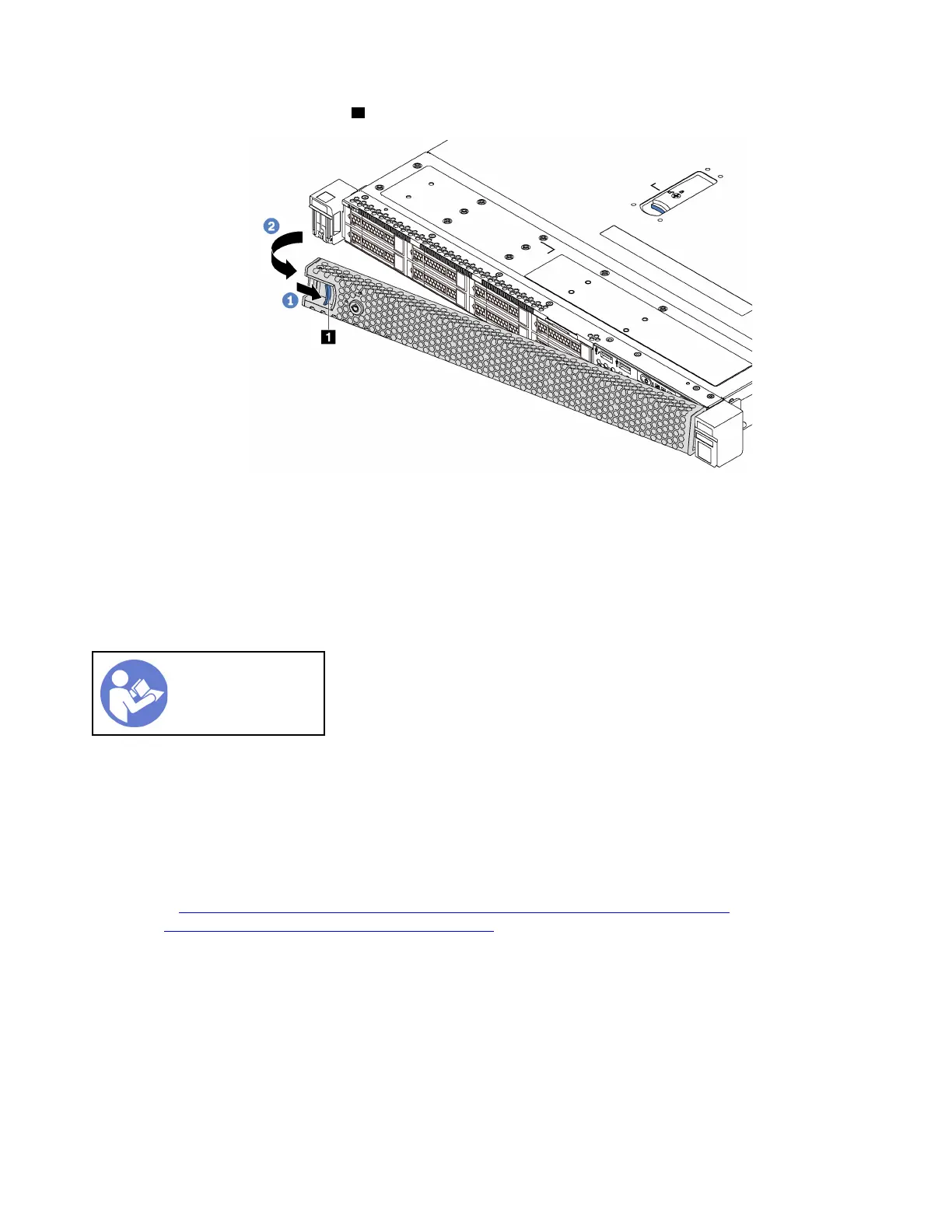
Step 2. Press the blue release latch 1 and pivot the security bezel outward to remove it from the chassis.
Figure 37. Security bezel removal
Attention: Before you ship the rack with the server installed, reinstall and lock the security bezel
into place.
Install the security bezel
Use this information to install the security bezel.
“Read the
installation
Guidelines” on
page 49
Before installing the security bezel, if you have removed the rack latches, reinstall them. See “Install the rack
latches” on page 60.
To install the security bezel, complete the following steps:
Attention: Before you ship the rack with the server installed, reinstall and lock the security bezel into place.
Watch the procedure. A video of the installation process is available:
• Youtube:
https://www.youtube.com/playlist?list=PLYV5R7hVcs-CjaaAyvBOOZ749SC-2SK2C
• Youku: http://list.youku.com/albumlist/show/id_51276391
64 ThinkSystem SR570 Maintenance Manual










 To Next Page