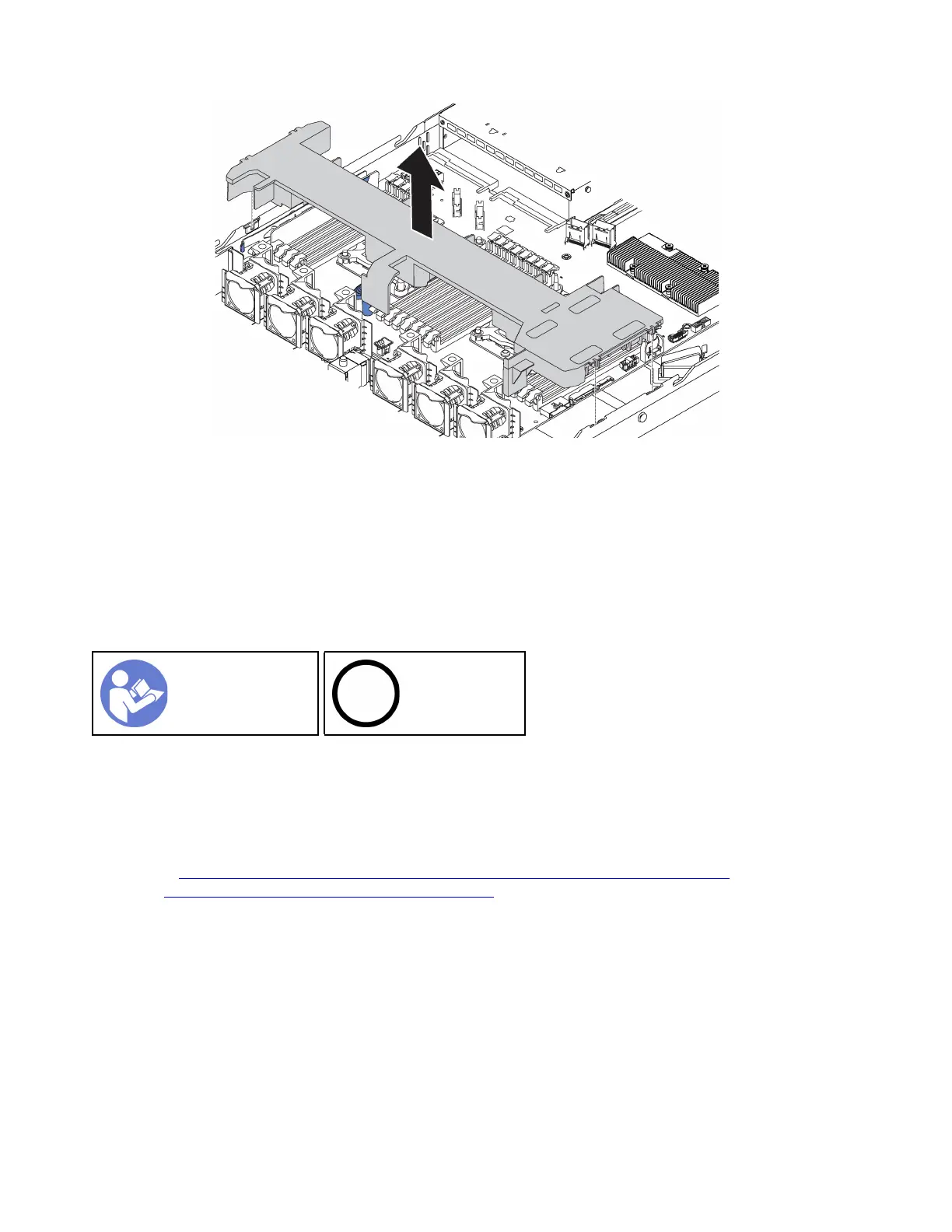
Figure 28. Air baffle removal
Step 1. Grasp the air baffle and carefully lift it out of the server.
Attention: For proper cooling and airflow, install the air baffle before you power on the server.
Operating the server with the air baffle removed might damage server components.
Install the air baffle
Use this information to install the air baffle.
“Read the
installation
Guidelines” on
page 49
“Power off the
server for this
task” on page
14
Before installing the air baffle, if you want to install a RAID super capacitor module on the bottom of the air
baffle, install it first. See “Install a RAID super capacitor module” on page 121.
To install the air baffle, complete the following steps:
Watch the procedure. A video of the installation process is available:
• Youtube:
https://www.youtube.com/playlist?list=PLYV5R7hVcs-CjaaAyvBOOZ749SC-2SK2C
• Youku: http://list.youku.com/albumlist/show/id_51276391
56 ThinkSystem SR570 Maintenance Manual






 To Next Page