CAUTION:
Hazardous moving fan blades nearby. Keep fingers and other body parts away.
Before removing a system fan, remove the top cover. See “Remove the top cover” on page 52.
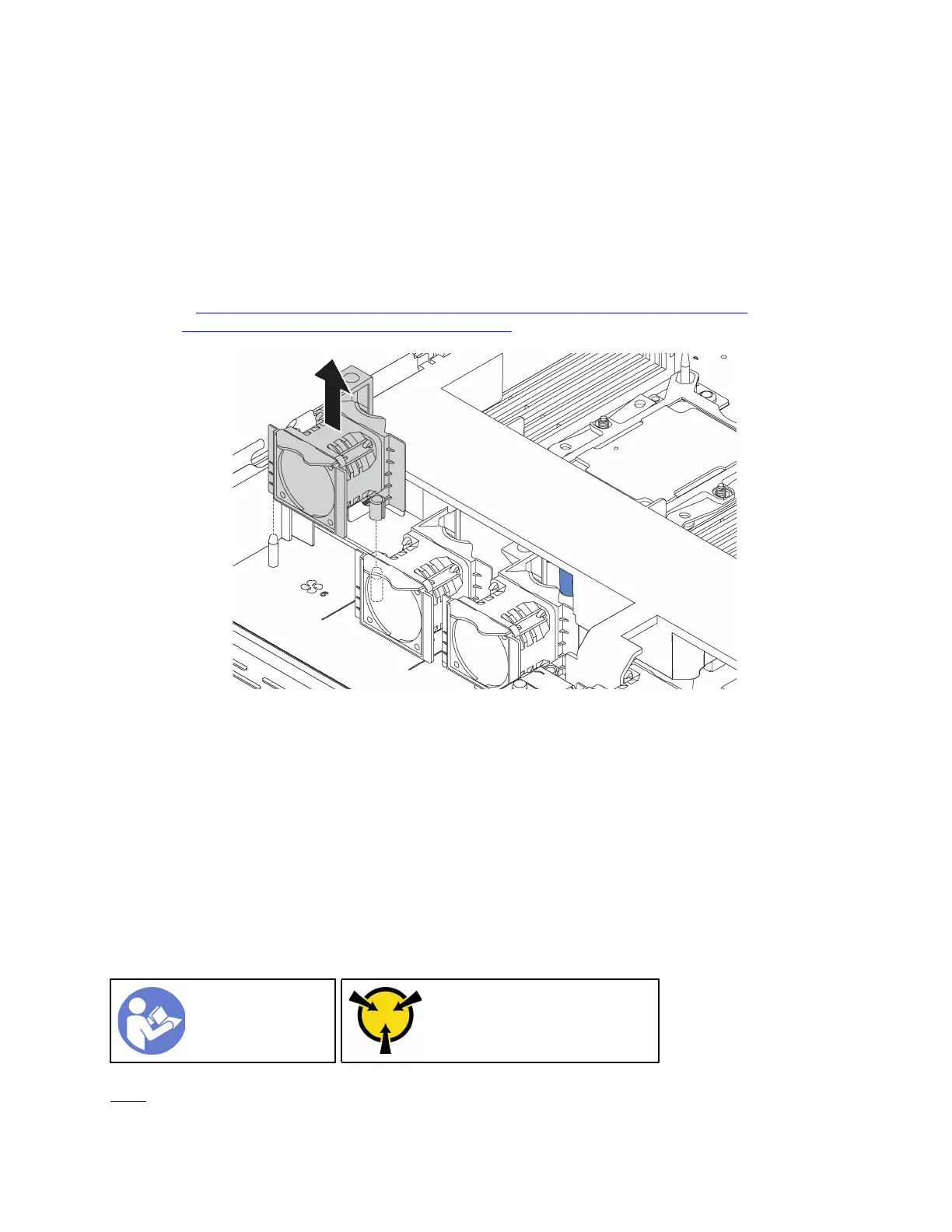
To remove a system fan, complete the following step:
Note: The fan you want to remove might be different from the following illustration, but the removal method
is the same.
Watch the procedure. A video of the removal process is available:
• Youtube:
https://www.youtube.com/playlist?list=PLYV5R7hVcs-CjaaAyvBOOZ749SC-2SK2C
• Youku: http://list.youku.com/albumlist/show/id_51276391
Figure 41. System fan removal
Step 1. Grasp the fan tabs on both ends of the system fan and carefully lift the system fan out of the server.
After removing the system fan:
• Install a new system fan. See “Install a system fan” on page 67.
• If you are instructed to return the old system fan, follow all packaging instructions and use any packaging
materials that are provided.
Install a system fan
Use this information to install a system fan. You can install a hot-swap fan without powering off the server,
which helps you avoid significant interruption to the operation of the system.
“Read the
installation
Guidelines” on
page 49
“ATTENTION:
Static Sensitive Device
Ground package before opening”
on page 52
S033
Chapter 3. Hardware replacement procedures 67






 To Next Page