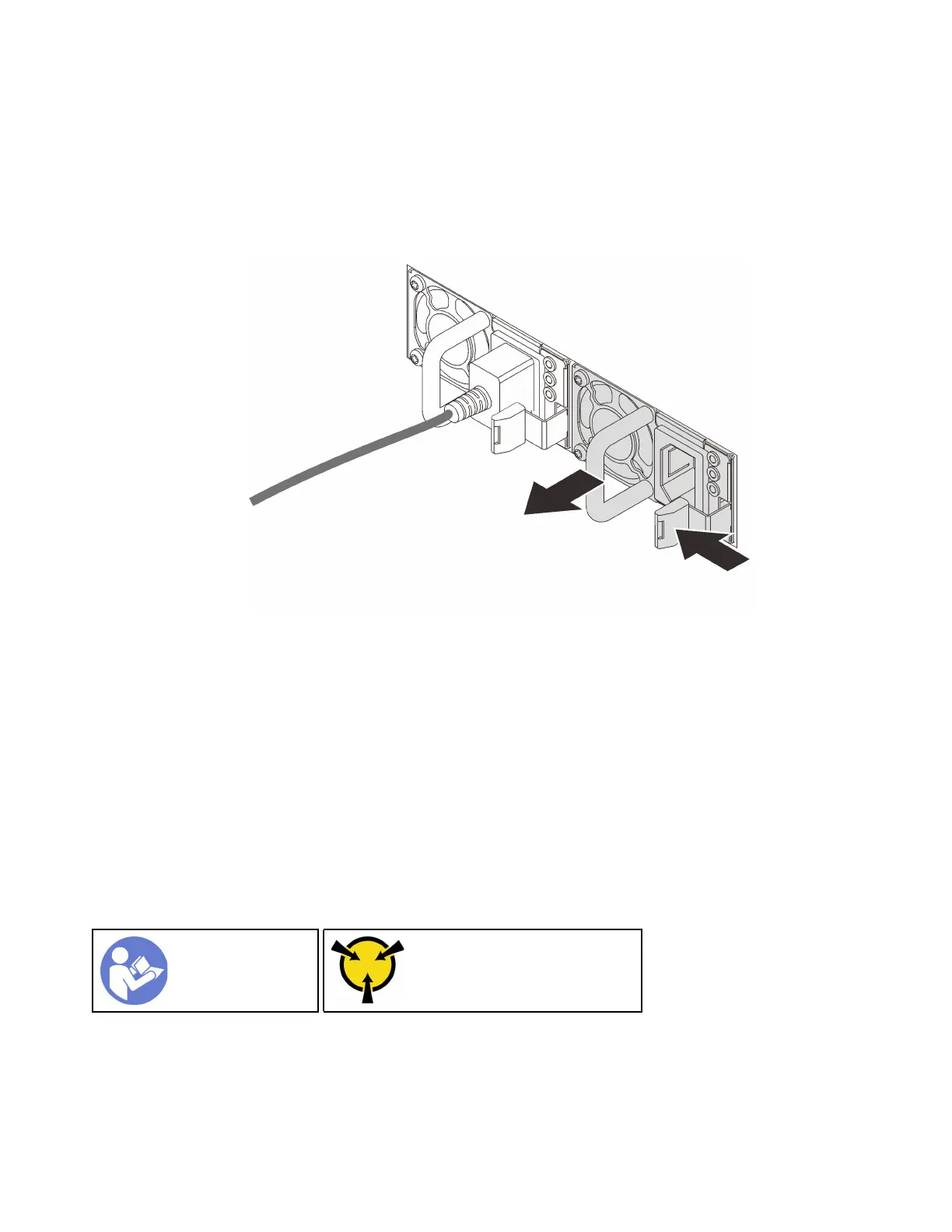
Step 3. Press the release tab toward the handle and carefully pull the handle at the same time to slide the
hot-swap power supply out of the chassis.
Note: Slightly pull the power supply upwards when sliding the power supply out of the chassis, if
you have installed one of the following CMA kits:
• 1U CMA Upgrade Kit for Toolless Slide Rail
• Toolless Slide Rail Kit with 1U CMA
Figure 99. Hot-swap power supply removal
After removing the power supply:
1. Install a new power supply or install the power-supply filler to cover the power supply bay. See “Install a
hot-swap power supply” on page 128.
Important: To ensure proper cooling during normal server operation, both of the power supply bays
must be occupied. This means that each bay must have a power supply installed; or one has a power
supply installed and the other has a power supply filler installed.
2. If you are instructed to return the old hot-swap power supply, follow all packaging instructions and use
any packaging materials that are provided.
Install a hot-swap power supply
Use this information to install a hot-swap power supply.
“Read the
installation
Guidelines” on
page 49
“ATTENTION:
Static Sensitive Device
Ground package before opening”
on page 52
The following tips describe the type of power supply that the server supports and other information that you
must consider when you install a power supply:
128
ThinkSystem SR570 Maintenance Manual










 To Next Page