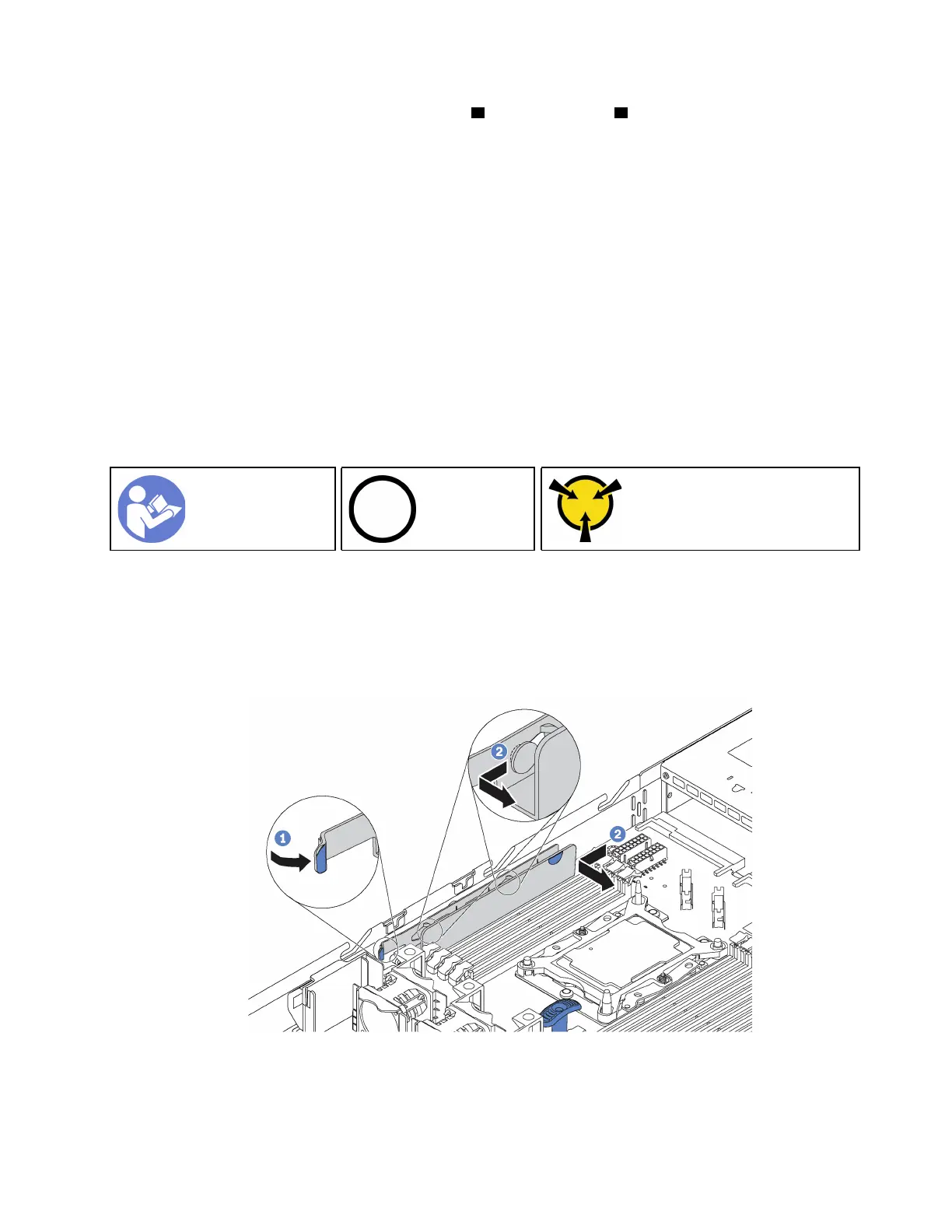
Step 2. Grasp the system board by the release pin 1 and the lift handle 2 at the same time and slide the
system board toward the front of the server. Then lift and tilt the system board upwards to remove
it out of the chassis.
If you are instructed to return the old system board, follow all packaging instructions and use any packaging
materials that are provided.
Important: Before you return the system board, make sure that you install the CPU socket dust covers from
the new system board. To replace a CPU socket dust cover:
1. Take a dust cover from the CPU socket assembly on the new system board and orient it correctly above
the CPU socket assembly on the removed system board.
2. Gently press down the dust cover legs to the CPU socket assembly, pressing on the edges to avoid
damage to the socket pins. You might hear a click on the dust cover is securely attached.
3. Make sure that the dust cover is securely attached to the CPU socket assembly.
Install the system board
Use this information to install the system board.
“Read the
installation
Guidelines” on
page 49
“Power off
the server for
this task” on
page 14
“ATTENTION:
Static Sensitive Device
Ground package before opening”
on page 52
Before installing the system board:
1. Touch the static-protective package that contains the new system board to any unpainted surface on
the outside of the server. Then, take the new system board out of the package and place it on a static-
protective surface.
2. Remove the cable holder as shown.
Figure 113. Cable holder removal
To install the system board, complete the following steps:
Chapter 3. Hardware replacement procedures 143










 To Next Page