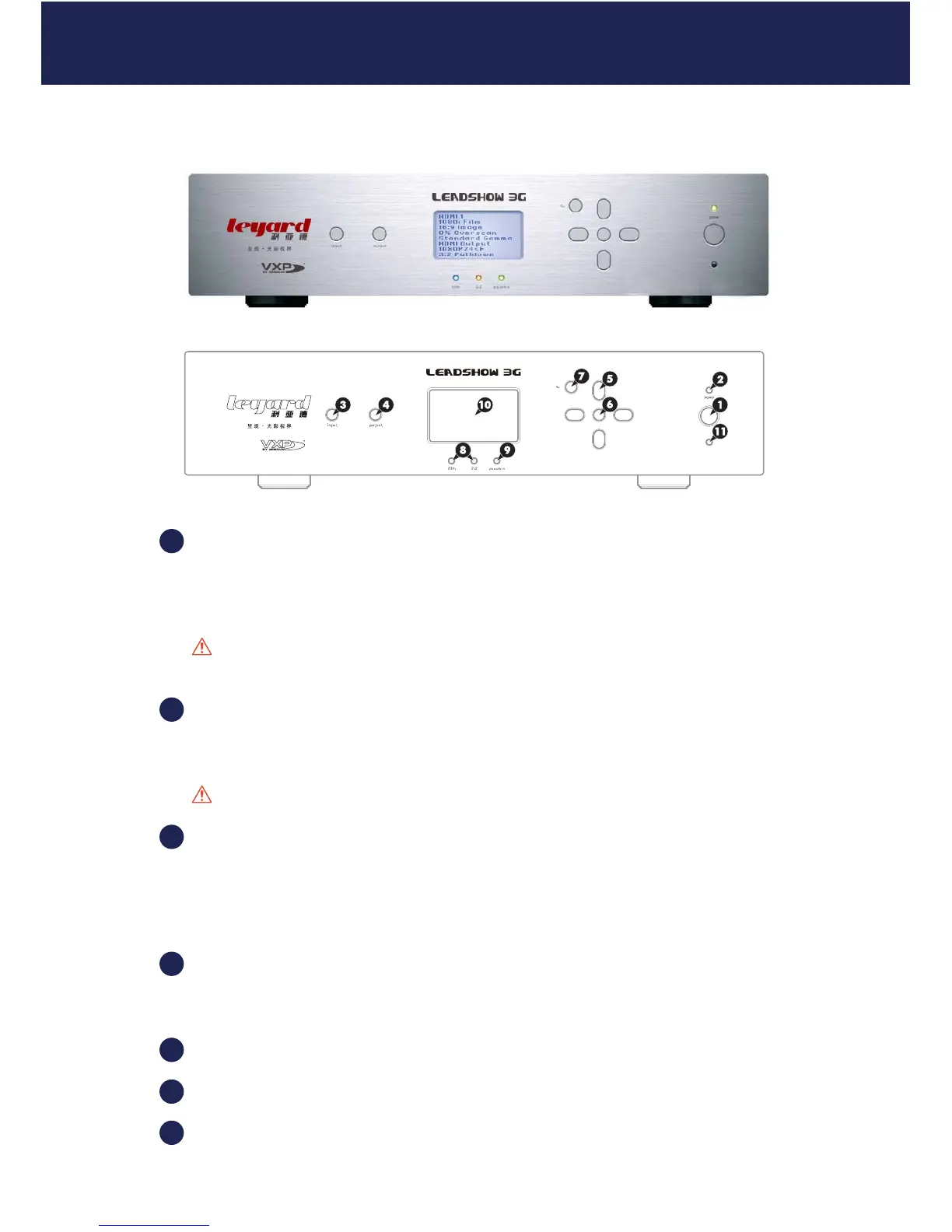
2.1 LEADSHOW 3G FRONT PANEL
POWER button
Press once to switch on; press once again to switch to standby.
The status is shown by the power indicator LED.
Caution: When Leadshow 3G is switched off, please wait for at least 10 seconds before
switching it on again.
POWER indicator LED
Green - Leadshow 3G is running
Red - Leadshow 3G is in standby mode
Caution: Never unplug the power plug when Leadshow 3G is running.
INPUT button
Press to cycle through the Leadshow 3G video input sources.
Input sources support HDMI; SDI; Component; RGBHV; S-Video; RGBs etc. Please refer to
Section 5.1.1: Input Select for details.
OUTPUT button
Press to cycle through the Leadshow 3G output ports:
HDMI 1; HDMI 2; Analog. See Section 5.3.1 to 5.3.3 for more information.
Navigation buttons
OK (setup) button
BACK button
2. FAMILIARIZING YOURSELF WITH LEADSHOW 3G
1
2
3
4
5
6
7
11



 To Next Page