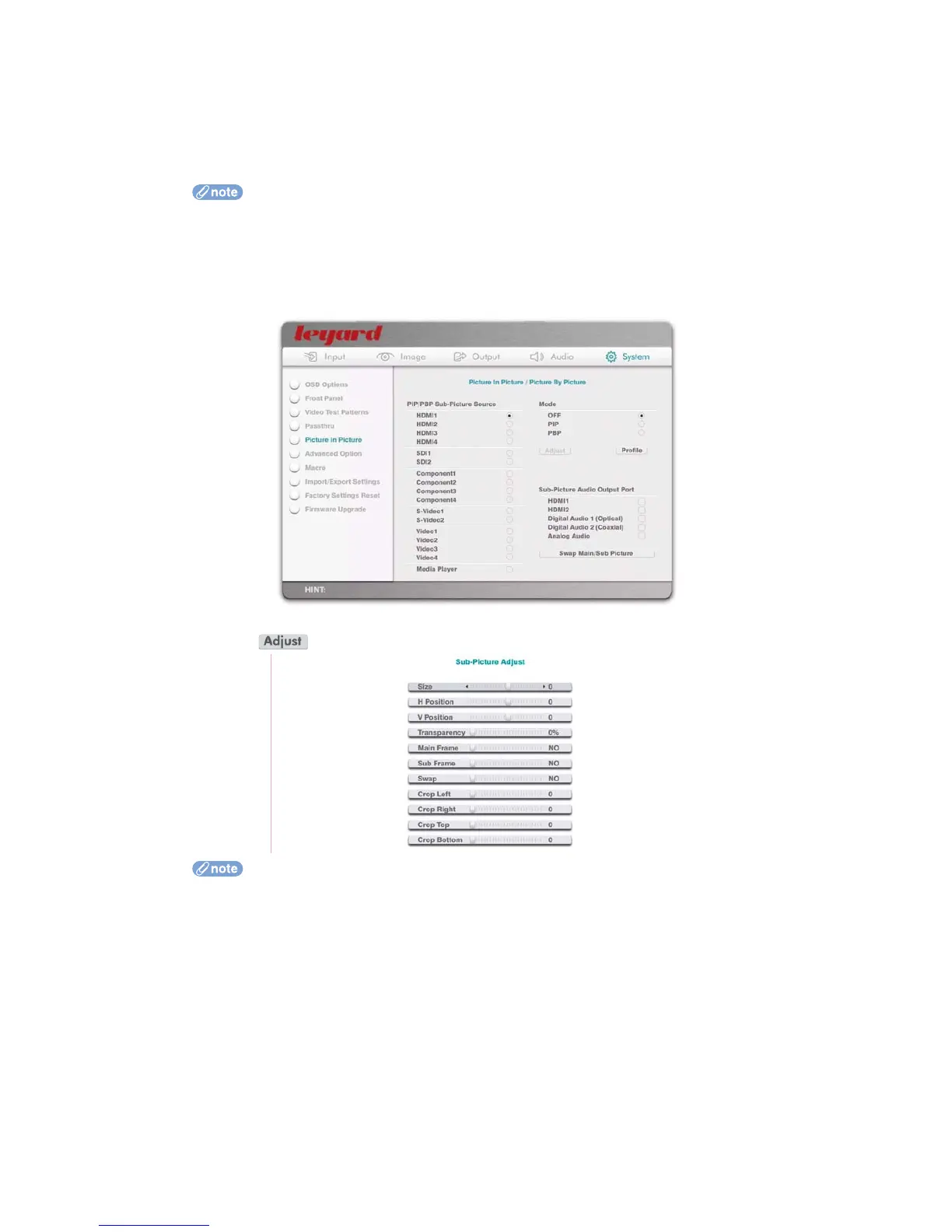
Audio Output:
You can also define any audio output port as the output of sub-picture audio. In this
case, the audio output port(s) is switched to output audio from the “audio source of sub-
picture” rather than audio from the “audio source of normal processing”
The audio output from the sub-picture audio source has no delay
This feature is available only in firmware version 2.00 or later
PIP/PBP and Secondary Passthru share the video input source. Therefore, when you set
PIP/PBP to ON, it is better to turn Secondary Passthru to OFF. Otherwise the video input
source of Secondary Passthru will be taken over by PIP/PBP as the video input source of
the sub-picture
When the action button is pressed, the OSD turns to the following page:
Use the Left/Right arrow remote control keys to adjust the sliders
Use the Up/Down arrow remote control keys to select between different sub-picture
adjustment options
When OK is pressed on the remote control, the whole OSD is hidden and only the slider
control is shown at the lower left corner of the display
Pressing Back on the remote control will return you to the full OSD, or simply press the
Menu key to exit from OSD mode
You can select a different color as the frame of the main picture and/or sub-picture. The
default is no frame
75



 To Next Page