1
2
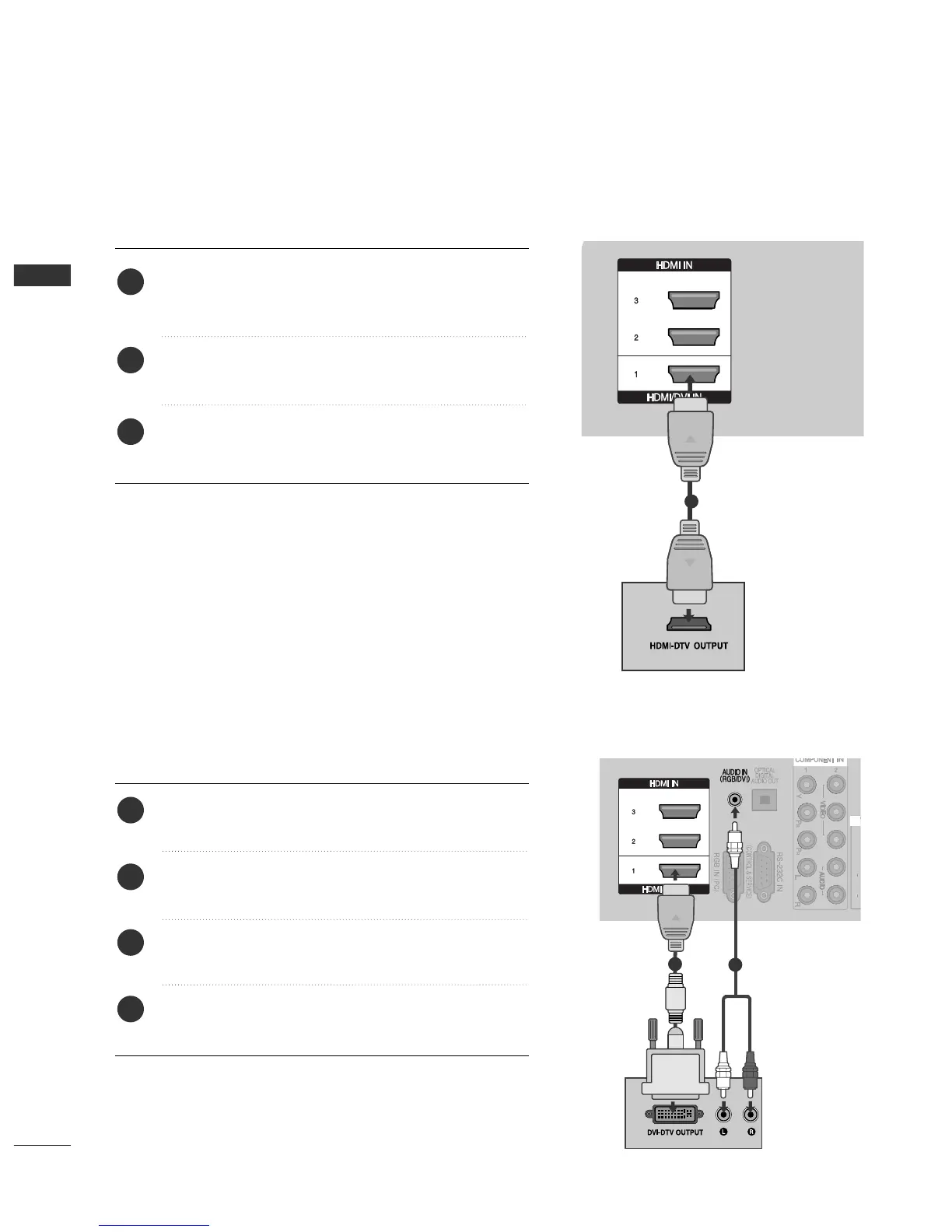
Connect the digital set-top box to
HHDDMMII//DDVVII IINN 11
,
HHDDMMII IINN 22
,
HHDDMMII IINN 33
or
HHDDMMII IINN 44
(except
42/50PG2
***
) jack on the TV.
Turn on the digital set-top box.
(
Refer to the owner’s manual for the digital set-top box.
)
Select
HHDDMMII11
,
HHDDMMII22
,
HHDDMMII33
or
HHDDMMII44
(except
42/50PG2
***
) input source using the
IINNPPUUTT
button
on the remote control.
2
3
1
Connect the digital set-top box to
HHDDMMII//DDVVII IINN 11
jack on the TV.
Connect the audio output of the digital set-top box to
the
AAUUDDIIOO IINN ((RRGGBB//DDVVII))
jack on the TV.
Turn on the digital set-top box.
(
Refer to the owner’s
manual for the digital set-top box.
)
Select
HHDDMMII11
input source using the
IINNPPUUTT
button
on the remote control.
2
3
4
1



 To Next Page