EasyManua.ls Logo

LG 42PG20D - Advanced - Film Mode

LG 42PG20D
130 pages
Print Icon
To Next Page IconTo Next Page
To Previous Page IconTo Previous Page
Loading...
74
PICTURE CONTROL
PICTURE CONTROL
OK
Move
• Contrast 50
• Brightness 50
• Sharpness 50
• Colour 50
• Tint 0
• Advanced Control
• Picture Reset
Screen
PICTURE
• Advanced Control
OK
Move
• Contrast 90
• Brightness 50
• Sharpness 60
• Colour 60
• Tint 0
• Advanced Control
• Picture Reset
Screen
PICTURE
EE
• Advanced Control
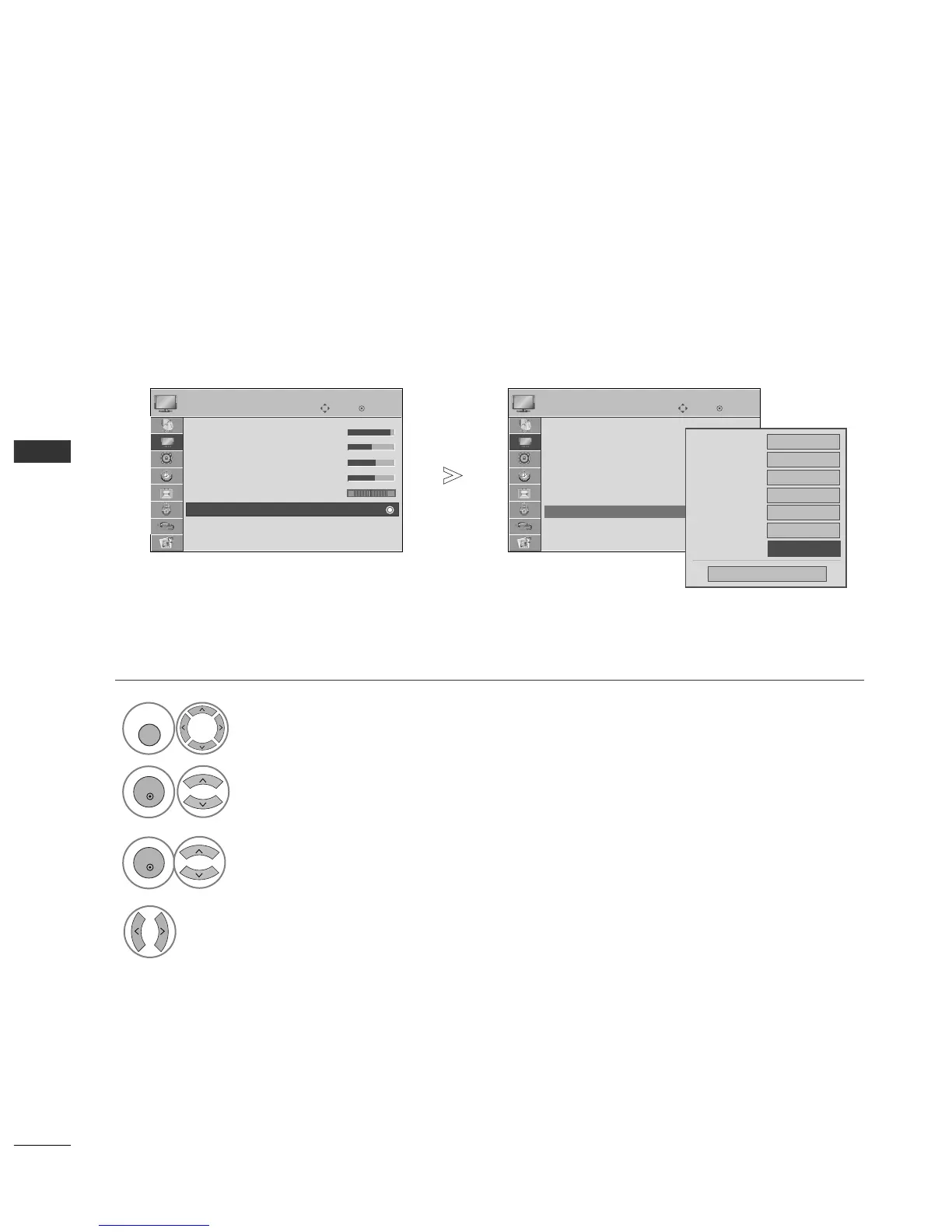
ADVANCED - FILM MODE
Select
PPIICCTTUURREE
.
Select
AAddvvaanncceedd CCoonnttrrooll
.
Select
FFiillmm MMooddee..
Select
OO nn
or
OO ffff
.
To set the TV up for the best picture quality for viewing films.
This feature operates only in TV, AV and Component 480i/576i/1080i mode.
1
MENU
3
2
OK
OK
4
Press the
MMEENNUU
button to return to normal TV viewing.
Press the
RREETTUURRNN
button to move to the previous menu screen.
Colour Temperature
Fresh Contrast
High
Fresh Colour
High
Noise Reduction
Medium
Medium
Gamma
Medium
Black Level
Auto
Close
FF
Off
GG
Film Mode
RG

Table of Contents

Other manuals for LG 42PG20D

Related product manuals