EasyManua.ls Logo

LG 42PG20D - On-Screen Menus Selection and Adjustment

LG 42PG20D
130 pages
Print Icon
To Next Page IconTo Next Page
To Previous Page IconTo Previous Page
Loading...
38
WATCHING TV / PROGRAMME CONTROL
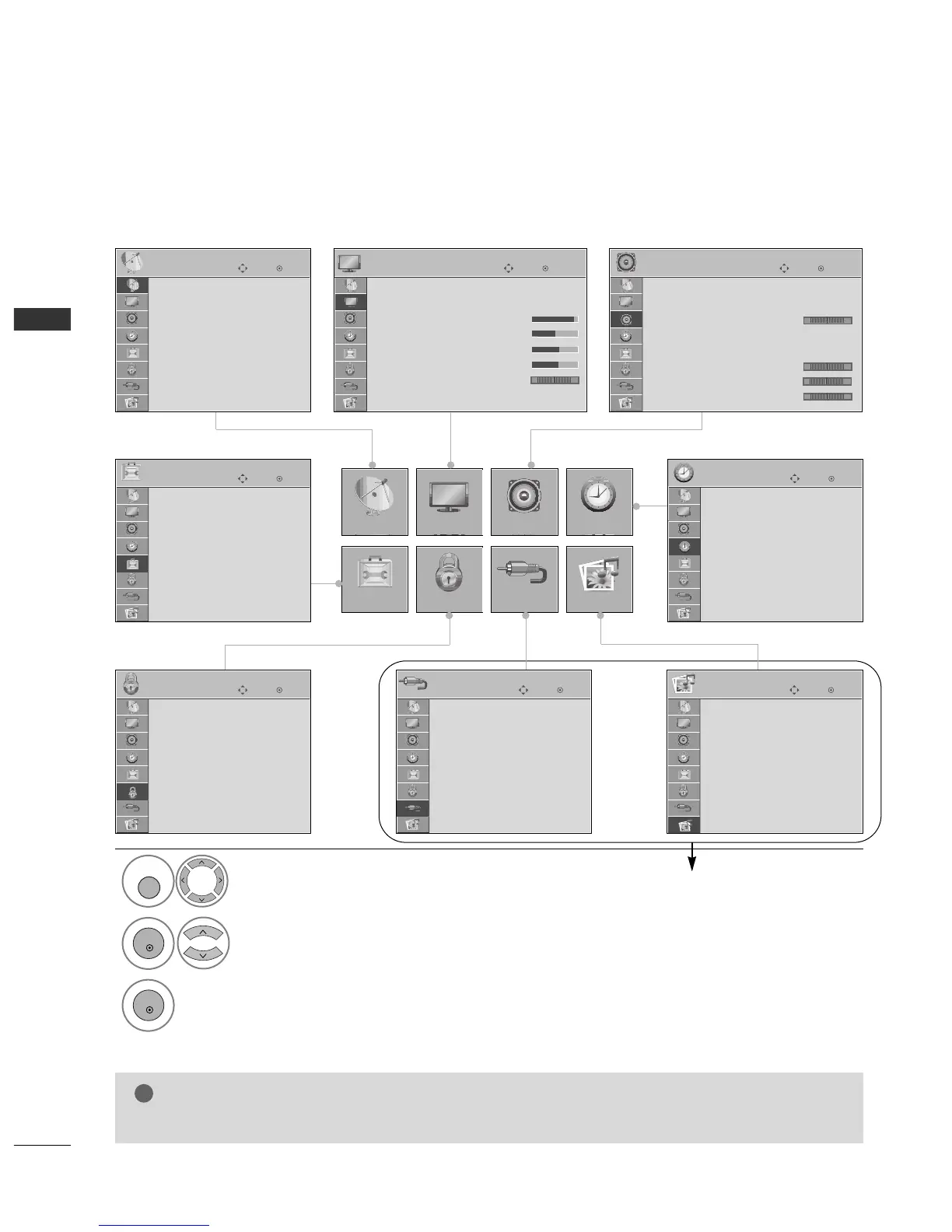
ON-SCREEN MENUS SELECTION AND ADJUSTMENT
Your TV's OSD (On Screen Display) may differ slightly from that shown in this manual.
OK
Move
Auto Tuning
Manual Tuning
Programme Edit
Booster : On
Software Update : On
Diagnostics
SETUP
SETUP
OPTION
PICTURE
LOCK
AUDIO
INPUT
TIME
USB
OK
Move
Aspect Ratio : 16:9
Picture Mode : Standard
• Contrast 90
• Brightness 50
• Sharpness 60
• Colour 60
• Tint 0
• Advanced Control
PICTURE
E
OK
Move
Auto Volume : Off
Clear Voice : On
Balance 0
Sound Mode : Standard
SRS TruSurround XT
: On
• 80Hz 0
• 220Hz 0
• 470Hz 0
AUDIO
E
LR
-+
-+
-+
OK
Move
Clock
Off Time : Off
On Time : Off
Sleep Timer : Off
Auto Sleep : Off
Time Zone : NSW/ACT
TIME
OK
Move
PHOTO LIST
MUSIC LIST
USB
OK
Move
Antenna
AV1
AV2
Component1
Component2
RGB
HDMI1
HDMI2
INPUT
E
OK
Move
Lock System : Off
Set Password
Block Programme
Parental Guidance : Off
LOCK
OK
Move
Subtitle : On
Input Label
SIMPLINK : On
Key Lock : Off
Set ID : 1
ISM Method : Normal
Power Saving : Level 0
Factory Reset
OPTION
NOTE
!
G
It is not possible to use
IINNPPUUTT
and
UUSSBB
menu in
4422//5500PPGG22
******
models.
Display each menu.
Select a menu item.
Move to the pop up menu.
1
MENU
3
2
OK
OK
Press the
MMEENNUU
button to return to normal TV viewing.
Press the
RREETTUURRNN
button to move to the previous menu screen.
Except 42/50PG2
***
RG

Table of Contents

Other manuals for LG 42PG20D

Related product manuals