39
WATCHING TV / PROGRAMME CONTROL
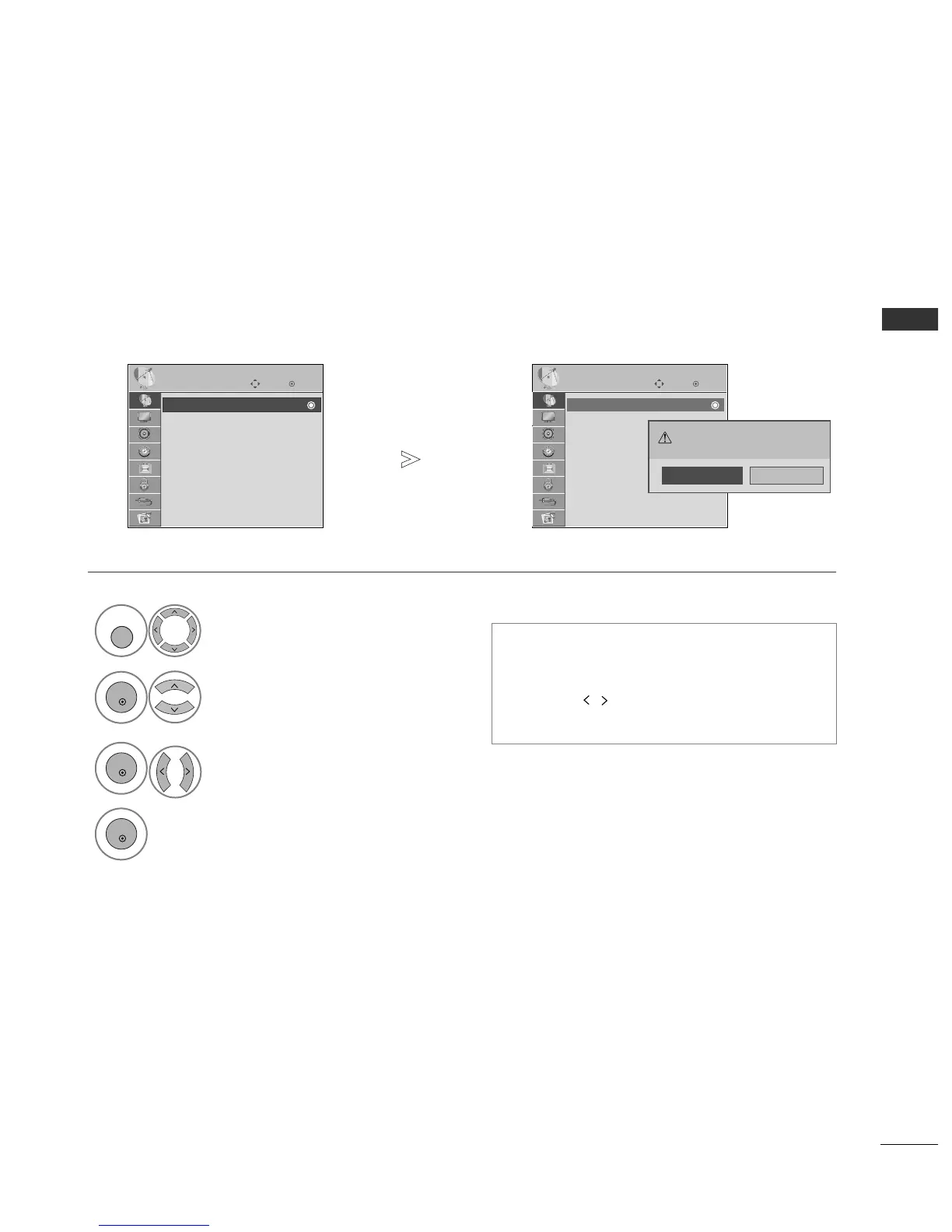
AUTO PROGRAMME TUNING
Use this to automatically find and store all available programmes.
When you start auto programming, all previously stored service information will be deleted.
• Use NUMBER buttons to input a 4-digit pass-
word in
LLoocckk SSyysstteemm
‘
OO nn
’.
•
If you wish to keep on auto tuning select
YY EESS
using the button. Then, press the OK but-
ton. Otherwise select
NN OO
.
Select
SSEETTUUPP
.
Select
AAuuttoo TTuunniinngg
.
Select
YY ee ss
.
Run
AAuuttoo ttuunniinngg
.
OK
Move
Auto Tuning
Manual Tuning
Programme Edit
Booster : On
Software Update : On
Diagnostics
SETUP
Auto Tuning
OK
Move
Auto Tuning
Manual Tuning
Programme Edit
Booster : On
Software Update : On
Diagnostics
SETUP
Auto Tuning
All service-information will be
updated. Continue?
Yes No
1



 To Next Page