Component Input ports
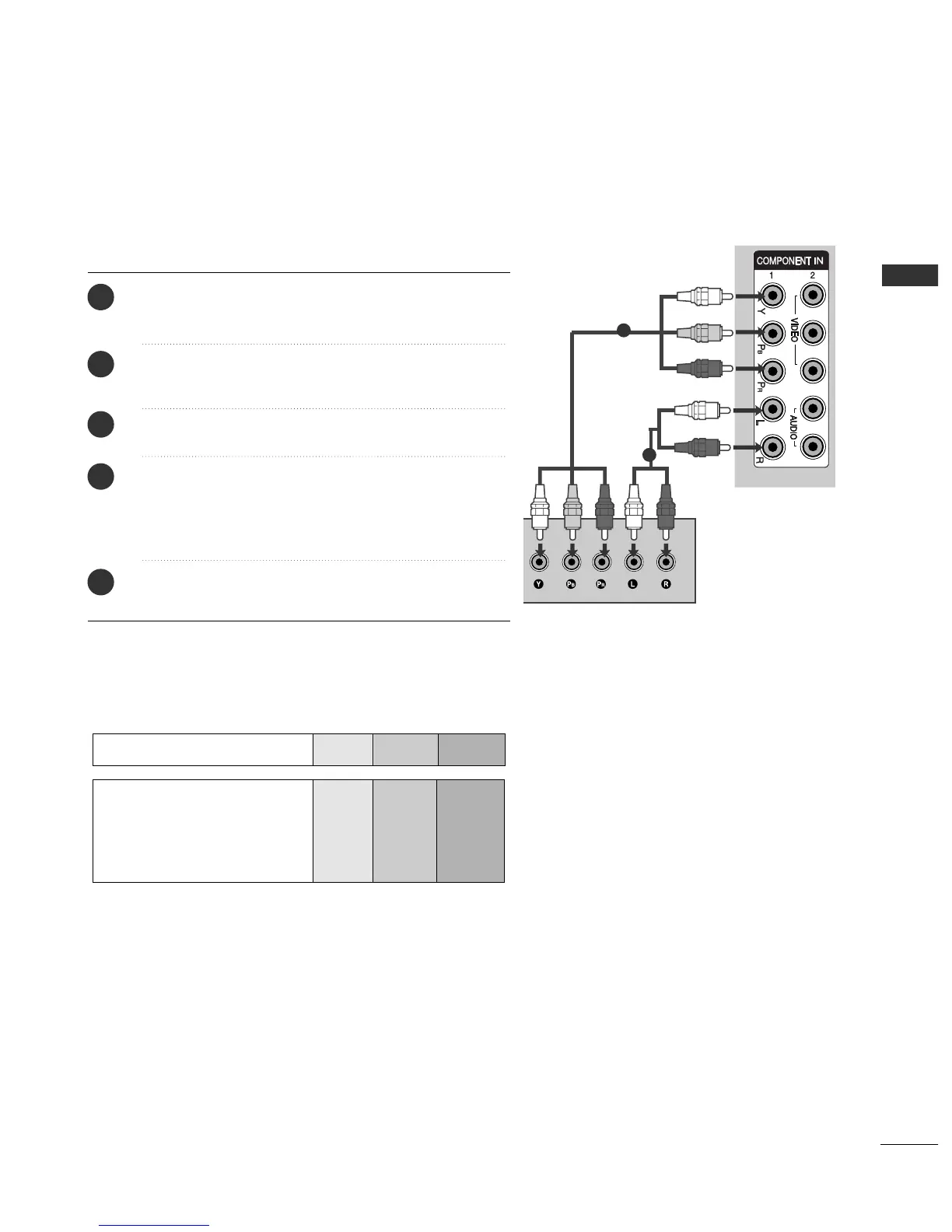
To achieve better picture quality, connect a DVD player to the component input ports as shown below.
Component ports on the TV
YP
B
P
R
Video output ports
on DVD player
Y
Y
Y
Y
PB
B-Y
Cb
Pb
P
R
R-Y
Cr
Pr
1
2
Connect the video outputs
(
Y, PB, P
R
)
of the DVD to the
CCOOMMPPOONNEENNTT IINN VVIIDDEEOO
jacks on the TV.
Connect the audio outputs of the DVD to the
CCOOMMPPOONNEENNTT IINN AAUUDDIIOO
jacks on the TV.
Turn on the DVD player, insert a DVD.
Select
CCoommppoonneenntt 11
input source using the
IINNPPUUTT
button on the remote control.
If connected to
CCOOMMPPOONNEENNTT IINN 22
input, select
CCoommppoonneenntt 22
input source.
Refer to the DVD player's manual for operating
instructions.
2
3
4
5
1



 To Next Page