EasyManua.ls Logo

LG 42PG20D - PC Setup

LG 42PG20D
130 pages
Print Icon
To Next Page IconTo Next Page
To Previous Page IconTo Previous Page
Loading...
24
EXTERNAL EQUIPMENT SETUP
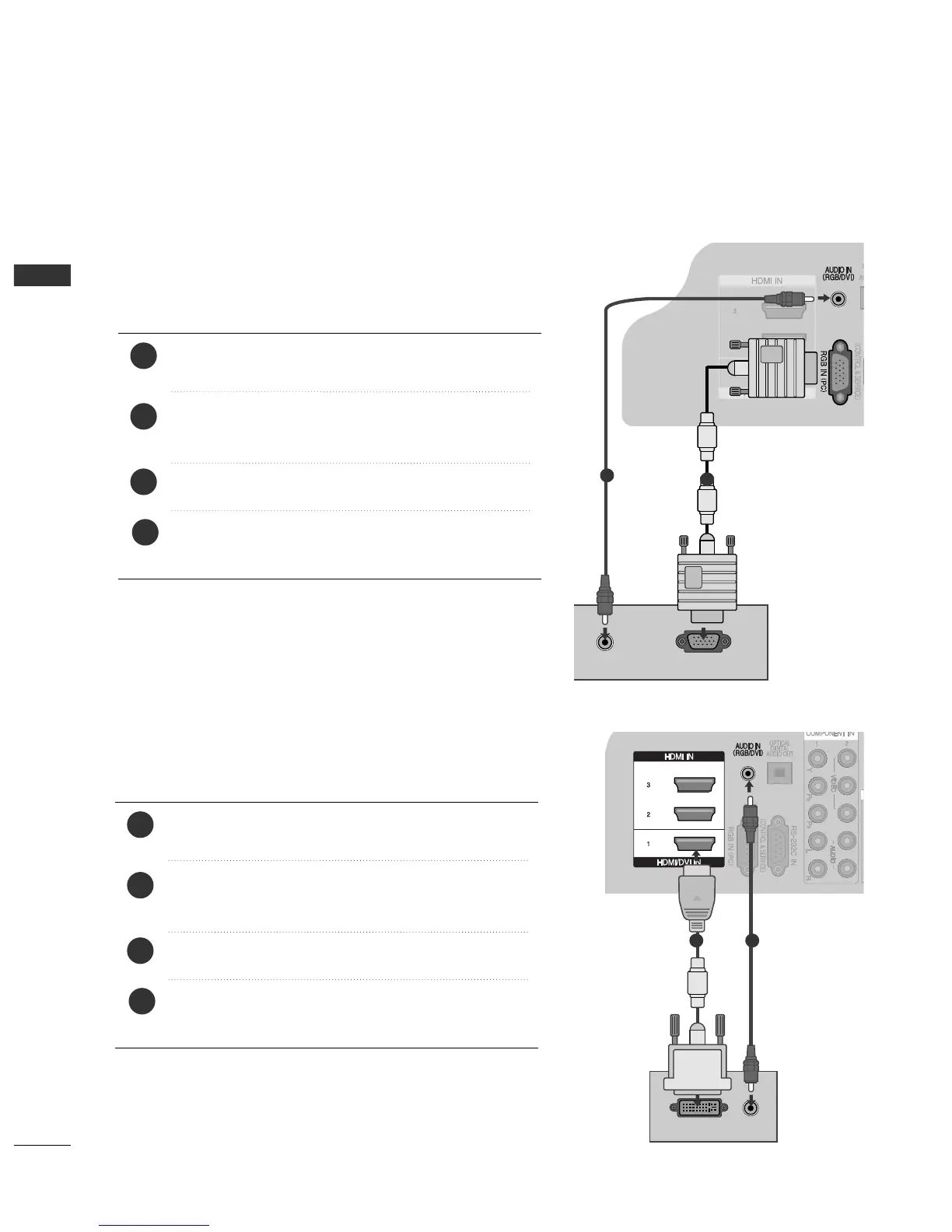
PC SETUP
This TV provides Plug and Play capability, meaning that the PC adjusts automatically to the TV's settings.
Connecting with a D-sub 15 pin cable
AV IN 1 AV OUT
L/MONO
R
AUDIO
VIDEO
L
R
AUDIO
VIDEO
AUDIO
RGB OUTPUT
AV IN 1 AV OUT
L/MONO
R
AUDIO
VIDEO
L
R
AUDIO
VIDEO
1
2
4
Connect the RGB output of the PC to the
RRGGBB IINN
((PPCC))
jack on the TV.
Connect the PC audio output to the
AAUUDDIIOO IINN
((RRGGBB//DDVVII))
jack on the TV.
Turn on the PC and the TV
Select
RRGG BB
input source using the INPUT button on
the remote control.
2
3
1
AV IN 1 AV OUT
L/MONO
R
AUDIO
VIDEO
L
R
AUDIO
VIDEO
AV IN 1 AV OUT
L/MONO
R
AUDIO
VIDEO
L
R
AUDIO
VIDEO
DVI-PC OUTPUT
AUDIO
Connecting with a HDMI to DVI cable
1 2
4
Connect the DVI output of the PC to the
HHDDMMII//DDVVII
IINN11
jack on the TV.
Connect the PC audio output to the
AAUUDDIIOO IINN
((RRGGBB//DDVVII))
jack on the TV.
Turn on the PC and the TV.
Select
HHDDMMII11
input source using the INPUT button
on the remote control.
2
3
1

Table of Contents

Other manuals for LG 42PG20D

Related product manuals